
The Ultimate Guide to Google Business Profile Manager (2026, Australia)
How to manage your Google Business Profile in 2026 now the old dashboard is gone: access, owners vs managers, verification, and what Google quietly removed.

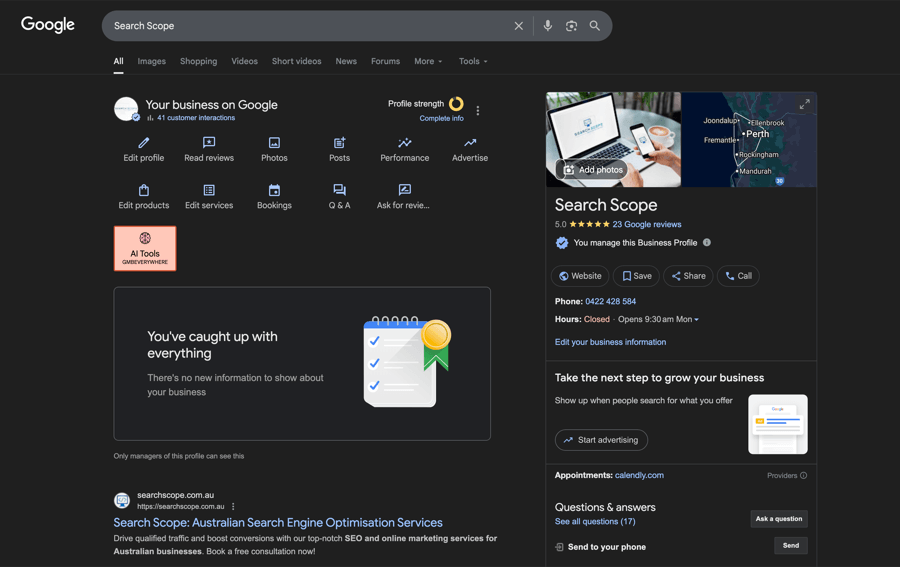
If you went looking for the “Google Business Profile Manager” app or a tidy management dashboard and could not find one, you are not doing anything wrong. Google moved it. The old Google My Business app was retired, and for a single-location business there is no separate manager dashboard anymore. You now manage your profile directly inside Google Search and Google Maps.
That change confuses a lot of business owners, and most of the guides still online describe a product that no longer exists. This guide fixes that. It explains what “Google Business Profile Manager” actually means in 2026, how to find and access your profile, who can do what, and what Google quietly removed along the way. It is written for Australian business owners, so the rules and examples match how things work here.
- There is no standalone Google Business Profile Manager app for single-location businesses. You manage your profile from Google Search and Google Maps while signed in.
- The web “Business Profile Manager” still exists, but in 2026 it is mostly for businesses with multiple locations (business groups).
- Owner and Manager are not the same role. Getting access levels wrong is how businesses lose control of their listing.
- Google removed chat messaging and call history in July 2024, and stopped supporting GBP-built websites. Older guides still list these as features.
- In Australia, reviews are covered by Australian Consumer Law. Incentivised or fake reviews are a real legal risk, not just a Google policy issue.
What “Google Business Profile Manager” actually means in 2026
The phrase gets used three different ways, and the confusion is understandable.
- The act of managing your profile. Updating your hours, photos, services, posts and reviews. This is what most people mean.
- The interface for a single location. There is no dedicated app or dashboard for this anymore. You edit your profile inside Google Search and Google Maps.
- The web Business Profile Manager. The dashboard at business.google.com still exists, but Google has narrowed it. In 2026 it is primarily for businesses that manage several locations through a business group.
The important takeaway: if you run one location, stop hunting for an app. Google retired the Google My Business app and now wants you working inside Search and Maps. If you see a “Business Profile Manager” app in the Play Store, that is a third-party product, not Google. Be careful with anything that asks for your login. And if hands-on management is more than you want to take on, our done-for-you Google Business Profile management service runs it for you, posts, photos, reviews and all.
How to find and access your profile (no app required)
There are three reliable ways in.
From Google Search
Sign in to the Google account that owns the profile, then search your exact business name, or simply search “my business”. If you own a verified profile, Google shows a management panel directly in the results with buttons to edit your profile, read reviews, post updates and view performance.
From Google Maps
Open Google Maps while signed in, tap your profile picture, and choose your business. The same editing controls appear. This is often the fastest route on a phone.
For multiple locations
If you manage several locations, head to business.google.com/locations. This is the one place that shows every profile and location your account manages in a single list, and it is where business groups, bulk edits and centralised user access live. If you are not sure how many profiles are tied to your account, or you have inherited a messy setup from a previous agency, this is the page to check first. A single-location business rarely needs it.
If you cannot find your profile at all, it usually means one of three things: you are signed in to the wrong Google account, the profile was never verified, or someone else currently controls it. The last one is common when a former staff member or a previous agency created the listing.
Claiming and verifying your profile (the 2026 reality)
To claim a profile, search your business on Google, select it, and choose the option to claim or manage it. If no listing exists, you can add your business from the same management panel.
Verification has changed. Google has moved away from mailed postcards as the default and now leans heavily on video and live methods. Depending on your business type and risk profile, you may be offered:
- Video verification, where you record a short unedited video showing your signage, premises and proof you operate there. Google favours this for many new profiles now.
- Live video call with a Google reviewer during business hours.
- Phone or text, for some eligible businesses.
- Email, where the business type supports it.
Have your details consistent before you start. Mismatched name, address or phone information across your website, your documents and your listing is the most common reason verification stalls. Our guide to verifying a Google Business Profile covers those mechanics in detail, including what to do when a verification stalls.
One Australian-specific point: list the trading name customers actually see on your storefront, not your registered “Pty Ltd” entity name. Stuffing your business name with keywords or adding location qualifiers breaches Google’s guidelines and is a common trigger for suspension.
Owners vs managers: the part people get wrong
This is where most access problems start. Owner and Manager are different roles with different powers, and handing out the wrong one either exposes you to risk or leaves you unable to make changes.
| Role | What they can do |
|---|---|
| Primary Owner | Full control. Can transfer primary ownership, remove other users, and delete the listing. Cannot be removed by anyone else. |
| Owner | Almost everything an owner does day to day, including adding and removing users. Can be removed by the Primary Owner. |
| Manager | Edit business information, respond to reviews, post updates and view performance. Cannot remove people, transfer ownership or delete the listing. |
You add and remove people through the “People and access” settings on your profile, which Google documents in its owners and managers help page.
A few rules worth following:
- Keep the Primary Owner role on an account the business controls long term, ideally the director or owner, not a staff member who might leave.
- When you bring in an agency, give them Manager or Owner access by inviting their Google account. Never share your password. We only ever recommend front-end, invited access for exactly this reason.
- Keep at least two people with owner-level access so you are never locked out if one account is lost.
What you can manage (and what Google removed)
Inside your profile you can edit your name, categories, address or service area, hours, phone, website, services, products, photos and posts, and you can respond to reviews. All of this is genuinely worth keeping current, because behavioural signals like calls, direction requests and review activity feed into local ranking, as Whitespark’s local search ranking factors research shows.
What you can no longer do matters just as much, because older guides still list these:
- Chat messaging and call history were removed on 31 July 2024.
- Google stopped supporting websites built inside GBP. If you relied on a GBP website, you need a real site.
If a guide tells you to “turn on messaging” or “check your call history in GBP”, it is out of date.
Getting the core fields right
The fields that move local visibility the most are also the ones businesses fill in carelessly.
Categories
Your primary category is one of the strongest local ranking levers you control. Be specific. “Italian restaurant” works harder than “restaurant”. Add a small number of accurate secondary categories rather than padding the list. Do not describe what you have, describe what you are.
NAP consistency
Your name, address and phone need to match across your website, your listing and the directories that mention you. Inconsistency confuses both customers and Google’s understanding of your business. This is foundational enough that our full piece on why NAP consistency matters works through what Google does with a mismatched listing.
Storefront vs service area
If customers come to you, show your address. If you travel to them (a plumber, an electrician, a mobile mechanic), hide the address and define your service area by the suburbs and regions you actually cover. Do not over-claim a service area you cannot realistically serve.
Services, products and description
Use your description to answer one question plainly: what problem do you solve and who for. Use the services and products sections to list what you offer in the words customers use. Keep promotional offers in posts, not in the description.
Reviews and the rules that apply in Australia
Reviews are both a ranking and a conversion factor. BrightLocal’s 2026 Local Consumer Review Survey found 97% of consumers read reviews for local businesses, and 80% say they are more likely to use a business that responds to all of its reviews. Responding is not optional anymore.
Two things to get right:
- Respond to every review, good and bad. Keep it specific and human. For the awkward ones, our review response templates give you a starting point.
- Do not buy, incentivise or fake reviews. In Australia this is not just against Google’s rules. Fake or misleading reviews breach the Australian Consumer Law, and the ACCC has acted on it. Incentivised reviews must be disclosed and the rule applies to both positive and negative feedback.
The rules above cover reviews you asked for. For the ones aimed at you by someone who was never a customer, Google review removal is the separate path, and it only bills once a review is actually gone.
You can also use Posts and your services and description fields to answer the questions customers actually ask, since the old Q&A feature has been retired.
Reading your performance without overthinking it
Your profile reports the interactions that matter: calls, direction requests, website clicks, messages and the searches people used to find you. The job is not to admire the numbers, it is to connect them to enquiries. High views but almost no calls or clicks usually means your listing is being seen but is not convincing anyone to act.
Because the metrics changed and several legacy ones were retired, it is worth understanding what is still reported and what is not. Our piece on how to interpret Google Business Profile metrics breaks down what is still reported and what was retired.
Managing multiple locations
If you run several locations, the web Business Profile Manager at business.google.com earns its keep. You can group locations into a business group, apply bulk edits like holiday hours across every location at once, and manage who has access centrally.
Two things keep multi-location setups out of trouble: strict NAP consistency for each location, and disciplined user access so a departing manager does not take control of a profile with them. The bigger the footprint, the more both of these matter. The profile side is only half of it though, because the website has to match: one genuinely distinct page per location, linked sensibly, which is the harder half of multi-location SEO and the part that decides whether each location ranks on its own.
Pick your management approach by location count
A practical decision framework for how to run GBP at different scales, drawn from Ottawa SEO’s writeup and the patterns we see across AU agency clients.
1-5 locations: manage each profile directly in Google Search and Maps. Individual logins, manual updates, roughly half an hour per location per month.
6-20 locations: Business Profile Manager with location groups, bulk edits, central user permissions. About 10 minutes per location per month.
20-100 locations: CSV bulk upload via Business Profile Manager (max 100 rows per file) plus the Business Profile API for posts and photos. Around 3 minutes per location per month. One warning from Google’s own docs: avoid partial CSV uploads for updates, they repeatedly cause cross-location data drift.
100+ locations: dedicated API integration through a listings-management platform like Yext, SOCi, Uberall, or Rio SEO. Building internally also works if you have engineering capacity.
When things go wrong
Three problems come up constantly.
- Suspension. Usually triggered by a keyword-stuffed name, a non-physical address, or inconsistent information. Prevention is far cheaper than recovery, which is why we wrote how to avoid a suspension before it happens. If you are already suspended, our suspension guidance is the place to start, rather than filing a second appeal blind.
- Profile not showing. Often an unverified profile, a brand new listing Google has not trusted yet, or a service area that excludes the searcher. Our diagnostic guide walks through it, and proximity ranking explains why distance matters so much.
- Duplicate listings. They split your reviews and confuse customers. Report duplicates through Maps and consolidate to one profile per real location.
Where Search Scope fits
Most businesses do not need a tool. They need someone to set the profile up correctly, fix the access mess left by a previous agency, and keep the listing working without tripping a suspension. That is ordinary, senior-led work, the same local SEO fundamentals that move Google Maps visibility further than any clever tactic.
If your profile is a mess, you have lost access, or you simply want it managed properly by someone who does this every day, and we will tell you plainly what needs doing.
FAQ
Is there a Google Business Profile Manager app I should download?
No, not from Google, and not for a single location. Google retired the Google My Business app. You manage your profile by signing in to Google Search or Google Maps. Any “Business Profile Manager” app you see is a third-party product, so be cautious about giving it access.
How do I give my agency access without handing over my password?
Use “People and access” on your profile and invite the agency’s Google account as a Manager or Owner. This gives them the access they need while you keep control, and you can remove them at any time. Sharing a password is a security and ownership risk, and we never recommend it.
What is the difference between an Owner and a Manager?
An Owner can add and remove users and manage almost everything. A Manager can edit the profile, post, and respond to reviews, but cannot remove people, transfer ownership or delete the listing. That last restriction matters, because who can delete a Business Profile listing is exactly what stops a departing staff member wiping it. The Primary Owner sits above both and is the only role that can transfer primary ownership.
Why can I not find my business when I am signed in?
Usually you are signed in to the wrong Google account, the profile was never verified, or another account controls it. Check which account you are using first. If someone else owns it, you can request access through the profile and Google will contact the current owner.
Does Google still offer messaging and call history?
No. Google removed chat messaging and call history on 31 July 2024, and stopped supporting websites built inside GBP. If a guide tells you to use these, it is out of date.