
How to Close or Remove a Google Business Profile (Without Losing What Matters)
Temporary closure, permanent closure, or full removal: which you actually need, the Australian compliance side, and how to keep your reviews.

Most people searching for how to delete a Google Business Profile do not actually want to delete it. They want to pause it, mark it closed, or move it, and full deletion would quietly cost them their reviews and years of built-up presence.
There are three real options: temporary closure, permanent closure, and complete removal. They are not interchangeable, and the wrong choice is hard to undo. Here is what each one does, when to use it, and the Australian compliance side most guides skip entirely.
- Temporary closure keeps the profile visible and reviews intact. Best for renovations or seasonal breaks.
- Permanent closure marks the business as closed but keeps the profile and reviews. Best for genuine shutdowns.
- Complete removal deletes owner content and is effectively irreversible. Rarely the right call.
- Relocating or rebranding? Update the profile, do not delete it. Deleting throws away reviews and ranking history.
- Closing for good in Australia carries tax and consumer-law obligations. Confirm them with the ATO or your accountant.
The three options at a glance
| Option | Visibility | Reviews kept | Reopen possible | Best for |
|---|---|---|---|---|
| Temporary closure | Visible, marked “Temporarily closed” | Yes | Yes | Renovations, seasonal breaks |
| Permanent closure | Visible, marked “Permanently closed” | Yes | Yes, by updating status | Genuine shutdown, reputation kept |
| Complete removal | Not managed by you; basic details may still show | Owner content lost, user reviews may remain | No, needs a new profile and verification | Ineligible business, true entity change |
Which option you actually need
Temporary closure is for a known, time-limited pause. Renovations, a seasonal business, an extended owner absence. The profile stays live, customers see you are coming back, and your reputation does not change.
Permanent closure is for a business that has genuinely shut down. The profile shows “Permanently closed” but stays visible, so your history and reviews remain and you are not misrepresenting anything. If you ever resume, the status can be updated. When most owners talk about closing a business on Google, this is the action they actually mean: flipping the status to closed, not wiping the listing off the map.
Complete removal deletes the content you and your managers added. It is the rare option, suited to a business genuinely ineligible for a profile or a true change of legal entity, not a tidy-up.
One steer worth stating plainly: if you are relocating or rebranding, do not delete the profile, update it. Deleting throws away reviews, ranking history, and the trust the listing has built. Updating the address or name on the existing profile keeps all of that. A rebrand is a profile edit, not a deletion, though name changes carry their own risk and can trigger a review.
The same logic applies if you are selling the business. A profile with years of reviews is an asset the buyer wants, so transfer it rather than closing it. In the profile’s “People and access” settings, make the new owner the primary owner, then remove yourself once the handover is done. Closing or deleting on a sale throws away exactly what makes the listing valuable, and the same roughly seven-day waiting period applies before the new owner can make the biggest changes.
Who can close or remove a profile
Only an owner can remove a profile, and the primary owner controls the most significant actions. That stops a former employee or a disgruntled manager from wiping a listing.
If you were recently added as an owner or manager, Google enforces a waiting period of around seven days before you can remove profile content or managers. It is a deliberate cooling-off step during ownership transitions.
One thing people miss: even after you remove content and managers, Google may still display basic business details it has sourced elsewhere. Removing your management is not always the same as the business vanishing from Maps.
How to temporarily close a business on Google (or mark it permanently closed)
For a short closure of less than a week, use Special hours rather than the closed status. You set the exact dates you are unavailable, the profile stays fully functional, and customers can see when you reopen.
For anything longer, mark it closed:
- On Google Search, open your Business Profile and select Edit profile. On Google Maps, select Edit profile, then Business information.
- Open Hours, then Edit.
- Choose “Temporarily closed” or “Permanently closed” and save.
Two cautions:
- Do not use the “Opening date” field with a future date to signal a closure. A future opening date can hide the profile and its reviews entirely.
- If you are moving rather than closing, update the address instead of marking the profile closed, so you keep the listing and its history.
How to permanently remove the profile
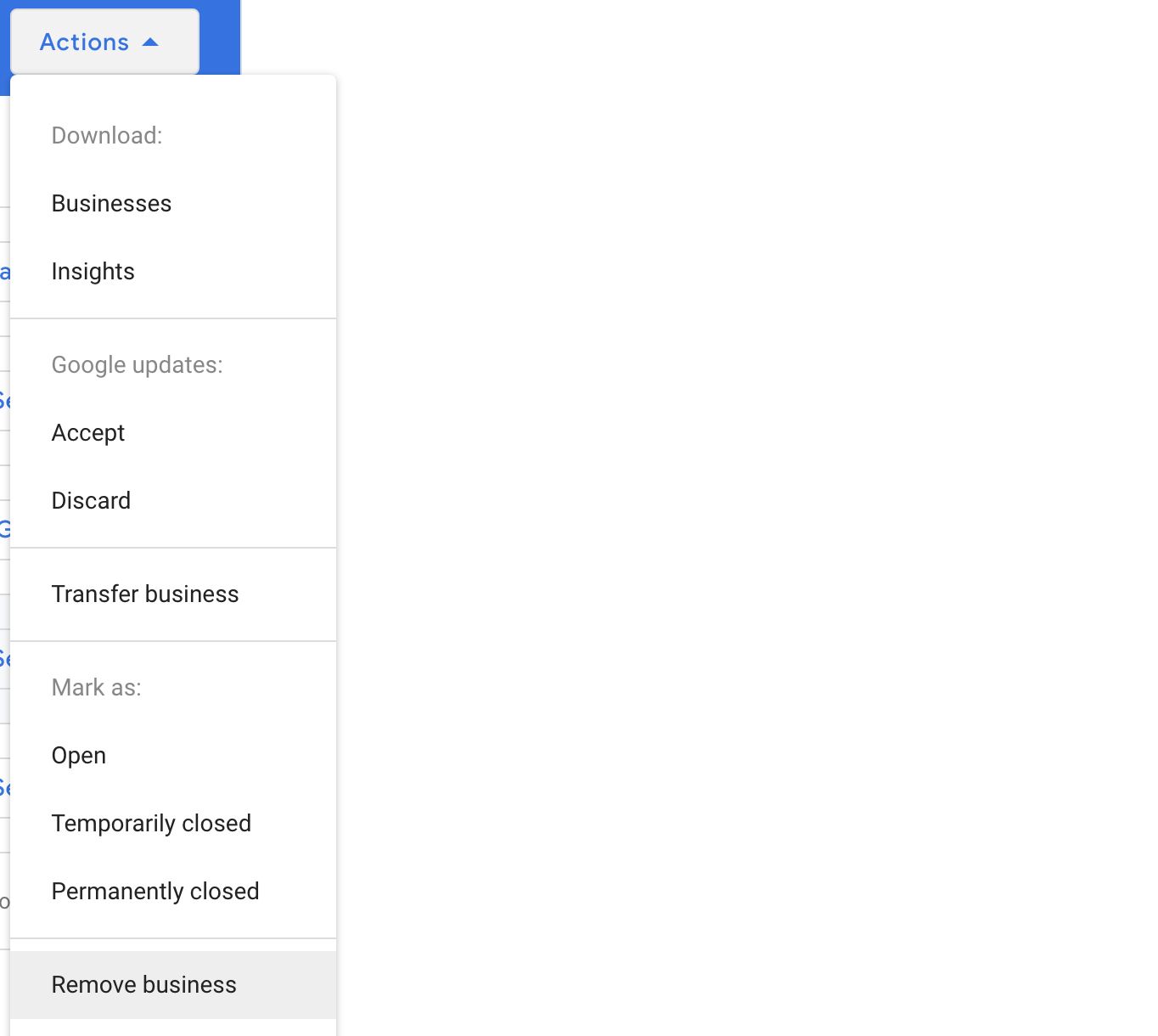
If removal is genuinely the right call, the process for a single profile is: open your Business Profile settings, select Remove Business Profile, then Remove profile content and managers, and confirm.
For multiple locations, the Business Profile Manager has a bulk option: select the profiles, choose the removal action, and confirm. If a bulk removal errors out, you may have to handle the problem profiles one at a time.
Be clear on what is lost versus what stays:
- Lost: posts, photos, videos, and review replies created by you and your managers. These cannot be recovered.
- Stays: user reviews, and any basic business data Google pulls from other sources.
Recreating the business later means a fresh profile and full verification again. Treat this as permanent.
Back up your data first
Before you delete anything, export your business data with Google Takeout. Pick the file format and delivery method that suits you, and store the export somewhere safe. This matters for tax records, expense claims, and any reporting that relies on profile history.
If a high-performing post still drives engagement, weigh whether deleting it now creates gaps in your reporting later. Keep a dated record of the change itself, in standard Australian date format (dd/mm/yyyy), so there is a clear trail.
If you want to understand what the profile was actually contributing before you switch it off, our guide to Google Business Profile metrics explains what is worth checking first.
Australian compliance when closing permanently
Closing the profile is the small part. Closing the business properly is the part that carries real obligations, and what follows is general guidance, not legal or tax advice, so confirm the specifics with the ATO or your accountant.
According to the ATO and business.gov.au, when a business stops operating you generally need to:
- Cancel your Australian Business Number and the registrations linked to it, such as GST, within the timeframe the ATO specifies after you cease trading.
- Finalise outstanding Business Activity Statements, PAYG obligations, and employee entitlements.
- Clear any outstanding tax debts before cancellation.
- Keep business and employee records for the minimum periods the ATO requires, so do not delete anything you are still required to hold.
There is a consumer-law angle too. Under Australian Consumer Law you cannot mislead or deceive customers, which includes manipulating or removing genuine negative reviews to create a false impression of the business. If you suspect fake or coordinated reviews, the right step is to report them to the ACCC with evidence, not to quietly bury them. When in doubt, get advice from an accountant or the relevant regulator rather than guessing.
Someone marked your business “permanently closed” and you didn’t
A nasty surprise that lands in the forums constantly: your profile suddenly shows “Permanently closed” and you never touched it. Because anyone can suggest an edit to a listing, a competitor or a confused passer-by can flag you as closed, and if Google trusts the source it can apply the change within minutes. The damage is immediate, because a “closed” label both scares off customers and suppresses you in Maps.
Do not panic-edit everything. Fix the status directly: open your Business Profile, go to Edit profile, then Hours, and set the operating status back to open (or, in Google Maps, use Suggest an edit to reopen it). If the change keeps reverting, two culprits are usual: a rogue owner or manager still on the profile (check “People and access” and remove anyone who should not be there), or a third-party listings service feeding conflicting data from elsewhere. A repeated, deliberate “permanently closed” attack is worth escalating to Google support, and it is exactly the sabotage we cover in our guide on monitoring suggested edits.
Removing a listing you don’t own: fakes and duplicates
The steps above are for a profile you manage. Two different problems need a different route entirely, because you cannot “close” a listing you do not control.
A fake or impersonating listing. If someone has created a listing using your business name or address, the tool for this is Google’s Business Redressal Complaint Form, built for reporting misleading business names, phone numbers and URLs, which also lets you report several at once (Google). Back it with evidence (your registration, signage, your own dated photos) and be ready to resubmit with stronger proof if the first attempt is rejected. You can also report it in Maps via Suggest an edit, then “Place is closed or not here”, then “Offensive, harmful, or misleading”.
A duplicate of your own listing. Duplicates are common, and the instinct to “just delete one” is the wrong move if the duplicate holds reviews, because deleting it can throw those reviews away. Instead, report the duplicate in Maps with Suggest an edit, mark it as a duplicate, and point to the listing you want kept, so Google merges them and consolidates the history. Watch the result: merges do not always carry over owner replies, and reviews can occasionally be misattributed, so record what each listing held before and after.
The “I accidentally verified a new profile during an ownership change” escape valve. Different scenario, different fix. If you (or the buyer of the business) inadvertently created and verified a new Business Profile because of a change in physical location or ownership, you don’t have to wear the lost reviews. Google’s own “move reviews” docs document a direct path: contact Google support and ask them to transfer the review history from the old profile to the new one. It’s not the Suggest-an-edit merge path covered above, it’s a manual support request, and it only applies when the duplicate came from an inadvertent verification after a real-world transition. Don’t keep editing either profile while you wait for the merge.
When to get professional help
Most single-location closures are straightforward and you can do them yourself. Get help when it is not simple: multiple locations closing at once, a suspension or duplicate listing surfacing mid-process, or a closure where the compliance and reputation stakes are high.
Small issues during a closure or removal have a habit of escalating. A duplicate that will not go away. A profile that gets caught in a review. An edit that triggers a suspension. That is where our GBP recovery service comes in, and the related guide on how to appeal a suspension is worth reading if anything goes sideways. Handled cleanly, none of this should threaten the rest of your local SEO.
FAQ
What is the difference between temporarily and permanently closing a profile?
Temporary closure tells customers you are unavailable for a short period and will reopen; the profile stays visible and reviews remain. Permanent closure signals the business has shut for good; the profile still shows but is marked “Permanently closed”. Both keep your reviews. Complete removal is the only option that deletes your content.
Will I lose my reviews if I close or remove the profile?
Closing, temporary or permanent, keeps your reviews. Complete removal deletes the content you added, though user reviews and some basic details Google sources elsewhere can still appear. If reviews matter to you, do not choose full deletion.
Can I reopen a permanently closed profile?
Yes. “Permanently closed” is a status, not a deletion. If you resume operating, you can update the status and the profile, with its history and reviews, comes back.
How long does a permanently closed business stay on Google?
Indefinitely. There is no countdown and no automatic clean-up date. Because the closed label is a status rather than a deletion, Google keeps the listing searchable for the long term, which is why the reviews and history stay attached to it and why you can switch it back to open whenever you like. The label fades in prominence over time as the business stops getting visits and searches, but the entry itself does not expire. The only way a closed listing actually disappears is full removal, or Google merging it into another record, and neither happens on a set schedule.
Should I delete my profile if I am relocating or rebranding?
No. Update the existing profile instead. Deleting loses reviews and ranking history a relocation or rebrand does not need to sacrifice. Change the address or name on the live profile, and be aware name changes can trigger a review.
How do I back up my data before deleting?
Use Google Takeout to export your business data before you remove anything, since deleted owner content cannot be recovered. Keep the export and a dated record of the change for tax and reporting purposes.
My listing shows closed (or gone) but I didn’t close it. Is that a suspension?
Not necessarily. “Permanently closed” is usually a status change, often a public suggested edit, that you can reverse yourself in the profile. A suspension is different: “suspended” or “this account has been disabled” means Google removed the profile for a suspected policy breach, and the fix is an appeal, not a status edit. If it has genuinely been suspended, see our guide on how to appeal a Google Business Profile suspension.
The bottom line
Deletion is rarely what a business actually needs. Temporary or permanent closure handles almost every real situation while keeping your reviews and history, and a relocation or rebrand is a profile update, not a delete. If you do remove a profile, back up first and treat it as permanent. And if you are closing the business itself, the Google steps are trivial next to the ATO and consumer-law obligations, so get those confirmed properly.
If a closure or removal is turning messy, or you want it handled without risking the rest of your Google Maps SEO, . Clear, careful, no guesswork.