
Google Business Profile Appeal Denied? How to Recover a Listing After a Failed Appeal
A denial is not the end, but resubmitting the same appeal is. Find the real reason, use the additional-review form, then escalate once Google refuses twice.

Your appeal came back “Not Approved”, and Google did not tell you why. That is the position most people are in when they land here. The profile is still down, the leads are still going somewhere else, and the obvious next move, resubmitting the same appeal with the same documents, is the one that buries the case for good.
A denial is not the end. What it changes is which form you use. The first appeal and the additional review are different URLs doing different jobs, and the additional-review form does not exist until Google has refused you once. After a second refusal the appeal option usually disappears from the tool altogether, and everything left is manual.
This walks the denial path in the order it needs to happen: what the refusal actually means, the routes still open, and how to rebuild the case so the second attempt is genuinely stronger than the first. If you have not appealed at all yet, the full first-appeal process is further down the page.
Google Business Profile appeal denied, in one paragraph. A denied appeal means Google reviewed the live profile and did not accept the case, not that the listing is unrecoverable. The next step is an additional review, a separate form that only becomes available after a denial, filed with stronger evidence than round one rather than the same pack again. If that is refused too, the appeal option usually closes and the remaining routes are manual: a Product Expert in the official help community, a cross-team escalation through Google Ads support, and, for businesses in the EEA only, out-of-court dispute settlement under the EU Digital Services Act.
- Do not resubmit the original appeals tool. Repeat submissions on the same form get auto-dismissed.
- Request an additional review instead. It is a separate URL, and it only opens once Google has denied you.
- Fix what the first appeal missed before you file it. Google reviews the live listing, not the appeal text.
- Strengthen the evidence rather than resending it. The same documents produce the same decision.
- After a second refusal the appeal option usually disappears, and escalation goes manual: Product Expert, Google Ads cross-team, or EU dispute settlement if you are in the EEA.
What a denied Google Business Profile appeal actually means
The denial email is as vague as the suspension notice was. It confirms a decision and gives a broad restriction reason, and it does not tell you which document failed, which field was wrong, or how close the case was.
What the denial does tell you, reliably, is one thing: Google looked at the live profile and did not accept it. The appeal is not judged on the explanation you typed. It is judged on the listing as it stood when a reviewer opened it, with your documents next to it. So a denial almost always means one of three things.
- The cause was never fixed on the live profile, only described in the appeal.
- The cause was fixed, but the evidence did not prove the business is where the profile says it is.
- Something else on the listing was still in breach, and you fixed the wrong thing.
None of those are solved by sending the same appeal again. All three are solved by finding the gap first, which is why the rebuild sections below come before the escalation ones in practice, even though escalation is what everyone wants to skip to.
Worth saying plainly, because the panic at this stage is real: a first denial is a normal stage of a reinstatement, not a verdict. Most of the cases we take on have already been refused at least once before they reach us.
Where a denial actually leaves you
The single most expensive mistake at this point is resubmitting the wrong form. Each stage is a different URL and a different job, and a denial moves you one row down the table, it does not send you back to the top.
| Stage | Where it happens | When to use it | Who can submit |
|---|---|---|---|
| First appeal | Google Business Profile appeals tool | Straight after you have fixed the live profile | Owner or manager on the listing |
| Additional review | support.google.com/business/contact/local_appeals | After a denial, with stronger evidence than round one | Any owner or manager, not only the original filer |
| Manual escalation | Help Community, Google Ads support, or EU dispute settlement | Once both forms are exhausted | You, or whoever manages the profile |
Work down the table in order. Skipping a stage, or resubmitting a stage you have already used, is what gets an appeal auto-dismissed. If you are running this across several profiles or want the stages and waits written down as you go, we built a Google Business Profile appeal tracker for exactly that.
The additional review: the form that only exists after a denial
A denial is not the end. Spamming the tool with repeat appeals is.
If you are knocked back, request an additional review and submit stronger evidence than the first round, not the same pack again. Add what was missing:
- Clearer documents.
- More proof of the physical operation.
- A tighter explanation of the fix.
The “additional review” is a separate form, not the same URL. This is where most owners go wrong on the GBP Help Community: they resubmit the original appeals tool with a tweaked file pack and get auto-dismissed. The additional-review path is its own URL at support.google.com/business/contact/local_appeals, reached via the link in your denial email, and Search Engine Land’s writeup covers the form structure.
Two things about that form catch people out, and both follow from the same fact: it is gated behind a denial. You cannot file it pre-emptively, and you cannot use it to strengthen an appeal that is still sitting at “Submitted”.
- It only appears once Google has refused you. Before the decision lands there is nothing to open, which is why the first appeal has to carry your best evidence rather than being treated as a rough draft you will improve later.
- It is not tied to the person who filed the original appeal. Any owner or manager on the listing can complete it. If the first appeal was submitted by a former staff member, an old agency, or an account nobody can access any more, that does not block round two, provided someone still holds owner or manager access.
Keep the written explanation short and factual again: what was actually wrong, what changed on the live profile since the denial, and which document proves it. A denial followed by a longer, more emotional appeal reads as pressure, not evidence.
If you genuinely cannot identify the cause, get a second set of eyes on it before re-appealing, because each weak attempt makes the case harder to win. Nobody, us included, can guarantee reinstatement, and you should be wary of anyone who does.
When the appeal button disappears
There is a specific moment that catches owners out, and it arrives quietly. After the additional review is refused, the appeals tool usually stops offering an appeal path for that profile at all. There is no error and no announcement. The button is simply not there any more, and the status label reads “Can’t be appealed”.
That is the point at which the form-based process is over. It is not a bug to work around, and no amount of signing in and out brings the option back. In our casework it is also the point where the most damage gets done, because it is when people start creating a duplicate listing out of frustration, which makes recovering the original harder rather than easier.
Two practical notes for this stage:
- Do not burn the second appeal to see what happens. Once the additional review is spent, it is spent. If you are unsure the case is strong enough, that uncertainty is the signal to rebuild the evidence first, not to file and find out.
- Keep everything from both rounds. The dates you submitted, the wording you used, the exact files you attached, and the full text of both refusals. Every manual route below asks for the case history, and reconstructing it from memory weeks later is where cases stall.
The three manual escalation routes
Once both forms are gone, escalation stops being a form and starts being a conversation with a human. Three routes exist. They are not equally available, and only one of them is a documented Google channel.
1. A Product Expert in the Google Business Profile Help Community
This is the main one, and it is the route Google itself points people towards. You post the case publicly in the official Google Business Profile Help Community, and a Product Expert, an experienced volunteer rather than a Google employee, picks it up and can raise it internally.
What it needs from you is a complete, boring, factual case: the Business Profile ID, the business name and address exactly as they appear on the listing, what was suspended and when, what you fixed, what you submitted in both rounds, and the wording of both refusals. Experts work through volume, and a vague post loses to a documented one every time.
Set expectations on pace. This route is slower than the forms, it depends on a volunteer choosing to take the case, and posting the same case repeatedly does not speed it up.
2. A cross-team escalation through Google Ads support
If the business runs a Google Ads account, there is a second door. Ads support is a staffed, contactable channel in a way that free Business Profile support is not, and reps can raise an issue with internal teams. Owners and agencies report using that access to get a stuck profile case looked at when the appeals tool had closed.
Be clear about what this is: a practitioner workaround, not a documented Google escalation path. Google publishes no policy saying Ads support handles Business Profile suspensions, there is no guarantee any given rep will route it, and it only exists at all if you have a live Ads account with a support contact. Treat it as a possible extra door rather than a step in a process, and do not start advertising purely to unlock it.
3. EU dispute settlement under the Digital Services Act (EEA only)
The third route is real, documented, and does not apply in Australia. Google’s own Business Profile appeals documentation states that businesses located in an EEA member state can refer an appeal to an out-of-court dispute settlement body, under the European Union Digital Services Act resolution options. The DSA also obliges large platforms to give a statement of reasons when they restrict an account, which is why EEA cases can extract more detail about a decision than anyone else can.
If your business is in Australia, this route is not open to you. It is worth knowing about anyway, because a lot of the advice circulating on suspension forums is written for European or American businesses and quietly assumes rights that Australian owners do not have. Reading a UK or Irish case study and expecting the same lever here is a common way to waste weeks.
Find the real reason the first appeal failed
Google will not tell you which rule you broke, and the denial does not narrow it down either. That is the maddening part, and it is also the part most people skip on the second attempt as well as the first. Re-appealing without fixing the cause fails the same way it failed the first time, because Google checks the live listing when it reviews the appeal.
Run the profile against the usual triggers again, and this time assume your first read was wrong, because a denial is evidence that it was:
| Area | What gets profiles suspended |
|---|---|
| Business name | Added keywords, location words, or legal suffixes like PTY LTD that are not on your real signage |
| Address | PO box, virtual office, or coworking space used as a primary address |
| Address type | A service-area business set up as a storefront, or the reverse |
| Categories | Categories that do not match what the business actually does |
| Edits | Several significant fields changed at once, or changes from multiple users |
| Eligibility | A business model Google does not allow a profile for |
Go through it honestly and assume the cause is one of these. A business name change can trigger suspension on its own, so if you recently touched the name, start there. Fix every issue you find on the live profile before you go near the additional-review form.
Rebuild the evidence pack for round two
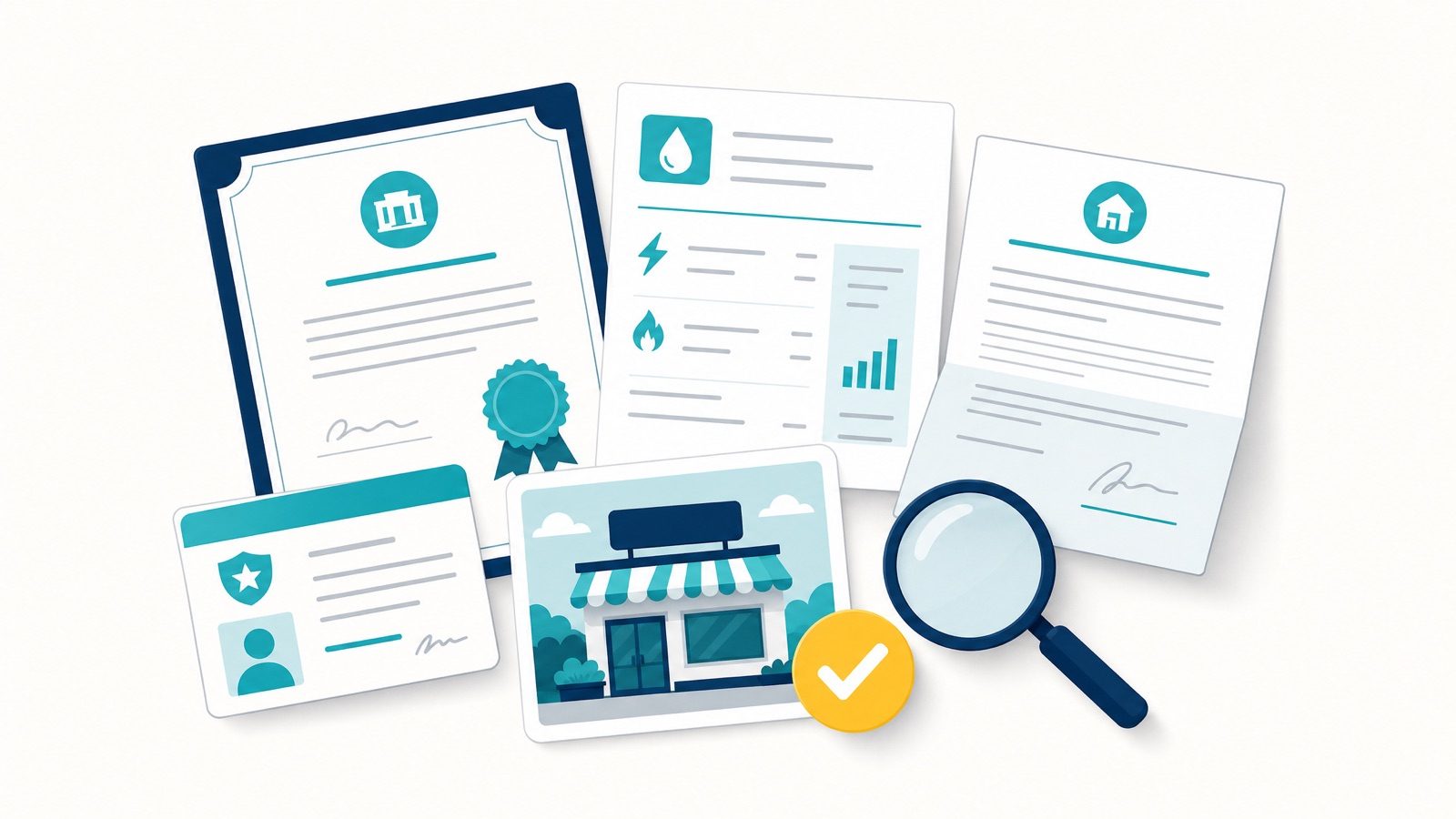
Google wants proof the business is real, legitimate, and located where the profile says it is. Pull this together before you start, because each stage can only be submitted once. There is no second bite at the same form to add a document you forgot.
Google lists four categories on the form itself: official business registration, a business licence, tax certificates, and utility bills for the business. In Australian appeals, the versions of those that actually land are a short, specific list. Stick to these:
- Your ASIC Record of Registration for the business name, downloaded from ASIC Connect at asic.gov.au. This is what Google means by “official business registration”. It is not an ABN extract from the Australian Business Register, which is the one to leave out.
- A recent utility bill showing the same business name and address as the profile.
- Your industry licence or permit, if your trade requires one.
- A commercial lease, if you operate from a storefront customers visit.
- Photos: exterior signage and interior for a storefront, or branded vehicles, equipment and signage for a service-area business.
Skip the documents that feel relevant but are not what Google asks for here, such as an ABN extract, a tax invoice or BAS, personal photo ID, or public liability insurance. They add noise without strengthening the case, and after a denial the instinct to send more of everything is exactly the wrong one. Our GBP appeal evidence pack walks the five documents and the format rules one at a time if you want to tick them off.
Documents need to be recent, clearly readable, and match the profile exactly. If your utility bill says “Unit 4” and the profile says “Suite 4”, make them agree before you submit.
Name the files sensibly, including the Business Profile ID, so the reviewer can follow the evidence without guessing.
Re-verification and the video-verification trap
Reinstatement is not always a clean “approved” and done. Google often asks you to re-verify the business as part of clearing a suspension, frequently by video, and that step trips a lot of people up. Two patterns show up again and again:
- The verification itself is tangled with the suspension. Re-verification triggered by an address or name edit is a common path into a suspension in the first place, so the two problems arrive together.
- After one failed video attempt, the options dry up and you are left looking at “No more ways to verify”, with the standard flow offering nothing further.
If you hit that wall, do not keep retrying the same broken flow. Use “Contact support” inside the Business Profile and ask them to reopen verification. Worth setting expectations: Google decides which method you are offered, and a live video call is something support may or may not put in front of you rather than something you can select. Note the standard flow is a live capture through the profile, not a recording you upload afterwards, which Google does not accept.
When you do record, follow Google’s rules: an unedited clip filmed live on your phone through the profile, showing your premises, signage and proof you operate there, with the business name on permanent signage matching the profile exactly. Google asks for at least 30 seconds and sets no maximum, so do not rush it. Reviewed within up to five business days (Google).
How often the “no more ways to verify” dead end happens is owner-reported rather than a documented Google state, but it is common enough to plan for.
Reading your appeal status label
To check your appeal status, sign back into the appeals tool with the account that filed the appeal and select the profile. Google shows a single status label, and that label is the whole answer. There is no progress bar, no percentage, and no estimated decision date.
| Status label | What it means | What to do next |
|---|---|---|
| Submitted | The appeal is in the queue and under review | Wait. Do not edit the profile or resubmit |
| Approved | The appeal succeeded and the profile is being restored | Nothing. Let the listing settle before editing |
| Not Approved | The appeal was rejected | Request an additional review at the separate URL, with stronger evidence |
| Eligible for appeal | The profile is restricted and an appeal path is open | Fix the violation on the live profile first, then appeal |
| Can’t be appealed | No appeal path is available through the tool | The forms are exhausted. Move to one of the manual escalation routes |
You also get the decision by email, and the restriction status updates on the profile itself, so there are three places the same answer shows up. Google’s documentation says a decision “can take up to 5 business days”.
The mistake to avoid here is treating a quiet “Submitted” as a failure and resubmitting. Read the label, not the silence.
If you have not appealed yet: the first-appeal process
Everything above assumes Google has already refused you at least once. If you are earlier than that, this is the ground the first appeal covers. Getting this round right is what keeps you out of the escalation routes entirely.
What a Google Business Profile appeal is
A Google Business Profile appeal is the formal channel for getting a suspended or disabled profile back online. Google shows the broad restriction reason, you fix the cause on the live listing, then you use the official appeals tool to submit your case with evidence that the business is legitimate and located where the profile says.
There are two rounds available to most owners: the first appeal, and, if that is rejected, an additional review. After both, direct appeals close and the realistic path is the manual escalation covered above.
Is it a profile suspension or an account restriction?
Before you appeal, work out which of two things has actually happened, because they are fixed in a set order.
Think of your Google Account as the master login, and each Business Profile as one listing that login manages.
- A profile suspension means Google has pulled a single listing. The account still works and your other listings are fine.
- An account restriction means Google has limited the master login itself, which can take every listing attached to it offline at once.
If it is an account restriction, fix that first. Clear the account-level issue before you touch the profile appeal. Google’s route is its own appeal: you provide a reason and submit it from your My accounts page, not through the profile appeals tool. Appealing a single listing while the whole account is still restricted is wasted effort, because the block sits above the listing. Once the account is clean, move on to the profile appeal.
This one also explains a specific kind of denial. If the appeal was refused and nothing on the listing looks wrong, check whether the restriction was ever at the profile level to begin with.
How to use the Google Business Profile appeals tool
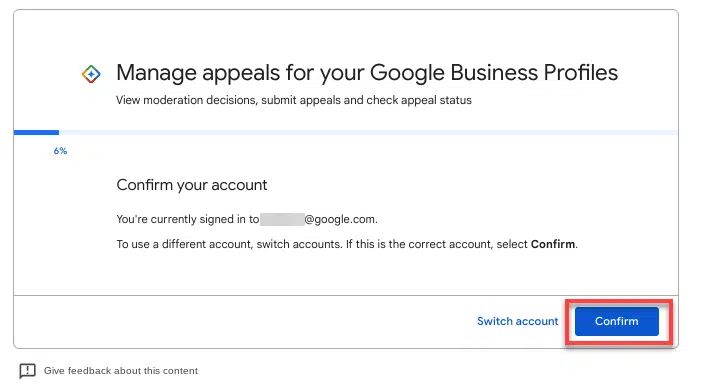
Use the official Google Business Profile appeals tool, signed into the account that owns the profile. Per Google’s Business Profile Help, the tool shows the restriction reason category and the relevant policy, and it is the only channel that reliably works now. Phone and social escalation are effectively dead for suspensions.
Google updated this flow in early July 2026 (Search Engine Roundtable), and the new version is more linear than the one most older guides describe. Two changes matter.
The bulk-reinstatement question now comes first. The appeal opens by asking whether you are reinstating a larger number of profiles, generally ten or more. Answer “No” and you drop straight into the normal single-location appeal. Answer “Yes” and you go to the spreadsheet-based bulk flow instead.
Evidence is now uploaded inside the appeal form itself. The old process pushed you to a separate evidence form after submitting, on a 60-minute timer that expired if you were slow. In the new flow that timed form is gone: you attach your documents in the appeal itself, through a single “Choose files” button that takes several files at once, rather than five separate upload fields.
One caveat before you start, because the downside of getting this wrong is losing your only appeal. Google’s own help documentation still describes the old route and still says evidence “must be submitted within 60 minutes of submitting your appeal”. If the form you are served has no upload step, assume that clock is running. Either way the safe habit is identical: have every file open and ready before you hit submit, because nothing gets prepared afterwards.
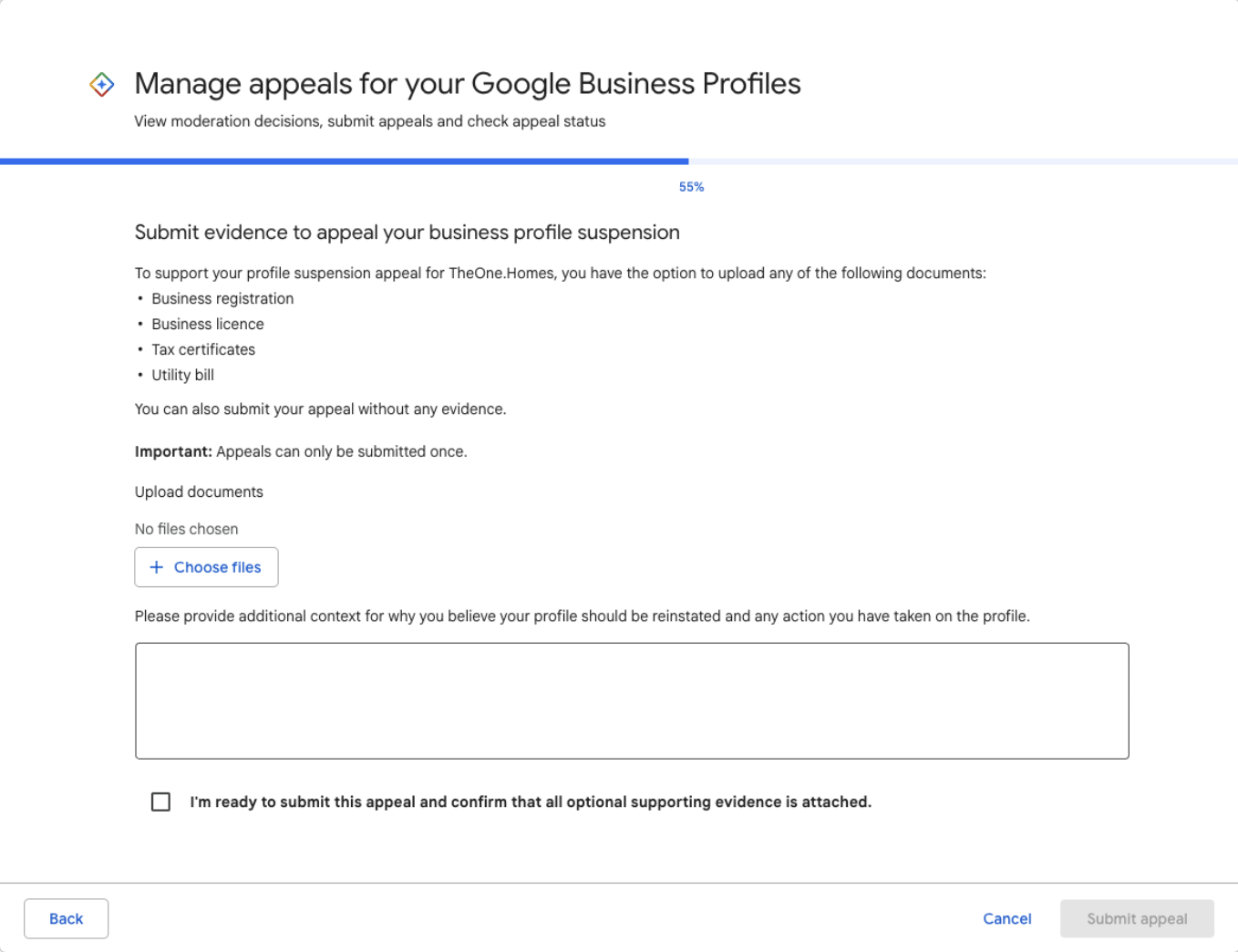
The trade-off is the line the form now states plainly: appeals can only be submitted once. There is no separate second window to fix a missing document, so the “prepare first” discipline matters more than ever, not less. Have your ASIC registration, utility bill, licence, lease and signage photos saved to one folder, named clearly, before you open the appeal.
Keep the written explanation short and factual: what was wrong, what you fixed, where the evidence is. A long, emotional appeal gets skimmed. A concise one that maps cleanly to the policy gets actioned.
Then tick the confirmation box and submit. Do not create a new profile while the appeal is under review. A duplicate rarely ranks, muddies the case, and can make reinstatement of the original harder. Submit your appeal once, properly, then wait.
Managing multiple suspended profiles
If you run many locations and several profiles are down, Google offers a bulk appeal flow for businesses with a larger number of profiles, generally ten or more, using a spreadsheet keyed by Business Profile ID. Since July 2026 the appeal asks whether this is a bulk reinstatement as its first question, so you are routed to this flow at the start rather than the end.
Keep a master tracking sheet: each profile’s ID, suspension reason, evidence submitted, which round each one is at, and the status of the other profiles alongside it. Multi-location reinstatement is mostly an organisation problem, and the disorganised submissions are the ones that stall, especially once some profiles have been denied and others have not.
You’re back, but the rankings aren’t (yet)
Worth setting expectations, because reinstatement is the win condition most guides stop at, and then the phone is still quiet. Getting the profile live again is not the same as getting your rankings back.
Visibility often lags reinstatement, particularly for service-area businesses, where it commonly takes a couple of weeks before the listing settles back into the map. Reinstatement also seems to push the profile through a fresh review, which can briefly re-expose weak spots, thin categories, inconsistent citations, or a quiet review profile, that were tolerated before.
This is observed behaviour, not a documented Google policy, so treat the timeline as a pattern rather than a promise. The move is not to panic-edit the moment you are back. Let it settle, keep the profile active, and treat recovery as the front end of normal local SEO rather than a sign that something is still broken.
How to avoid it happening again
Reinstatement is the fire. Prevention is cheaper than the fire.
- Review Google’s profile policies each quarter, since enforcement shifts.
- Audit each live profile monthly for changes you did not make.
- Lock down user access. Remove former staff and old agencies from the profile.
- Keep your name, address, and phone consistent across your website, citations, and the profile.
- Prefer pushing changes as front-end suggested edits rather than heavy back-end edits, and watch what gets through. Our guide on monitoring suggested edits covers how to catch and stop the changes that get through.
Stable profiles are usually the actively, carefully managed ones, not the ones left alone and hoped over.
When to get help
Do it yourself if the cause is obvious, the fix is simple, and the business is not losing meaningful revenue while it is down.
Get help when leads are bleeding with the profile offline, when an appeal has already been refused, or when you cannot work out what triggered it. A botched second appeal can entrench a suspension, and there is no third form behind it, so the cost of guessing rises with every round.
That is what our GBP reinstatement service does day to day: find the actual trigger, fix the live profile, and submit one clean, evidence-backed appeal instead of a string of hopeful ones. It is $550 flat, paid upfront and fully refunded if the profile does not come back, and it covers both appeal rounds plus manual escalation if Google refuses. If you have already burned both of your own appeals before coming to us, the post-second-denial rebuild is scoped separately, from $650.
Since April 2026 Google has also run Gemini over suggested edits, blocking policy-violating ones before they publish, and started emailing “verified and active owners” about important edits before they go live. Verified and active is now the switch that turns that early warning on, which is another reason a dormant profile is a riskier profile.
Across Australian reinstatements since early 2025, that method has recovered 295 of 300 profiles, a 98% success rate, for businesses across trades, clinics, and professional services.
One recent example: a Perth trades business was suspended after an address edit. We corrected the listing, submitted matching documentation, and it came back within days. Outcomes vary by case, which is exactly why the appeal in front of you needs to be the strong one.
FAQ
What happens if Google rejects your appeal?
You request an additional review at a separate URL with stronger evidence, not the same pack again. That form only becomes available once Google has denied you, and any owner or manager on the listing can file it. If the additional review is refused as well, the appeal option usually closes in the tool and escalation becomes manual: a Product Expert in the official community, a cross-team escalation through Google Ads support if you advertise, or out-of-court dispute settlement under the EU Digital Services Act if the business sits in the EEA. Do not resubmit the original appeals tool repeatedly, it gets auto-dismissed.
How many times can I appeal before the option disappears?
You generally get a formal appeal and an additional review. After the second refusal, direct appeals usually close and the tool starts returning “Can’t be appealed” for that profile. From that point the routes are manual rather than form-based. This is why the first appeal should not be rushed, and why a denial should not be answered with a rushed second one.
What can I do after Google refuses a second time?
Three routes remain, and none of them is a form inside the appeals tool. Post the case to the Google Business Profile Help Community for a Product Expert to pick up and escalate. If you run a Google Ads account, raise it with Ads support and ask them to route it to the Business Profile team, which is a practitioner workaround rather than a documented Google channel. And if the business is in the EEA, Google’s own appeals documentation points to out-of-court dispute settlement under the EU Digital Services Act. That last route does not exist for Australian businesses.
Why won’t Google tell me why my appeal was rejected?
Google gives a broad restriction reason and a decision, not the specific fix, and the denial email is no more detailed than the original suspension notice. It is on you to audit the profile against the guidelines and correct everything before appealing again. Working backwards from the common triggers is usually how you find it.
What documents do I need for a Google Business Profile appeal?
For an Australian appeal, five things carry the case: your ASIC Record of Registration, a recent utility bill in the business name and address, your industry licence or permit if your trade needs one, a commercial lease if customers visit a storefront, and photos of signage, premises, or branded vehicles. Every document has to match the profile exactly. Leave out the ABN extract, tax invoices, BAS, and personal photo ID, Google does not ask for them here and they add noise.
How long does a Google Business Profile appeal take?
Google’s own documentation says appeal reviews and decisions “can take up to 5 business days”. In our casework most decisions land inside that window and a minority run longer when the case is queued or complex. There is no guaranteed timeframe, and anyone promising an exact number is guessing.
How do I appeal my suspended Google Business Profile?
Fix the live profile first, then use the Google Business Profile appeals tool signed into the owning account. Confirm whether it is a profile suspension or an account restriction, correct the cause, attach your five documents in the appeal form, and submit once. Since July 2026 the evidence upload happens inside the appeal itself, so there is no separate timed form to chase.
What happens when a profile is removed instead of suspended?
Removal is what a hard suspension looks like from the outside. The listing disappears from Google Search and the maps database entirely, and reviews can go with it, whereas a soft suspension or a disabled profile usually stays publicly visible. The appeal route is the same either way, but the urgency is not, because a removed profile is invisible to every customer searching your name. Our piece on suspended vs disabled breaks the two states apart and says what each one needs next.
Can I just create a new profile instead?
No, and the temptation is strongest right after a denial. A duplicate profile during a live suspension rarely ranks, can breach guidelines, and complicates reinstatement of the original. Fix and appeal the existing profile.
Do I lose my reviews if I am suspended?
Reviews are tied to the profile, not destroyed by a suspension. In most cases, when the profile is reinstated the reviews come back with it, and what you lose during the suspension is visibility and leads, not your review history.
The exception to watch for: occasionally Google reinstates a business as a brand-new profile rather than restoring the original, and reviews do not carry across. If that happens, do not start fresh. Give support both the old and new profile links plus examples of the missing reviews and ask them to restore the original. The same evidence approach works when Google reviews go missing without a suspension behind it.
The bottom line
A denial is recoverable, but it rewards method over volume. Work out what the reviewer actually saw on the live profile, fix that, then use the additional-review form once with evidence that is genuinely stronger than round one. If Google refuses a second time the forms close, and what is left is a Product Expert, an Ads-side escalation if you have one, and, in the EEA only, the DSA route.
If your profile is down and the leads are going with it, or your appeal has already been refused, , start the onboarding form, or look at our GBP reinstatement service. Calm, methodical, one strong appeal, and honest local SEO advice on keeping it stable afterwards.