
How to Build Trust Signals and Pass Google Verification Without Getting Stuck
Video verification fails on the same few things every time. What the recording must show, how to prepare for a live call, and the AU documents that help.

Google Business Profile verification is the step where Google confirms you are a real business and that you are the one running it. It is also the step where plenty of legitimate Australian businesses get stuck, usually because they hit “verify” before they have given Google any reason to trust them.
The good news is that verification is not a lottery. It is a proof-of-legitimacy check, and once you understand what Google is actually looking for, you can set yourself up to pass it the first time. This guide covers the trust signals to put in place before you start, what your verification video needs to show, the Australian documents that genuinely help, and what to do when you are stuck. If you just want the basic step-by-step, our guide to verifying a Google Business Profile covers the mechanics; this piece is about passing cleanly and staying verified.
- Verification confirms your business is real and that you manage it. Set up trust signals before you start, do not hit verify cold.
- You cannot choose your method. Google assigns it (often video) based on your business type and the information it already has.
- A passing video shows three things: where you are, that the business exists, and that you manage it.
- In Australia, the documents that help are your ASIC business name registration, a recent utility bill, an industry licence if relevant, a commercial lease if you have a storefront, and photos of your signage.
- After you are verified, do not immediately change your name, address, phone or category. Big edits can trigger re-verification.
Why verification exists, and why it blocks good businesses too
Google verifies profiles to keep fake and spam listings out of Search and Maps. The system leans heavily on automated checks, and those checks are blunt: they are built to catch fakes, but they also catch legitimate businesses that have not given Google enough corroborating information.
So the goal is not to argue with the system or look for shortcuts. It is to hand Google the proof of legitimacy it is looking for, in a form it can read, before you start. Businesses that do this tend to sail through. Businesses that hit verify with a brand new profile, a personal Gmail and no website footprint are the ones that end up stuck. Building that footprint first is ordinary local SEO work, and it pays off well past the verification step.
You cannot pick your verification method
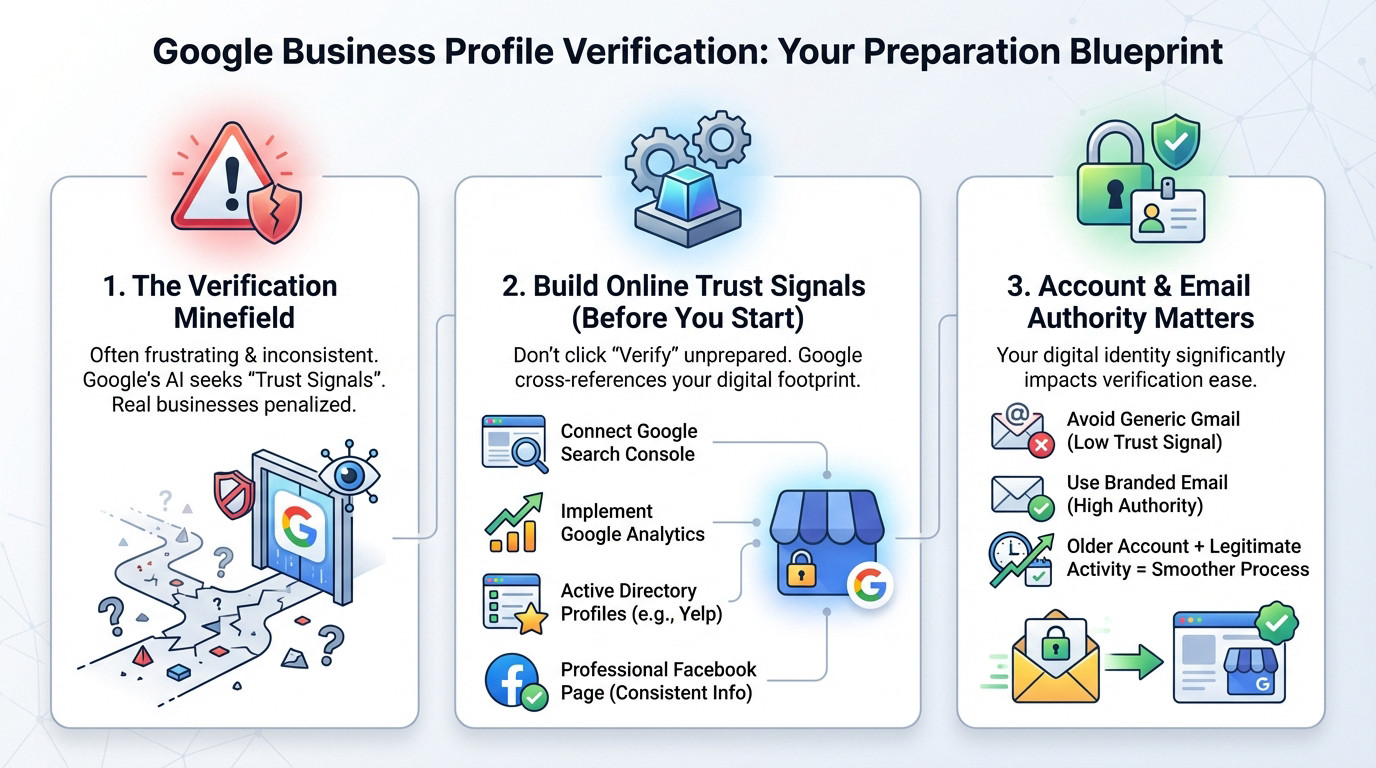
This trips a lot of people up. Google automatically determines which verification methods you are offered, based on your business type, category, region and the public information it already has about you. You cannot force phone, email or postcard if Google does not offer it.
In 2026 the method you are most likely to see is video, either a recorded video or a live video call. Phone and email are offered to some businesses. Mailed postcards have been largely phased out and are no longer the default, so do not plan around one. Because you cannot choose, your influence is indirect: the stronger and more consistent your information is, the more likely Google is to offer you a simpler method and approve you quickly. Verification review usually takes several business days.
Build your trust signals before you start
Everything here makes Google more confident you are real before it even looks at your video.
- Use a proper business Google account, not your personal daily Gmail. Set it up with your business details and use it consistently to own and manage the profile.
- Use a branded email on your own domain (for example, hello@yourbusiness.com.au) rather than a generic Gmail. It reads as an established business.
- Connect your website to Google Search Console using the same account. It proves you own the digital asset.
- Make your name, address and phone identical on your website, your profile and your directory listings. Inconsistency is one of the most common reasons verification stalls, which is why NAP consistency matters here, not just for ranking.
- Complete the profile properly: correct category, real photos, accurate hours.
None of this is a trick. It is simply giving Google a consistent, corroborated picture of a real business.
Video verification: show three things
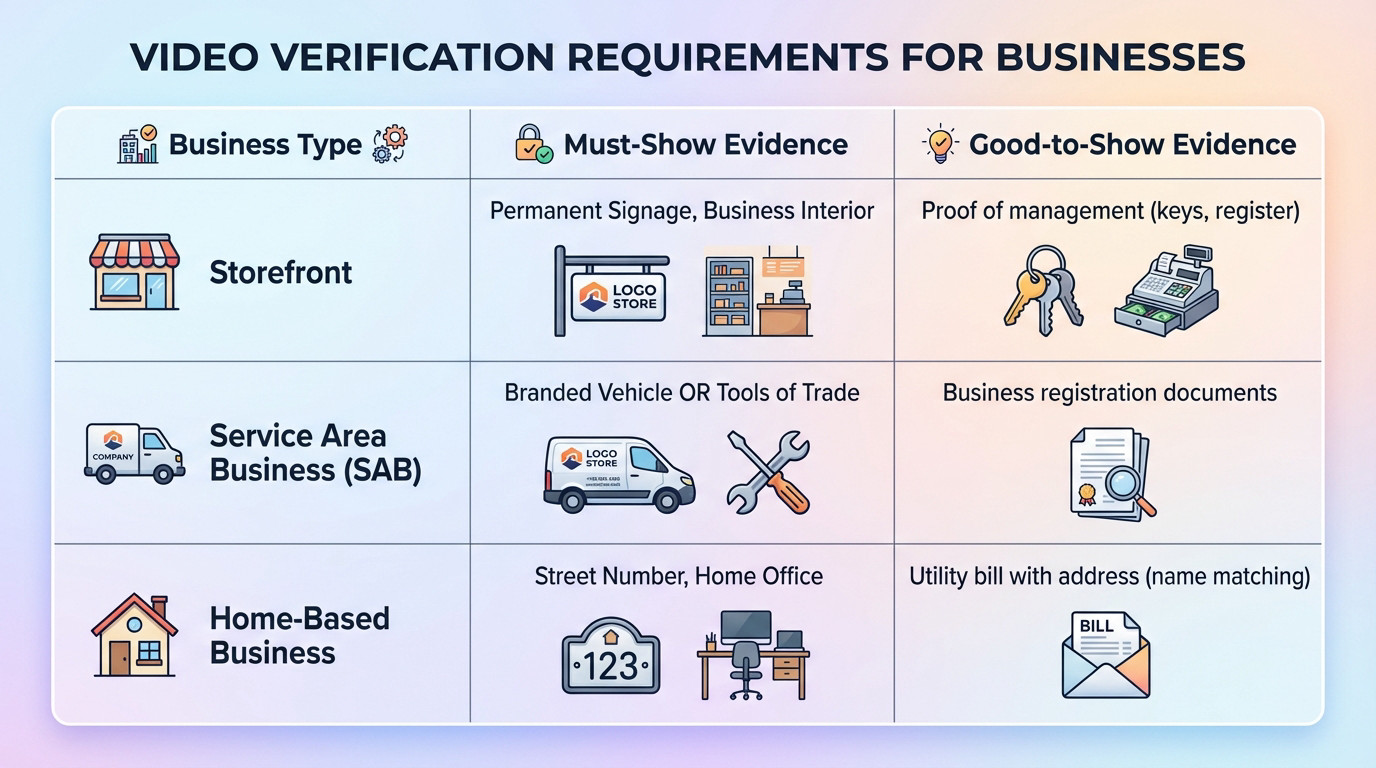
Google’s video verification asks for a single, unedited video, usually recorded on your phone, that proves three things:
- Location: where the business is. Film street signs, the building number, and nearby landmarks.
- Existence: that the business is real. Show permanent signage, branded equipment or tools, and your products or premises.
- Management: that you run it. Show something a customer could not, such as accessing a staff-only area, the till or EFTPOS terminal, or relevant business documents.
What you show depends on your business type:
| Business type | Must show | Helpful to show |
|---|---|---|
| Storefront | Permanent signage and the interior customers see | Proof of management (keys, register, staff area) |
| Service area business | A branded vehicle or marked tools of trade | Business registration documents (mask sensitive details) |
| Home-based | The street number and your dedicated workspace | A utility bill with a matching name and address |
A few practical points. Record steadily in good light, walk slowly, and keep the subject in focus, because a shaky or dark video can fail on quality alone. You do not need to speak; the system is looking for visual proof, not narration. And if you run a home-based business, you do not need a commercial sign at your house. Google does not expect one, and faking signage can cause more problems than it solves.
One technical point owners miss: record the video directly in the Google Business Profile app (or the Maps app prompt), in one continuous take. Editing the clip in your phone’s gallery, stitching multiple takes together, or uploading a file from your camera roll is a common cause of silent rejections that practitioners flag repeatedly (Dietz Group walkthrough of real 2025 rejections). If your upload keeps failing on file size or connectivity, switch to Wi-Fi and try again rather than trimming the video.
The Australian documents that actually help
If Google asks for documentation, or you need to support an appeal, the documents that carry weight for an Australian business are specific. Provide only these:
- Your ASIC business name registration.
- A recent utility bill at the business address.
- An industry licence, if your trade requires one (electrical, plumbing, and similar).
- A commercial lease, if you operate from a storefront.
- Clear photos of your signage and premises.
Do not pad an appeal with US-style documents or irrelevant paperwork. A clean, matching set of the documents above does more than a thick folder of mismatched ones.
If you get a live video call
Live video verification is a Google Meet style call with a Google reviewer, offered to some businesses instead of an uploaded video. Practitioners report a fairly consistent flow (Search Engine Land’s 2025 change writeup, Boomcycle 2026 guide):
- You pick a slot within Australian business hours, usually same-day to three days out, in your local time zone.
- The agent joins within five to fifteen minutes of the slot and asks you to walk through the same three things you would record: street sign and number, exterior signage, then interior and proof of management.
- They will ask you to open a staff-only area, show a POS or booking system, and hold a business document up to the camera. Have your ASIC business name registration and a utility bill open and ready.
- A decision usually lands within a few hours to three business days.
Treat the call like a friendly inspection rather than a casual chat: stable signal, the camera in landscape, and the documents on a clean surface. Missing the slot or a dropped connection mid-call often means rescheduling rather than a fail.
If someone else already controls your listing
Sometimes the blocker is that your profile was already claimed, often by a former agency or a past employee. Before you fight with anything, find out who holds it. On Google Maps, find your listing and choose the option to claim or request access. Google will show a masked version of the current manager’s email, which is usually enough to recognise who it is.
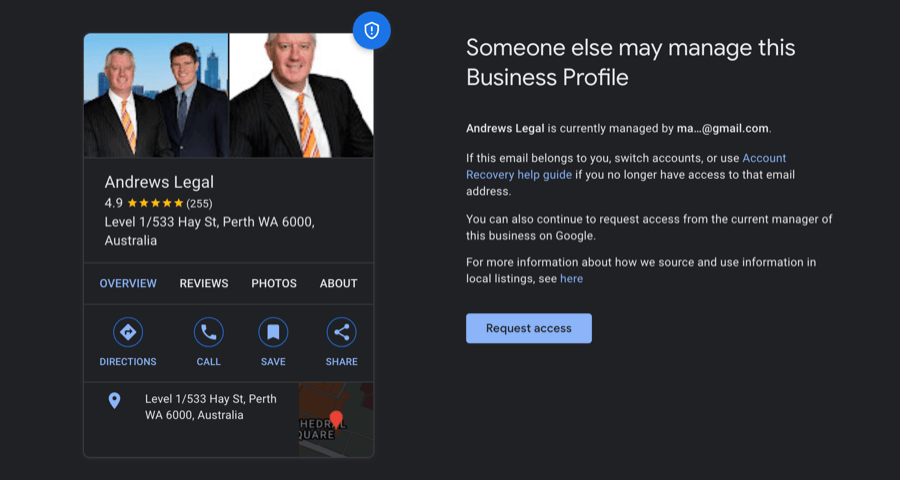
From there you can request access through the proper flow and Google will contact the current owner. This is the safe route, and it is the same reason we always recommend managing access properly rather than sharing logins.
After you are verified, do not rush edits
Getting the green tick is not the moment to overhaul the profile. Immediately changing core details can look like suspicious activity and, in some cases, triggers re-verification or a review.
Give it a few days, then make changes gradually rather than all at once. The edits most likely to trigger re-verification are changes to your business name, address, primary phone number, or primary category, and the risk is higher if you make them from a different account than the one used to verify. Adding photos, posts and review responses is low risk and worth doing. When you are ready to build the profile out properly, our optimisation guide covers what actually moves visibility.
When verification is stuck or fails
First, separate a delay from a failure. “Processing” for a few days is normal, especially when a manual review has been triggered. A flagged error or a failed status is different and needs action.
If you are genuinely stuck:
- Wait several business days before escalating. Sending support tickets too early rarely helps.
- When you do contact support, come prepared. Have your Business Profile ID (in your profile settings), a short clear summary of the issue, the video or photos you submitted, and a screenshot of any error message.
- Do not look for ways around Google’s checks. Attempts to game the system, including routing around limits, are exactly what gets profiles suspended.
If the same recorded video has been rejected more than twice, stop re-submitting the same evidence and explicitly request a live video call when you contact support, with your case ID. Repeating an identical upload trains the system to keep failing it, where a live call resets the assessment (BrightLocal guide to escalating in the GBP Help Community).
When to get help
Most businesses get verified on their own once they prepare properly. But if you have failed video verification more than once, inherited a tangled or suspended listing, or you are simply losing leads while stuck in limbo, it is worth bringing in someone who handles this every week.
That is a core part of what we do. We get profiles verified, recover access to listings owned by someone else, and handle suspensions and reinstatements for Australian businesses. If you are stuck, or start the onboarding form and we will tell you plainly what is going wrong and what it takes to fix it. For badly stuck or suspended profiles, our reinstatement service is the faster route.
FAQ
Can I choose how Google verifies my business?
No. Google decides which methods you are offered based on your business type, category, region and the information it already holds. You cannot force a specific method. What you can do is strengthen your trust signals first, which makes a simpler method and a faster approval more likely.
Why does my verification video keep getting rejected?
Usually because it is missing one of the three things Google needs: location, that the business exists, or proof that you manage it. Many people film the sign and the street but never show management access, such as opening a staff-only area or the till. Quality matters too; a shaky or dark video can fail on its own.
How do I verify without a postcard?
In 2026 you generally will not be offered a postcard, because Google has largely phased them out in favour of video and live methods. You cannot request one. Set up your trust signals (Search Console, a branded email, consistent information) and Google will assign you a method, most often video.
What documents does Google accept for an Australian business?
The ones that carry weight here are your ASIC business name registration, a recent utility bill at the business address, an industry licence if your trade needs one, a commercial lease if you have a storefront, and photos of your signage. Provide a clean, matching set rather than a pile of unrelated paperwork.
My verification has been stuck for weeks. What should I do?
After five business days with no movement, contact Google support with your Business Profile ID, a short summary, the proof you submitted, and a screenshot of any error. If it keeps failing or the listing is tangled with a previous owner or a suspension, that is the point to get professional help rather than retrying the same video.