
Google Business Profile Flagged for Quality Issues: The 2026 Recovery Guide for Australian Owners
A quality-issues flag is not a policy violation, and treating it like one gets appeals denied. What Google actually means by it, and how to clear it properly.

If Google has flagged your Business Profile for “quality issues”, or suspended it outright with that wording, don’t start by panicking. Start by diagnosing. “Quality issues” is a catch-all label Google uses for several distinct problems, and the right recovery move depends on which one you’ve actually been hit with. Get the diagnosis wrong, submit the wrong appeal, and you’ll burn your one good shot at reinstatement.
The damage feels enormous and most of it is. Phones quiet down inside a day. Your Maps pin is gone. A Google search for your own business name returns nothing useful. That’s the visible part. The recoverable part lives underneath it, and it’s bigger than the visible part suggests.
This guide is for an Australian business owner trying to fix it. We’ll cover what “quality issues” really means in 2026, how to tell which type of suspension you’re in, the policy violations that trip up AU local search the most, and the current Appeal Tool process, the one that’s quietly replaced the old Business Redressal Complaint Form most agency blogs are still telling people to use. If you’d rather not gamble a second appeal, our GBP reinstatement service handles the whole thing.

What “quality issues” actually means
Google’s automated systems compare your profile against its Guidelines for representing your business. When something doesn’t match, the business name, the address, the categories, photos, description, reviews, the profile gets tagged as a quality issue and Google either reduces its visibility, suspends it outright, or disables it.
Quality-issue suspensions aren’t punishment. They’re content-policy enforcement, and they’re how Google keeps its local search index clean. That distinction matters because it changes how you respond. You’re not arguing with Google about whether the suspension was fair. You’re proving your business is real, your data is consistent across the web, and your profile complies. Eligibility is the question, not fairness.
Soft suspension vs hard suspension vs disabled
Before you do anything, figure out which fight you’re in. The three states look almost identical in the dashboard but they need different recovery moves.
Soft suspension (under review). Your profile is still visible on Google Search and Maps but reach is reduced, edits are blocked, and Google has usually told you the profile is “under review” or has “quality issues.” The gentlest of the three. Reinstatement is straightforward if you respond cleanly.
Hard suspension. The profile disappears from Search and Maps. You’ll still see it inside your dashboard, often with a red banner across the top. Phones stop. This is the state most owners come to us in.
Disabled. Google has removed the profile entirely. You’ve lost ownership. Recovery is possible but harder, usually the Appeal Tool plus reverification. Our suspension vs disabled deep dive sets out what each state actually means and what each one needs next.
Not sure which one you’re looking at? Open Google Maps in a private browser window and search your exact business name and suburb. If the listing appears, you’re soft-suspended or visible-but-throttled. If it doesn’t, you’re hard-suspended or disabled. Don’t ring Google support trying to confirm, local search support doesn’t handle individual cases by phone, and the queue lives inside the Appeal Tool anyway.
Decode the exact message Google sent you
Google almost never names the real trigger. It gives you a stock phrase, and different phrases point at different problems. Before you touch anything, match the wording in your email or dashboard to the row below, then read the matching trigger further down.
| What Google says | What it usually means | Where to look first |
|---|---|---|
| ”Suspended due to quality issues” | A catch-all content flag. Could be any trigger below, most often the name, the address, or a NAP mismatch. | Audit the whole profile cold before you appeal. |
| ”This profile doesn’t follow the guidelines” (dashboard banner) | Same family as quality issues. A policy violation Google won’t specify. | Business name, address, category, photos. |
| ”Flagged for suspicious activity” | Often an eligibility or verification doubt, or a competitor report through Suggest an edit. | Address type, service-area setup, recent edits. |
| ”Deceptive content” or “deceitful content” | A visual or written misrepresentation. Stock or AI photos, wrong hours, services you don’t provide. | Photos, description, hours, services. |
| ”Misrepresentation” | Google doubts the business is what it claims to be, or operates where it claims. | Address, signage, service-area vs storefront. |
| ”A Google Account associated with this profile is not in good standing” | This is not a profile problem. The Google account managing it has been restricted. | Your Google account, not the listing. See trigger 8. |
| ”Google has turned off posting for this profile” | A softer content flag. Google has blocked edits to stop further policy breaches. | Recent posts, photos, description. |
| ”Under review” | The gentlest state. Still visible, edits blocked, reach throttled. | Respond cleanly, change nothing on the identity fields. |
If the wording doesn’t match any row cleanly, treat it as a general quality-issues flag and audit the profile end to end. The phrase is a hint, not a diagnosis.
The triggers that send Australian profiles to the quality-issues pile
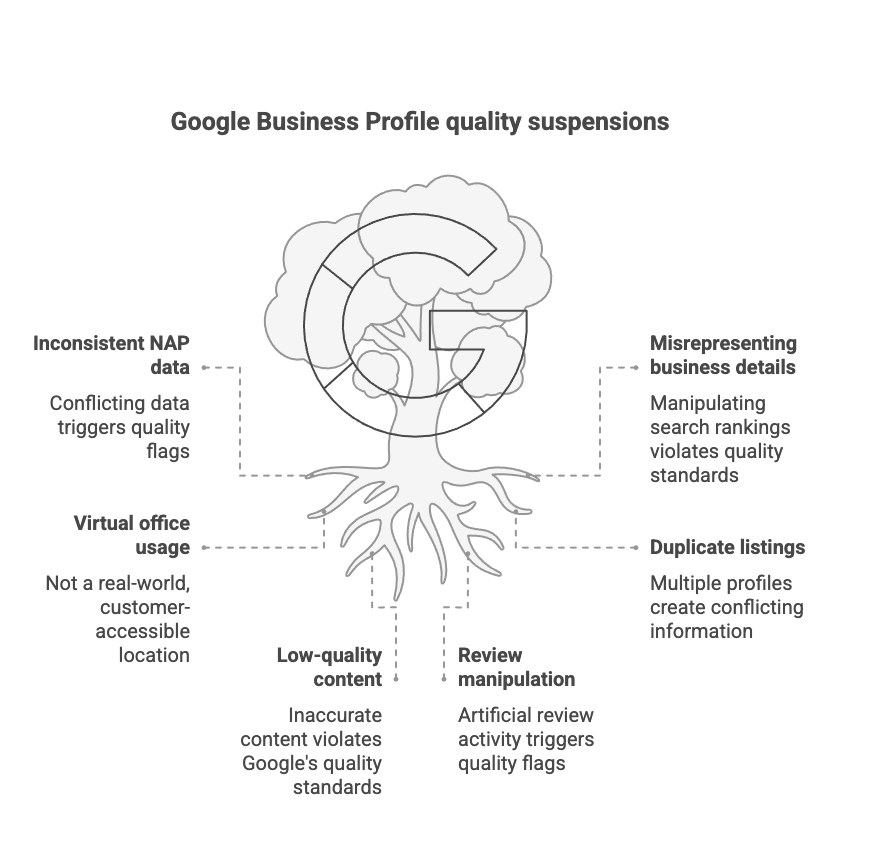
These are the policy violations we see almost weekly. The first three account for most cases.
1. Keyword stuffing in the business name
The single most common trigger. If your registered business name is “Coastal Plumbing Pty Ltd,” your Google name has to be “Coastal Plumbing”, not “Coastal Plumbing Perth Hot Water 24/7 Emergency.” Adding suburbs, services, hours or slogans to the business name is spamdexing, and Google has cracked down on it hard in recent years. Match your ASIC-registered name or your trading name on the ASIC business name register and stop there.
2. Virtual offices, PO boxes, and residential addresses
Google requires a physical address where customers can either visit you or where you actually conduct business operations. Mailbox services, coworking-day-pass providers, virtual office addresses you only collect mail from, none of these qualify. Google now cross-references known virtual-office buildings against the address you’ve listed, and tradie profiles in particular get caught here constantly.
If you’re a service-area business, a tradie, a mobile mechanic, a cleaner, you should be using a service area listing with your address hidden, not a fake storefront. Setting up a service-area business as a storefront is one of the fastest ways for a local business to get suspended.
3. NAP inconsistency across the web
Name, Address, Phone. These have to match on your website, your ABN extract, your ASIC record, your social profiles, and your major directories (True Local, Yellow Pages, Yelp AU, industry directories). Even small differences trip the algorithm: “Suite 4/120 Hay St” on one site, “Unit 4, 120 Hay Street” on another, “0412 345 678” here, “(04) 1234 5678” there. Pick one canonical format and roll it across every citation. Google’s systems read these as separate businesses, and that data mismatch quietly compounds until the profile gets flagged. Cleaning it up properly is standard local SEO citation work, not a suspension task.
4. Duplicate listings
Two profiles for the same business at the same address. Usually accidental, ownership changed, the new agency built a “new” one without finding the old one, or a staff member made one for their own login years ago. Google detects duplicates even when names are slightly different, and both listings get flagged for quality issues. The fix is to keep the older, better-reviewed profile and request removal of the duplicate.
5. Deceptive content and misleading photos
Stock photos that aren’t from your premises, AI-generated images of fake storefronts, hours that don’t match your real opening hours, services you don’t actually provide. Google flags these as “deceitful content” or “deceptive content” violations. Our breakdown of the compliance guidelines treats any visual or written misrepresentation the same way, quality issues. The one we see almost weekly is an AI-generated “shopfront” photo on a Cloverdale tradie profile that has no physical shopfront at all.
6. Review manipulation
Sudden spikes in 5-star reviews. Reviews from accounts with no other activity. Reviews coming from IPs near your office. Incentive offers (“get a $20 voucher for a 5 star rating”), all violate Google’s content policy and feed back into a profile-quality score. An honest 4.6 average beats a manufactured 4.9, always. The penalty for getting caught is usually a quality-issues suspension, not just a review removal.
7. A website URL that redirects or points somewhere else
The URL on your profile has to load your actual business website, directly. If it redirects to a different domain, forwards to a social media page, or bounces through an affiliate or tracking link, Google reads that as a mismatch between the profile and the business behind it. Agencies cause this one constantly by pointing the profile at a landing page or a call-tracking redirect instead of the real site. Point the profile URL at your primary domain, no redirect chain, and make sure that domain matches the NAP everywhere else.
8. A Google account that’s “not in good standing”
This one isn’t a profile problem at all, which is why owners chase the wrong fix for weeks. If the Google account that manages the listing has been restricted, usually because it was flagged in another Google service like Ads, YouTube or Workspace, every Business Profile that account manages gets suspended with it. The wording is specific: “a Google account associated with this profile is not in good standing.” No amount of editing the listing will fix it. You have to resolve the account-level restriction first, or move ownership of the profile to a clean account with proper access. If you’ve been suspended and the profile itself looks compliant, check this before anything else.
9. 24/7 hours on a business that isn’t a genuine emergency service
Setting your hours to “open 24 hours” when you don’t actually run a round-the-clock emergency operation is a quiet trigger, and tradies hit it often. Google treats always-open hours as a claim, and for most categories it reads as an attempt to catch more after-hours searches than the business really serves. Genuine emergency plumbers, locksmiths and electricians can justify it. A standard trades business, a clinic, or a retail shop can’t. Set your real trading hours, and use a separate emergency-callout note in the description if you genuinely offer one.
10. A competitor reporting your profile
Not every suspension is something you did. Anyone can flag a profile through the “Suggest an edit” feature or report it as non-compliant, and in competitive local categories that gets used as a weapon. A rival reports your listing as keyword-stuffed, wrongly addressed, or closed, Google’s automated system acts on the report, and your profile is suspended while you’re left guessing what changed. You can’t stop competitors reporting you, but you can make the profile bulletproof so the report doesn’t stick: a clean compliant name, a verifiable address, consistent NAP, and a ready evidence pack. When we see a profile suspended within days of a competitor’s own listing climbing, a malicious report is usually the cause, and a tight evidence pack is what gets it back.
The 2026 recovery process, Appeal Tool walkthrough
The old Business Redressal Complaint Form has been deprecated for most quality-issue cases since 2024. The path now is the official Appeal Tool linked from Google’s Fix suspended or disabled profiles help page. Follow these six steps in order. Don’t skip one.
Step 1: Stop editing your profile
The instinct is to log in and “fix” things. Don’t. Editing a profile that’s under review, especially the business name, address, phone, or primary category, usually resets the review or triggers a fresh quality flag. We explain the rationale in our front-end-edits-only policy. Touch nothing on the back-end identity fields until the appeal is in.
Step 2: Diagnose the specific violation
Open the email Google sent you. It came from local_listing_corrections@google.com or a similar Google address. The wording matters: “quality issues,” “doesn’t follow our guidelines,” “deceptive content,” “ineligible,” and “doesn’t exist” each point to different triggers. Match the wording back to the triggers list above. If you can’t tell from the email, audit the profile cold, business name, address, categories, hours, photos, description, services, attributes, and write the violation down before you do anything else.
Step 3: Fix the issues across every platform first
Google reviews your current profile when it processes the appeal, not the profile as it was when you submitted. Fix issues before you appeal, not after. Rename the listing back to your registered business name. Swap the virtual address for a real one. Update your website, ASIC record, social profiles and directories so the NAP matches. Delete duplicate listings. Remove deceptive photos. Replace stock photos with real ones you’ve taken on your phone of your actual premises, vehicle, or work.
Step 4: Gather your Australian evidence pack

This is where most owners drop the case. Google reviewers want documents that prove the business is real and operates at the address on the profile. Keep the pack tight, two or three of the right documents beat a folder full of irrelevant paperwork. For an Australian business, the pack we send is:
- ASIC business name registration extract showing your registered name (the headline document, what Google’s reviewers actually want to see for AU)
- Recent utility bill (electricity, water, gas, internet) in the business name at the listed address, dated within 90 days
- Industry licence where applicable, electrical, plumbing, gas, security, real estate, medical, legal, anything regulator-issued
- Commercial lease if you operate from a fixed storefront or office
- Photos of permanent business signage, premises exterior and interior, branded equipment or vehicles, taken in daylight, ideally including the building or unit number
Scan or photograph each in PDF or JPG, name the files clearly (ASIC-extract.pdf, utility-bill.pdf, lease-page-1.pdf, shopfront-signage.jpg), and have them ready to upload in one go. We don’t recommend including ABN extracts, tax invoices, BAS statements, or government photo ID, those add noise to the appeal and aren’t what Google’s reviewers are looking for on Australian cases.
Step 5: Submit an appeal through the Appeal Tool, only once
Open the Appeal Business Profile content & profile restrictions page, choose your suspension type, sign in with the email tied to the profile, and submit an appeal. Upload every relevant document in the same submission. In the free-text field, write a clear, factual two-paragraph explanation:
- What the business is, where it operates, how long you’ve been trading.
- What you’ve corrected on the profile and across the web to comply with Google’s guidelines.
Don’t argue. Don’t over-apologise. No marketing language. Plain facts. Then close the tab and don’t submit a second appeal, Google support treats multiple appeals as spam and pushes you to the back of the queue.
Our guide to the Google Business Profile appeals tool walks the form itself step by step, including what to do after a denial.
Step 6: If the first appeal is denied
You usually get one shot at “additional review to a denied request” before the case is closed for good. Don’t fire it back the same day. Re-read the denial email, Google sends slightly more specific reasons than it did in 2023, often hinting at what’s still ineligible. Address the new reason in the additional-review submission, attach any additional evidence you didn’t include the first time (a fresh utility bill, a clearer signage photo, or your industry licence if it applies), and submit. After that, your remaining options are reverification (if the profile was disabled) or specialist help.
Reinstatement timelines in 2026: what to expect
The honest version, based on what we’re seeing right now:
- Clean case, single trigger, full evidence pack: appeal acknowledged within 24 hours, reinstatement in 24–72 hours.
- Multiple violations or partial evidence: 5–14 days, often with a request for additional documents.
- During a Google enforcement wave (the kind we have seen hit categories like garage doors, tree services and personal injury lawyers): 2–6 weeks even on clean cases, because the Google support queue is overwhelmed.
- After a denied first appeal: add another 1–3 weeks for the additional-review path.
If your appeal sits with no movement for more than four weeks, that’s not unusual in 2026. But it usually means there’s an unresolved trigger Google’s reviewers haven’t surfaced in writing. That’s the point at which most owners we work with finally call.
Why most owner-submitted reinstatement appeals fail
We’ve handled 300 reinstatement cases since early 2025. Reinstated 295 of them. The five that didn’t split three ways: two where fake or manipulative review practices surfaced once we were already appealing, one account-level trust problem we couldn’t argue past, and two where the documentation was clean, the business was legitimate, and Google simply never explained the rejection.
The common pattern in failed owner-submitted appeals isn’t bad intent. It’s:
- Editing the profile mid-review and triggering a reset
- Missing a policy violation, usually a duplicate or a NAP mismatch on an old directory the owner forgot existed
- An evidence pack with gaps Google can pick at, names that don’t match, an out-of-date utility bill, an address with no signage
- Submitting two or three appeals in a row and getting deprioritised
- Arguing with the reviewer in writing
None of these are hard to fix once you know what to look for. They’re just hard to spot on your own profile.
When to bring in a specialist
Bring us in when your first appeal has been denied, when the suspension has been open more than a fortnight with no response, when you’re not sure which trigger you’ve been hit with, or when the phone is bleeding leads and you can’t afford to gamble a second appeal.
In the first 24 hours of any engagement we audit the profile end to end, identify the actual trigger (usually different from the one the owner suspects), build the AU evidence pack, and lodge the appeal. Then we wait, properly, without nudging the queue.
Our GBP reinstatement service runs on three tiers:
- $550 done-for-you reinstatement, reinstated or refunded: we lodge the appeal within 24 hours, and you’re fully refunded if we don’t get you reinstated
- $350 per hour consulting if you want to keep doing the work and have us guide you
- $999 per hour agency tier for agencies handling client portfolios
Dorian Menard, who has been in SEO since 2013, personally supervises every case. Email seo@searchscope.com.au or , or start the onboarding form if you want help fast.
Prevention going forward
Once you’re reinstated, keep the profile clean.
- Lock the business name to your ASIC registration. Never add suburbs, services or slogans.
- Keep NAP identical across the website, ABR, ASIC, social profiles and the top ten directories. Re-audit quarterly.
- Don’t create duplicate profiles when you change agencies, claim the existing one.
- Upload real photos every month or two: real premises, real team, real work.
- Treat reviews as a slow, organic process. Don’t run incentive promotions on Google. Use our GBP optimisation guide to keep the listing healthy.
- If the business actually moves address, update Google and every other citation the same week.
FAQ
Why did my Google Business Profile get suspended on Google? Usually one of three things: a non-compliant business name, a non-eligible address (virtual or mismatched), or a NAP inconsistency Google’s algorithm picked up across the web. The email Google sends hints at which one, but rarely names it directly.
What’s the difference between “soft suspension” and “hard suspension”? Soft suspension keeps the profile visible but throttles reach and blocks edits. Hard suspension removes the profile from Search and Maps entirely. Soft usually resolves faster; hard needs the Appeal Tool and a full evidence pack.
Can a customer review cause my Google Business Profile to be suspended? A single review, no. A pattern of fake, incentivised or policy-violating reviews can absolutely contribute to a quality-issue flag. Genuine negative reviews can’t, and you can’t legally suppress them under Australian Consumer Law anyway.
What happens when a Google review is flagged? Flagging sends it for moderation against Google’s content policies. If it breaches the policy (spam, fake engagement, hate speech, conflict of interest) it gets removed. If it’s a genuine complaint, even a harsh one, it stays. When a review clearly breaches policy but the automated pass keeps rejecting your flag, removing negative Google reviews takes a documented case and escalation rather than another flag. Flagging is separate from a profile quality-issues suspension, one flagged review won’t suspend a profile, but a pattern of policy-violating reviews can.
How long does a Google business suspension last? Clean case with the right evidence: 24–72 hours after submission. During enforcement waves: 2–6 weeks. The wait length is mostly about Google’s queue, not your case.
Will my rankings recover after my profile is reinstated? For most profiles, yes. When Google reinstates a listing it restores the profile with its history, reviews and ranking signals intact, so it usually returns to roughly where it sat before the suspension. Recovery isn’t always instant. Some profiles snap straight back into the map pack within a day or two, others take a week or three to settle as Google re-crawls and re-trusts the listing. What you don’t do is start fresh: never create a new profile to “reset,” because that throws away the reviews and ranking equity the reinstatement was meant to protect. If rankings are still flat several weeks after a clean reinstatement, that’s usually a sign an underlying trigger, a lingering NAP mismatch or a duplicate, was never fully resolved.
Can I reply to Google’s suspension email with more documents? No. That mailbox isn’t monitored for case responses. Everything has to go through the Appeal Tool. Add documents to your existing case through the tool, not by email.
Why does Google keep flagging me for suspicious activity? Repeat flags almost always trace back to one unresolved underlying trigger, usually NAP inconsistency on a citation you’ve forgotten about, or a duplicate listing somewhere in your Google account. If you’ve been suspended twice on the same profile, the cause is structural, not behavioural.
The bottom line
Quality-issue suspensions feel terminal. They almost never are. Most legitimate Australian businesses with proper documentation get reinstated. What turns a fixable case into a closed one is panic edits and rushed appeals, not the suspension itself. Diagnose, fix the issues everywhere before you appeal, submit one clean Appeal Tool case, and wait. If you’d rather have it handled, the reinstatement service takes the diagnosis and the appeal off your desk.