
Local SEO for Service Area Businesses: The 2026 Guide
Service area businesses have no shopfront, so proximity works against them. Here is the local SEO playbook that actually wins for plumbers, electricians and mobile services in Australia.

A service area business has a structural disadvantage in local search, and most guides never mention it. You travel to the customer, so you have no shopfront address near them. Proximity, one of the three things Google weighs most heavily for local results, is working against you before you do anything.
You cannot change that. But proximity is only one of three factors, and you have full control over the other two. This is the local SEO playbook for plumbers, electricians, cleaners, mobile mechanics, and anyone else who serves an area rather than a storefront, written for Australian operators.
- Your structural problem is proximity. The fix is not faking an address. It is dominating relevance and prominence so hard that proximity stops being the deciding factor, accepting that hiding your address does cost you some local pack visibility.
- Configure your Google Business Profile service areas by suburb or council area, not a radius, and hide your address if you work from home.
- Build genuine suburb pages for the areas that actually pay you, not a thin template repeated 40 times.
- Review velocity and consistent business information do more for an SAB than almost anything else.
- Spreading yourself across 60 suburbs makes you weak in all of them. Win your core area first.
Why Local SEO Is Different for Service Area Businesses
A business with a shopfront has an address Google can anchor to. When someone nearby searches, that physical location is a strong, honest proximity signal. You do not have that. Your registered address might be a home in one suburb while your customers are spread across thirty.
This changes the strategy. A storefront can lean on proximity. You have to win on the other two factors hard enough to compensate:
- Relevance: how precisely Google understands what you do and where you do it.
- Prominence: how trusted and established your business looks across the web.
Everything below is about maximising those two, because they are the levers you actually control.
Google Business Profile for Service Area Businesses
Your Google Business Profile is the single highest-return asset for an SAB, and it has settings that storefronts never have to think about.
Set Service Areas Properly
In your profile, set your service areas by suburb or local government area, not a radius from your address. Be deliberate about which ones. Google lets you add up to 20, and there is a real temptation to list everything within an hour’s drive. Resist it.
If you are a solo operator working across thirty suburbs, pick the eight to ten that generate most of your revenue. One thing to be clear on, though: these service-area entries are display-only. They tell customers where you travel; they do not make you rank there (Whitespark’s controlled test, run in 2024, found no ranking impact from adding them).
So the point of focusing is not the list itself. It is concentrating the things that do rank you, proximity, suburb pages and reviews, on the areas that pay, rather than scattering them across sixty.
Hide Your Address If You Work From Home
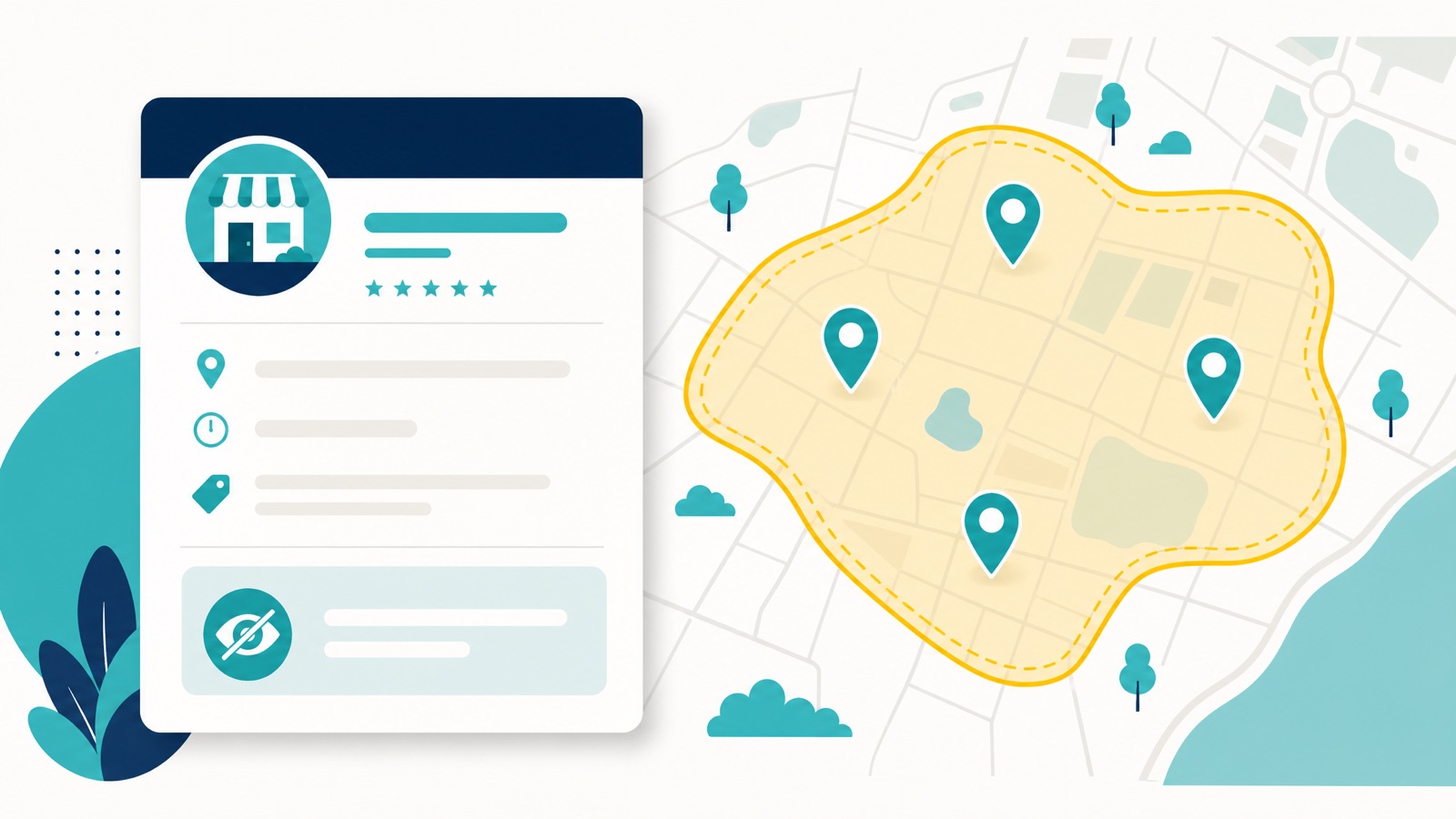
If you operate from a residential address, hide it and rely on service area configuration. A visible home address can both look unprofessional and create the wrong proximity signal. If you have a genuine commercial premises, show it and configure service areas as well, because that combination is the strongest signal available to an SAB.
One troubleshooting note: if you change your address and service area in the same edit, the old address sometimes lingers publicly for a while. If yours is still showing after you hid it, re-enter the exact address, save with no other pending edits, then hide it again.
The “hidden address = ranking drop” tradeoff most SAB guides miss. Sterling Sky ran a controlled test and watched a SAB profile lose ranking, sometimes losing the local pack entirely, after hiding its address. Adding the address back restored the rankings. Google’s own guideline tells SABs to hide the address, but the algorithm appears to use the visible address as a stronger anchor than the hidden one, so following the guideline costs visibility. This is no longer a single agency’s observation either: Whitespark’s 2026 Local Search Ranking Factors added “address is showing on GBP (not SAB)” as a new local pack factor, ranked seventh. Hiding your address is a real trade-off with a measurable cost, not the free compliance move most SAB guides present it as.
There is a legitimate workaround, but it only applies if you meet one specific condition: you have a real premises, staffed during your posted hours, where you genuinely receive customers, even if only by appointment. Google’s guidelines are explicit that a location showing an address has to be staffed and able to receive customers during its stated hours. If that describes you, show the address and run the profile as a hybrid business with appointment-only hours rather than walk-in trade. You keep the visible anchor without inviting drop-ins.
If you never meet customers at the address, showing it fails that test, and that is the criterion a reviewer checks first. Hide it. The same goes for a residential address you cannot show: hide it, accept the visibility tradeoff, and lean harder into the relevance and prominence levers below. Don’t try to “rent an address” or use a virtual office, those routes lead to a different kind of pain.
Keep your hours accurate including public holidays, choose the most specific primary category for your core service, and use secondary categories for adjacent work. Only add a category for work you genuinely do, though: ticking one for a service you do not offer blurs what Google thinks you are, and can weaken you for the thing you actually want to win. Our Google Business Profile optimisation guide has the full walkthrough, category by category.
Beating the Proximity Problem (Without Getting Suspended)
Proximity is the one factor you cannot optimise your way out of, so it deserves its own plan.
The proximity ceiling is real, and it bites hardest where competition is dense. Your verified pin is an invisible leash. When we ran a 10x10 grid at 1km spacing over our own inner-Perth pin, the contested head terms collapsed within roughly 1.5 to 2km of it, while less competitive terms held right across the whole box. That is the pattern to expect: proximity is not a fixed radius, it is a function of how many competitors sit between you and the searcher. No amount of profile polish lifts it on its own.
Here is the same effect on a client scan, a Canberra handyman we work with. Green near his base in the south, fading through orange to red, then out of the top twenty entirely as the grid moves north across the city:
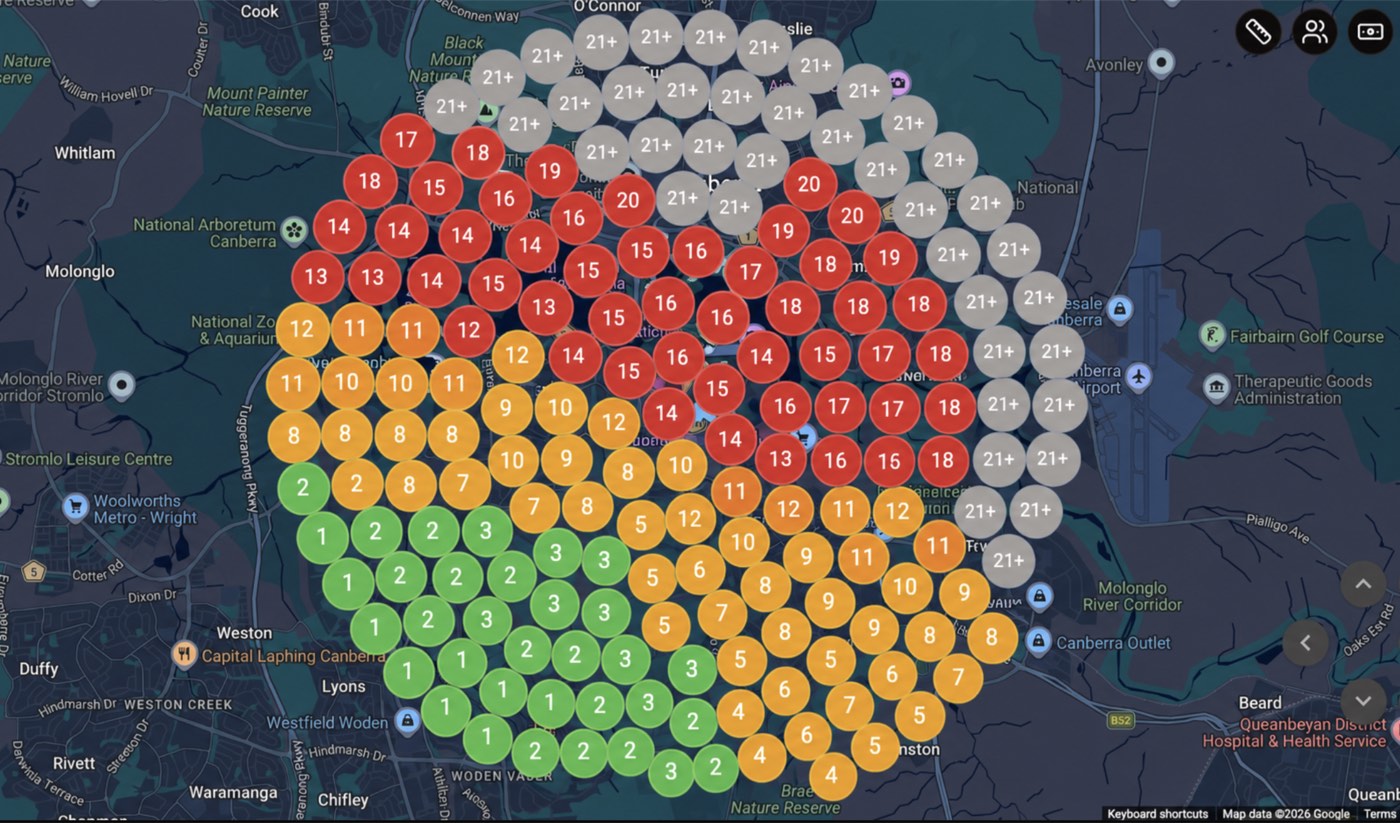
More real bases is the legitimate way through. The way to genuinely cover a sprawling metro is more genuine locations, each able to support its own profile. Google’s guidelines allow one profile per location, but only where each has separate staff and its own non-overlapping service area, and your service area should not stretch much beyond about two hours’ drive from base (Google). A real, staffed base in another part of the city gives you a second proximity centre. A fake one (a mate’s garage, your accountant’s address, a virtual office) is a fast suspension, and increasingly a hard one to recover.
This is exactly the line we work. Google Maps visibility and GBP compliance is our specialty, and we know how to stand a second location up so it survives review: real, documented, defensible bases, not shortcuts that get the whole profile pulled. When one does get pulled, we have recovered 295 of the last 300 Australian profiles we have taken on since early 2025, which is the other half of knowing where the line sits. Done properly, multiple legitimate bases is the single most effective way for a service area business to offset the proximity penalty.
Don’t reach for a virtual office, PO box or hot desk. It is tempting for privacy or to “look local”, but Google states that a rented mailing address you don’t operate from “isn’t eligible for a Business Profile”, and that PO boxes and remote mailboxes aren’t acceptable. Co-working is the trap people fall into next, and Google’s rule there is narrow: you can’t list an office at a co-working space “unless that office maintains clear signage, receives customers at the location during business hours, and is staffed during business hours by your business staff”. A hot desk meets none of that. The compliant privacy answer is to verify with your real address and hide it, not rent a mailbox.
Cover the dead zones with paid. For high-value suburbs that sit outside your organic reach, geo-targeted Google Ads is the rational fill. (Google’s Local Services Ads are not available in Australia, so here that means standard location-targeted Search and Maps ads, not LSAs.)
And track it honestly. A single rank check from your desk, right at your pin, always looks green. A geo-grid scan shows where you actually fade across the area, which is the only way to see your ceiling and decide where a second base or some paid coverage is worth it.
Stay Active
Google reads an active profile as evidence of a real, operating business. Add genuine photos of completed jobs and your team, post regularly, and respond to every review within a day or two. Most SABs set the profile up once and never return to it, which is exactly why doing the basics consistently is a competitive advantage.
Suburb Pages That Earn Their Place
If you serve multiple areas, dedicated suburb pages are how you capture searches a single generic page never will. The catch is the one most businesses get wrong: a thin template with the suburb name swapped out forty times is a doorway page, and Google has penalised that pattern for years.
A suburb page that works is genuinely useful to someone in that suburb. It references the area specifically, addresses problems common there, includes real work or testimonials from that area where possible, and answers the questions a local would actually ask. If you cannot write something substantive and true about operating in a suburb, do not publish a page for it. Three strong suburb pages beat thirty thin ones.
Build them for the areas that pay you, link them sensibly to your main service pages, and keep them current. Our location pages master guide has the full framework, including URL structure and the technical detail.
Local Keywords for an SAB
You do not need hundreds of keywords. You need the specific service-plus-area terms that people ready to book actually type, including the urgent and “near me” variants. “Emergency electrician Joondalup” and “blocked drain Fremantle” will return more work than chasing a broad head term you will never rank for as a single operator. If you would rather have this playbook run for your business, that is exactly what our local SEO for tradies program does.
Map your real services against the suburbs that matter and target those combinations deliberately. Our local keyword research guide covers how to find the terms worth the effort, and our guide on ranking for near me searches covers the high-intent traffic SABs depend on.
NAP Consistency and Citations
Your Name, Address, and Phone number must match exactly across your website, your Google Business Profile, and every directory you appear in. When they disagree, Google’s confidence in your business drops, and for an SAB that already lacks a strong proximity signal, you cannot afford to also look inconsistent.
This is not a volume game. A smaller set of accurate, consistent listings beats hundreds of inconsistent ones. Prioritise the major Australian directories and the ones specific to your trade. Our guide on why NAP consistency matters explains the mechanism, and the best Australian citation sites covers where to be listed. If your footprint is a mess and you would rather it was handled properly, that is what an SEO audit is for.
Beyond Google: The Platforms That Still Matter for an SAB
Google is the game, but it is not the whole board. A few other platforms carry real weight for a service area business, and most of your competitors ignore them completely.
Apple Maps and Apple Business Connect. Apple historically listed only businesses with a public address, which locked SABs out entirely. That changed: Apple now lets service area businesses register through Apple Business Connect and manage how they appear across Maps, Siri and other iPhone surfaces. Given how many of your customers search on an iPhone, it is worth the twenty minutes.
Bing Places. Smaller share, far less competition, and it supports address hiding for SABs the same way Google does. It also feeds Copilot and part of the AI answer layer, which we cover in our guide to Bing and Copilot visibility. Claim it, mirror your details exactly, move on.
Facebook. Set the page to hide your street address so only your suburb and state show, the same privacy logic as your profile. It will not move you in Maps, but it is a consistency signal, and for some trades it is where word of mouth actually happens.
The rule across all of them is the one from the section above: identical name, address and phone everywhere, and only claim what you will keep current. A dead listing carrying an old phone number does more harm than no listing at all.
Reviews: The SAB’s Biggest Lever
For a service area business, review velocity does more heavy lifting than almost anything else. You cannot out-proximity a storefront, but you can out-trust one. A steady flow of recent reviews signals an active, trusted operator, and Google weighs that.
Build a simple system. Ask every satisfied customer right after the job, while it is fresh. Send a direct one-tap link. Respond to everything that comes in. Reviews that mention the suburb and the specific job done are stronger local signals than generic five-star ratings, so make it easy for customers to be specific.
There is a second reason to care where reviews come from. For an SAB trying to prove it genuinely covers an area, reviews spread across your service suburbs are worth more than a cluster from one. If you list ten suburbs and every review names the same one, you are signalling where you really operate. Aim to earn reviews from customers in each core area you want to rank in. Reviews also feed the online reputation that converts the visibility into booked jobs.
Local Authority and Backlinks
Prominence for an SAB comes from looking like a genuine part of the communities you serve. A link or mention from a local news outlet, council directory, trade association, or a sponsored local club is worth far more than a pile of national directory links. Sponsor a local team, join your trade body, get listed where your area’s businesses are listed. These signals tie your business to the places you work, which is exactly what an SAB needs and a storefront gets for free from its address.
Measure What Actually Matters
Most SABs never check whether any of this is working, which means they cannot tell a good month from a lucky one. You do not need a dashboard the size of a car. Four things, tracked honestly, will do.
Google Business Profile insights. Your profile reports calls, direction requests, website clicks, and how people found you, split between searches for your name and searches for what you do. For an SAB that split matters: a profile winning only on brand searches is not yet earning discovery. Watch the direction of travel over months rather than the daily noise. Reading these properly is its own skill, and our guide to Google Business Profile insights goes through each metric in context.
Calls and form fills from the site. A booked job usually starts with a phone call or a form, so if neither is tracked you are optimising blind. A page can rank beautifully and still leak every enquiry through a form that silently fails, and rankings will never tell you. Our local conversion tracking setup covers the events worth wiring up.
Where you actually rank across the area. A single rank check from your desk sits right on your pin and always looks green, which is exactly what the grid scan above exists to expose. Run it on a schedule rather than once, so you can watch the fade line move. For organic terms, track real positions instead of an average position figure, which blends your good and bad days into a number that means nothing.
Here is the same Canberra handyman’s grid earlier in the engagement. Not a single top-three position anywhere on the board:
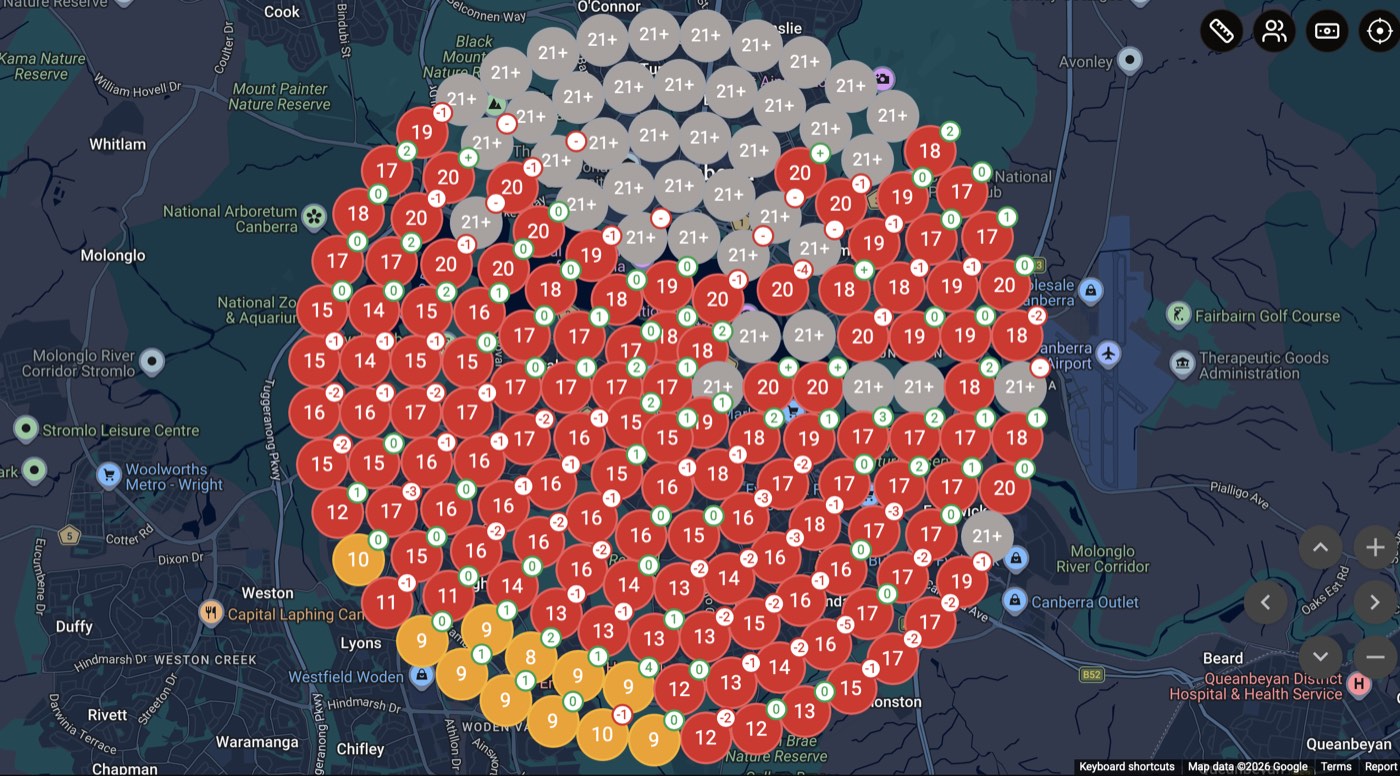
Put it next to the scan further up this page and the useful part is what did not change. The core around his base lifted into the top three. The northern edge of the grid sat outside the top twenty in both scans, before and after. That is the proximity ceiling behaving exactly as described earlier: the work lifts what it can reach, and distance keeps the rest. A single scan cannot show you that, because you cannot see a ceiling until you have watched something stop rising against it. Two scans of the same grid can.
Reviews over time. Track the rate, not just the total. A steady flow of recent reviews is the signal; a big pile from two years ago is not. If the rate stalls, your biggest lever has gone quiet.
A Practical Order of Operations
You cannot do everything at once, so do it in the order that compounds:
- Fix and properly configure the Google Business Profile, including service areas and address visibility.
- Get NAP consistent across the web.
- Build a review system and start the velocity now, because it takes time to compound.
- Build genuine suburb pages for your core paying areas.
- Add local authority signals and backlinks deliberately over time.
Publishing suburb pages while the profile is half-built is doing step four before step one. The order matters.
How Long It Takes
Foundational work, particularly the Google Business Profile, can move within a few months. Meaningful, compounding results across your core suburbs typically build over 6 to 12 months depending on competition. Anyone promising page one in 30 days for a competitive trade is not being honest. Sustainable results build progressively, which is also why they hold.
Frequently Asked Questions
What is a service area business in Google Business Profile terms?
It is a business that serves customers at their location rather than at a premises customers visit, like a plumber, electrician, or mobile mechanic. In your profile you list the suburbs or council areas you cover instead of relying on a public address, and you can hide your address entirely if you work from home.
Do service area businesses show up on Google Maps?
Yes. SABs appear in Maps and the local results within their configured service areas, but without a pin at a public address. Visibility depends heavily on how accurately the service area is set up, plus your relevance and prominence signals.
How is local SEO different for an SAB versus a storefront?
A storefront has a strong built-in proximity signal from its address. An SAB does not, so the strategy shifts to dominating relevance (precise profile, suburb pages, accurate categories) and prominence (reviews, citations, local authority) hard enough that proximity stops deciding the result.
How many suburbs should I target?
Start with the eight to ten that generate most of your revenue and win those properly before expanding. Covering too many areas at once spreads your signals too thin to rank well anywhere.
How long until local SEO works for a service area business?
Profile-led gains can appear within a few months; durable results across your core areas usually take 6 to 12 months depending on how competitive your trade and city are.
Where to Start
If you run a service area business and want to know exactly which of these is costing you the most jobs right now, we offer a no-pitch review from our Perth SEO specialists with an honest read on what to fix first. Prefer to talk it through? or email seo@searchscope.com.au. No lock-in, no theatre, just a straight answer for your trade and your area.