
Location Pages Master Guide: How to Build Pages That Actually Rank (And Convert)
How to build location pages that rank in the Local Pack and convert, without triggering doorway-page penalties. The exact framework Australian businesses use to win suburb-specific search.
Most Perth businesses create location pages that Google ignores.
They slap “Plumber [Suburb Name]” at the top of a template, change the suburb name 12 times, and wonder why none of them rank. Or they write generic service pages that try to target “Perth” as if 2 million people across 6,000+ square kilometres all search the same way.
Here’s the reality: location pages are either your biggest local SEO asset or a fast track to a doorway page penalty.
This guide shows you exactly how to build location pages that rank in Google’s Local Pack, convert visitors into customers, and don’t trigger algorithmic penalties. You’ll get the framework Perth businesses use to dominate suburb-specific searches, from keyword research and content structure to schema markup and conversion optimisation.
No fluff. Just what works.
TL;DR, the location pages master guide:
- Location pages target suburb-specific search intent: “plumber Fremantle” converts better than “plumber Perth” because the searcher has already told you where they are
- Thin doorway pages get penalised: a 200-word template repeated across suburbs is what Google’s scaled content abuse policy is aimed at. Google publishes no word count, but in our experience a page needs 800 or so genuinely local words before it has anything to say
- Three core elements make pages work: Location-specific keywords, unique local content, technical optimisation (schema, NAP consistency, mobile-first)
- Multi-location businesses need dedicated pages: One page per physical location (not just service areas) with unique content, embedded maps, location-specific testimonials
- Service area businesses can target suburbs without offices: But each page must solve local problems, reference local landmarks, and provide substantive value
- “Near me” optimisation matters: suburb names and “near me” dominate local queries, so your title tags and content have to reflect how people actually search
- Reviews and local citations amplify rankings: Location pages work best when supported by consistent NAP data, local backlinks, and suburb-specific reviews
- Conversion elements matter as much as rankings: Local phone numbers, embedded Google Maps, suburb-specific CTAs, and social proof drive actual leads
Expected timeline: 3 to 4 months for location pages to rank in competitive suburbs; faster for less competitive areas
Why Most Location Pages Fail (And How to Fix It)
Let’s start with the uncomfortable truth.
Most location pages are garbage.
They’re thin, templated, keyword-stuffed pages that exist only to rank, not to help users. And Google knows it.
The doorway page problem:
You’ve probably seen this strategy. A business creates 20 location pages:
- “Plumber Fremantle”
- “Plumber Subiaco”
- “Plumber Joondalup”
Each page has 200 to 300 words. Same template. Just the suburb name changed. Maybe a stock photo of the suburb swapped in.
Google calls these “doorway pages”, pages designed to rank for specific searches without providing unique value. And they penalise them.
Why generic service pages don’t work either:
On the flip side, businesses create one broad “Plumber Perth” page and expect it to rank for every suburb across Greater Perth.
Doesn’t work.
When someone in Fremantle searches “emergency plumber Fremantle,” Google prioritises businesses that:
- Are physically close to Fremantle
- Have Fremantle-specific content
- Have local citations and reviews mentioning Fremantle
Your generic “Perth” page doesn’t signal any of that.
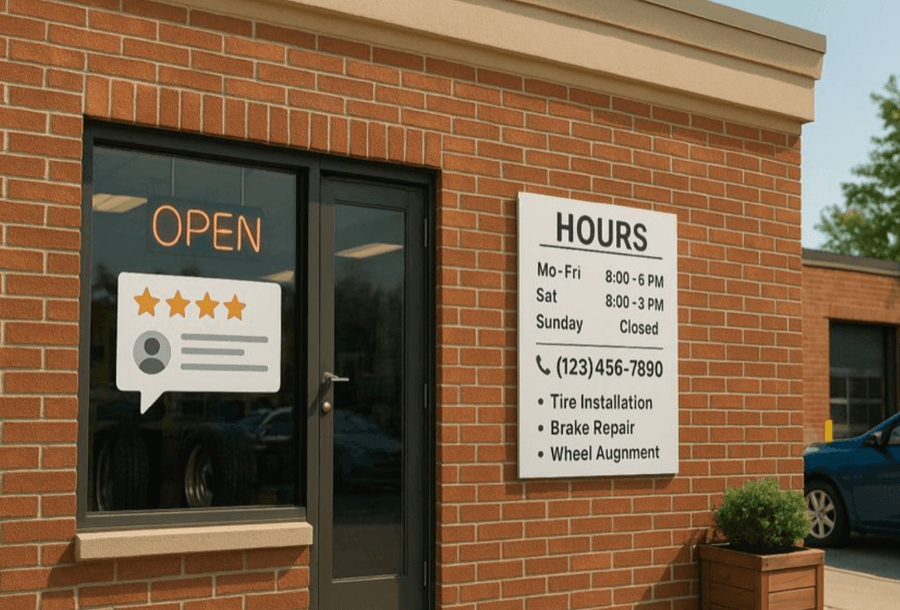
What actually works:
Location pages that rank and convert do three things:
- Target specific geographic intent (“plumber Fremantle” not “plumber Perth”)
- Provide unique, substantive local value (800+ words addressing Fremantle-specific plumbing issues, local landmarks, testimonials from Fremantle customers)
- Technical optimisation (LocalBusiness schema, consistent NAP, mobile-first design, fast load times)
You will see two numbers quoted everywhere on this topic: that 46% of Google searches carry local intent, and that 76% of nearby searchers visit a business within a day. We do not cite either. The first traces to a conference slide Google never published, and the second to a 2016 US study whose wording has drifted with each retelling. Open your own Search Console instead, filter queries by your suburb names, and you will see how much local intent your market actually has. Getting location pages right is not negotiable, but the case for them does not rest on borrowed statistics.
Let’s break down exactly how to build them.
Understanding Your Local Market Before You Write
You can’t write effective location pages without understanding who you’re writing for and how they search.
Generic assumptions don’t work. What works in Fremantle doesn’t necessarily work in Joondalup. Search behaviour varies by suburb, demographics, and local culture.
Setting Location Targets (The Hierarchy That Works)
Don’t try to target every suburb in Perth with equal effort. You’ll spread yourself too thin.
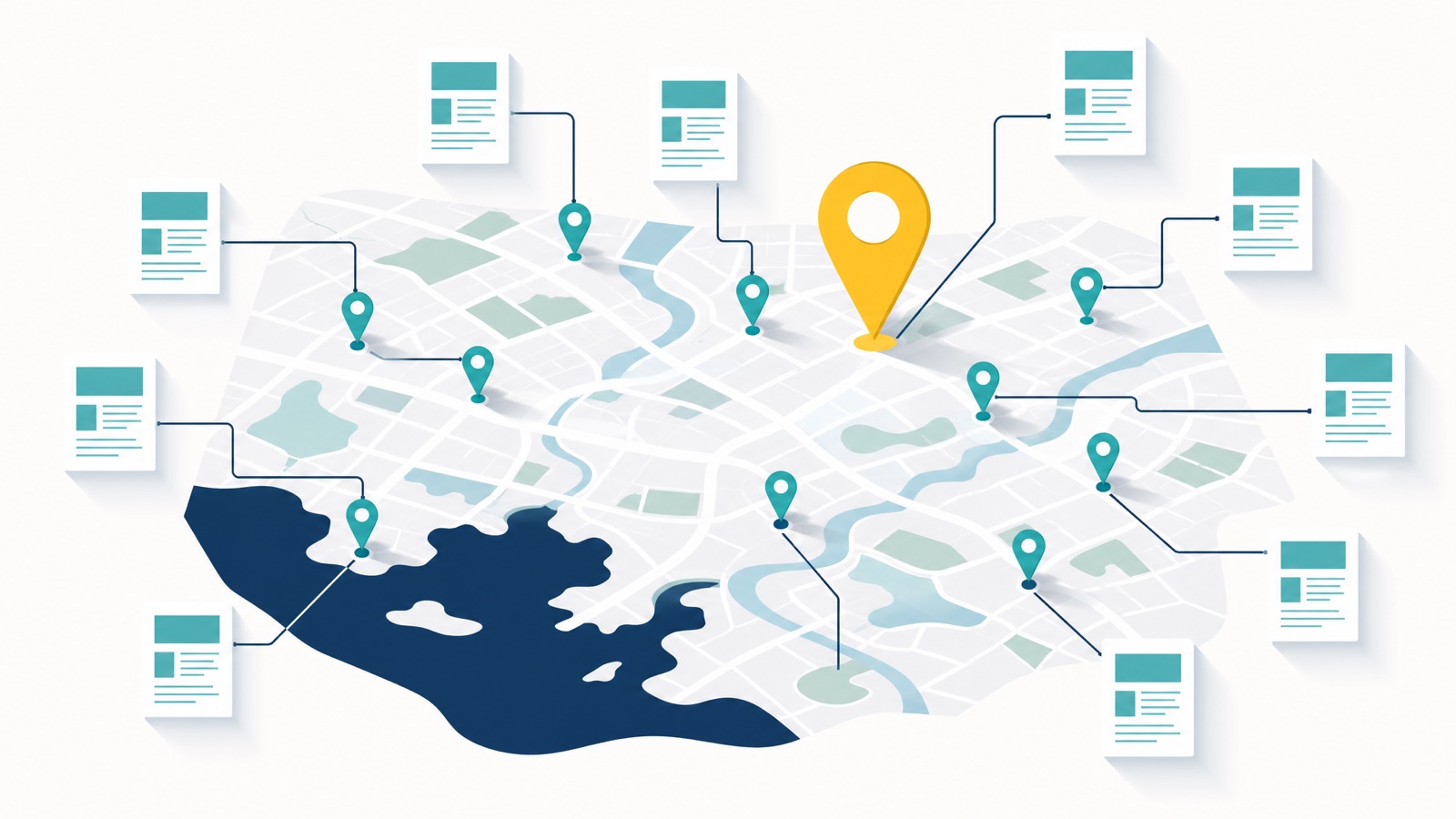
Instead, tier your targets:
Primary Tier: Your Core Service Area
- Suburbs where you have physical locations
- High-value commercial areas
- Areas with the best customer lifetime value
Example for a Perth business:
- Perth CBD
- Subiaco
- West Perth
These get the most detailed, substantive location pages with dedicated content resources.
Secondary Tier: Nearby Suburbs
- Adjacent suburbs where you regularly service customers
- Areas with good search volume but manageable competition
Example:
- Leederville
- Northbridge
- Mount Lawley
These still get unique content, and it can be shorter, but the test does not change: if there is not enough genuinely local material to fill the page, do not build it.
Tertiary Tier: Extended Service Areas
- Suburbs you service occasionally
- Lower search volume but worth capturing
Example:
- Scarborough
- Victoria Park
- Applecross
These might be referenced in blog content or included in your service area map but don’t necessarily need dedicated pages unless search volume justifies it.
Local Keyword Research That Actually Finds Opportunities
Here’s how to find the keywords that actually matter for each suburb.
| Research Phase | What You’re Looking For | Tools |
|---|---|---|
| Initial Research | Suburb + service combinations (e.g., “roof repair Fremantle”) | Google Keyword Planner, Semrush, Ahrefs |
| Competitor Analysis | What local competitors rank for | Ahrefs, Semrush, Google Search Console |
| Local Intent | “Near me” searches, seasonal patterns, urgent modifiers | Google Trends (filtered for Australia) |
| Geographic Modifiers | Landmark-based searches, regional slang, neighbourhood names | Local Facebook groups, Google Business Profile insights |
Example keyword research for a Fremantle plumber (our plumber local SEO page walks through the full method):
Primary targets:
- “plumber Fremantle” (320 searches/month)
- “emergency plumber Fremantle” (110 searches/month)
- “blocked drain Fremantle” (90 searches/month)
Long-tail opportunities:
- “hot water system repair Fremantle” (40 searches/month)
- “plumber near Fremantle Markets” (30 searches/month)
- “24 hour plumber South Fremantle” (20 searches/month)
These long-tail terms have way less competition and often convert better because they’re more specific.
Local Market Analysis (What Problems Do Locals Actually Face?)
Don’t assume you know what problems your target suburb faces.
Research it.
Where to find local problems:
- Local Facebook community groups
- Nextdoor discussions
- Competitor review replies, where owners answer the same questions customers keep asking
- Local news coverage
- Council reports and community forums
Example: Perth Hills suburbs vs. coastal suburbs
A roofing company targeting Mundaring (Perth Hills) might focus content on:
- Bushfire-resistant roofing materials
- Dealing with Perth Hills weather (hail, storms)
- Tree debris and gutter protection
Meanwhile, that same company targeting Scarborough (coastal) would emphasise:
- Salt corrosion-resistant materials
- Cyclone-rated roofing systems
- Dealing with coastal wind damage
Same service. Completely different local problems. Your content needs to reflect that, and this suburb-by-suburb angle is exactly what we build into our roofing SEO location pages.
How to Write Location Pages That Don’t Suck
Now we get to the actual writing. This is where most businesses fail, they think writing location pages is just find-and-replace.
It’s not.
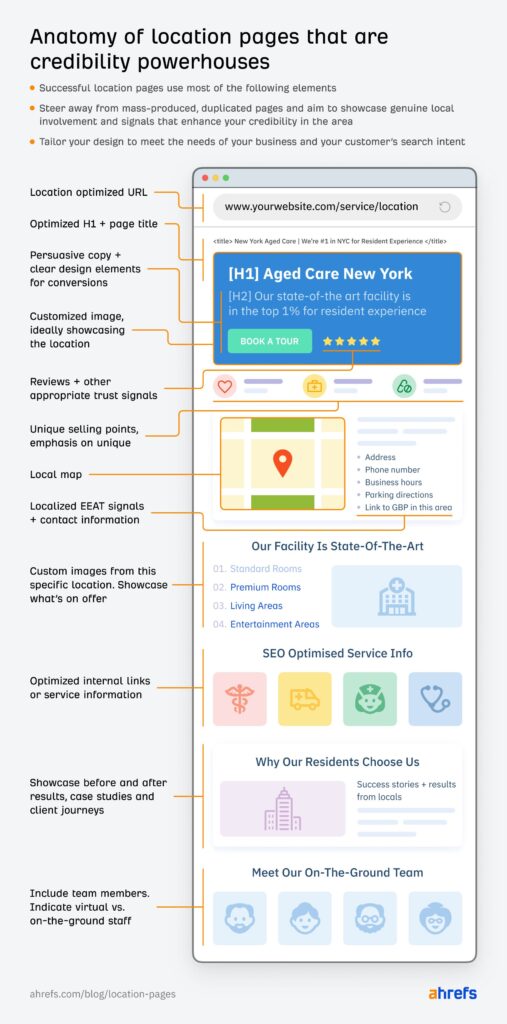
Credits: Ahrefs
The Content Structure That Works
Here’s the framework for a location page that ranks and converts:
1. Headline (H1)
Include your service + suburb + value proposition
Example:
“Emergency Plumber Fremantle | Same-Day Service | 24/7 Available”
Not:
“Plumber Fremantle”
2. Opening Paragraph (First 100 words)
- Immediately address the local reader
- Include your primary keyword naturally
- State your unique value for this specific suburb
- Make it conversational
Example:
“If you’re dealing with a blocked drain or burst pipe in Fremantle, you need a plumber who actually knows the area, not someone coming from Joondalup who’s never navigated South Terrace traffic during peak hour. We’ve been serving Fremantle homes and businesses since 2015, and we can be at your door faster than anyone else because we’re local.”
3. Local Problem Section (H2)
“Common Plumbing Issues in Fremantle Homes”
Address suburb-specific problems:
- Older housing stock in South Fremantle (pre-1950s plumbing)
- Hard water issues in certain Fremantle postcodes
- Tree root infiltration from established street trees
- Coastal salt corrosion affecting fixtures
This shows you understand Fremantle. Not just “Perth.”
4. Service Details Section (H2)
“Our Fremantle Plumbing Services”
List your services with local context:
- Emergency blocked drains (common in older Fremantle properties)
- Hot water system repairs (mention brands popular in Fremantle)
- Gas fitting (address Fremantle’s older gas systems)
5. Why Choose Us Section (H2)
This is where you differentiate:
- “5-minute response time to South Fremantle emergencies”
- “We stock parts for older Fremantle homes”
- “Licensed and insured for heritage property work”
Include real testimonials from Fremantle customers. With their suburb mentioned.
6. Local Landmarks & Service Area (H2)
“Areas We Service Near Fremantle”
Be specific:
- Fremantle CBD
- South Fremantle
- North Fremantle
- White Gum Valley
- Beaconsfield
- “Near Fremantle Markets”
- “Near Fremantle Hospital”
- “Close to Fishing Boat Harbour”
Landmarks help Google understand geographic relevance and help users confirm you’re truly local.
7. FAQ Section (H2)
Address location-specific questions:
- “Do you service heritage homes in Fremantle?”
- “How fast can you get to South Fremantle?”
- “Do you offer same-day service in Fremantle?”
8. Call-to-Action
Local phone number (not a 1300)
Embedded Google Map showing your location relative to Fremantle
Click-to-call button for mobile users
Make the CTA itself local and easy to tap. Put the suburb in the button text (“Book Your Fremantle Plumber”, not “Submit”), keep one primary action above the fold on mobile so it never competes with a second button, and size tap targets at least 48 by 48 pixels with enough padding that nobody fat-fingers the wrong one.
Word Count: Our Working Range Is 800 to 1,200 Words
Not 200. Not 5,000.
Google sets no minimum and no threshold for thin content, so treat this as our own rule of thumb rather than a rule. 800 to 1,200 words is where location pages tend to land once they say something real:
- Long enough to provide substantive value
- Short enough to not overwhelm mobile users
- Focused enough to maintain topical relevance
If you can’t write 800 unique words about a suburb, don’t create a page for it.
Writing for Local Readers (Not Just Google)
The best location pages feel like they’re written by someone who actually lives or works in that suburb.
Use local references naturally:
- “If you’re heading to the Fremantle Markets this weekend…”
- “Just grabbed coffee at Little Creatures?”
- “Stuck in South Terrace traffic?”
Solve actual local problems:
- “Fremantle’s heritage homes often have galvanised pipes that…”
- “Coastal salt air in Fremantle can corrode fixtures within…”
Reference local events and seasonal patterns:
- “During Fremantle Festival, our response times may…”
- “As Fremantle’s summer crowds arrive, we stock extra…”
This level of detail signals to Google (and users) that you’re genuinely local. Not a national chain pretending to be local.
Technical Optimisation for Location Pages
Great content alone won’t rank if your technical SEO is broken.
Location Keyword Placement (Where It Actually Matters)
Don’t stuff keywords. But do place them strategically:
Title Tag:
“Emergency Plumber Fremantle | Same-Day Service | [Business Name]”
Meta Description:
“Need a plumber in Fremantle? We’re local, licensed, and can be there within 30 minutes. Serving all Fremantle suburbs. Call now: [phone]”
URL Structure:
yoursite.com.au/plumber-fremantle/
Not:
yoursite.com.au/locations/perth/fremantle/plumbing-services-123/
Keep it simple and keyword-focused.
H1 Tag:
Include service + suburb
“Emergency Plumber Fremantle”
First 100 Words:
Mention Fremantle at least 2 to 3 times naturally
Image Alt Text:
“Emergency plumber fixing blocked drain in Fremantle home”
Not:
“plumber-img-01.jpg”
Throughout Content:
Use variations naturally:
- “Fremantle plumber”
- “plumbing services in Fremantle”
- “Fremantle homes”
- “South Fremantle properties”
Don’t force it. If it reads awkwardly, rewrite it.
URL Structure for Location Pages
These are the three URL patterns we most commonly use for Australian location-page rollouts. The examples below use invented businesses, so the shapes are real but the brands are not.
1. Single-location business. The homepage carries the main city term, service pages rank for service-led queries, and suburb pages are optional:
- Homepage:
/targets “landscaping services Perth” - Service page:
/services/lawn-maintenance/targets “lawn maintenance Perth” - Suburb page:
/locations/joondalup/targets “landscaping Joondalup”
A brand-led homepage avoids over-stuffing location terms, and suburb pages only earn their place when residents genuinely search with the suburb name.
2. Multi-location, service pages plus location hubs. Keeps service authority national and uses location pages for city intent:
- Service page:
/services/drain-cleaning/targets “drain cleaning” nationally - Location hub:
/locations/lists every serviced city - Location page:
/locations/sydney/targets “emergency plumber Sydney”
This works best when your service descriptions do not vary much between cities.
3. Multi-location, location-specific service pages. Combines location and service in the URL itself:
/locations/perth/solar-installation/targets “solar panel installation Perth”/locations/melbourne/solar-repair/targets “solar repair Melbourne”
Use this when offerings genuinely differ by city, for regulatory or climate reasons, or in verticals competitive enough that you need the URL-level signal. It is the heaviest pattern to maintain, so do not reach for it by default.
Whichever pattern you pick, keep it consistent. Mixing two of them on one site is how you end up with the same suburb reachable at three URLs.
NAP Consistency (This Breaks Rankings if You Get It Wrong)
NAP = Name, Address, Phone Number
Your NAP details must be exactly identical across:
- Your website footer
- Your location page
- Your Google Business Profile
- All citation directories (Yellow Pages, True Local, Yelp, etc.)
Even small inconsistencies confuse Google:
- “123 Main St” vs. “123 Main Street”
- “Pty Ltd” vs. “Pty. Ltd.”
- “(08) 1234 5678” vs. “08 1234 5678”
Pick one format and use it everywhere.
Why NAP consistency matters for local SEO
Local Schema Markup (Tell Google Exactly What Your Page Is)
Implement LocalBusiness schema on every location page.
Minimum required fields:
- Business name
- Address
- Phone number
- Opening hours
- Service area
- URL
- Geo coordinates (latitude/longitude)
Use more specific schema types when relevant:
Plumber(for plumbing businesses)Electrician(for electrical businesses)Restaurant(for restaurants)Dentist(for dental practices)
Also implement:
AggregateRatingschema (if you have reviews)Serviceschema (list specific services)- Not
FAQPageschema. Google retired FAQ rich results entirely on 7 May 2026, so the markup no longer produces anything in search. Keep the FAQ section itself, it still answers real questions and earns the click
What is local schema markup and how to implement it
One honest caveat on AggregateRating. Google stopped generating star snippets from self-serving review markup back in 2019, and the rule still holds in 2026. If you add AggregateRating to a location page based on testimonials you collected and host yourself, the markup may validate but Google will not show stars under your result. The star ratings Australian searchers see next to your name come from your Google Business Profile, Yelp, TripAdvisor, or your industry-vertical platform, not your own JSON-LD. Add Review and AggregateRating for completeness if you like, but earn the SERP stars on those third-party profiles, not in your page code.
Mobile Optimisation
| Metric | Target | How to hit it | Verifier |
|---|---|---|---|
| LCP | 2.5s or under | Compress the hero image, lazy-load below the fold | PageSpeed Insights |
| INP | 200ms or under | Defer non-critical JS, minimise third-party scripts | CrUX report |
| CLS | 0.10 or under | Set width and height on images, avoid layout shifts | Lighthouse |
| Tap targets | 48x48px or larger | Increase button padding, avoid crowded links | Lighthouse accessibility audit |
| Body text | 16px or larger | Use system fonts, keep contrast strong | Accessibility checks |
Your location pages must work perfectly on mobile.
Key mobile elements:
- Click-to-call phone number in header (sticky)
- Embedded Google Map that opens in Google Maps app
- Fast load time (under 3 seconds on 4G)
- Readable text without zooming
- Large, thumb-friendly CTA buttons
Test every location page on actual mobile devices. Not just desktop browser emulation.
Location Pages vs. Generic Service Pages (Why One Works and One Doesn’t)
Let’s be clear about the difference.
Generic Service Pages
Target: “Plumber Perth”
Content:
- Broad overview of services
- No specific suburb focus
- Generic stock photos
- National or city-wide positioning
Result:
- Competes with 50+ established businesses
- Rarely ranks in Local Pack
- Lower conversion rate (users want “near me” not “city-wide”)
When to use: Your main service page that links out to location pages
Location Pages (Geo Landing Pages)
Target: “Plumber Fremantle”
Content:
- Suburb-specific problems and solutions
- Local landmarks and references
- Testimonials from that suburb
- Suburb-specific FAQs
Result:
- Lower competition (fewer businesses target specific suburbs)
- Higher Local Pack rankings
- Better conversion rates (proximity + relevance)
When to use: Every suburb where you can write something genuinely different, and no others. If the only thing that changes between two suburb pages is the suburb name, they should be one page. Five pages that each say something real will out-earn twenty that repeat each other.
The Ranking Difference
| Factor | Generic Service Page | Location Page |
|---|---|---|
| Local Pack Rankings | Rarely appears | Strong visibility |
| User Engagement | Lower (too broad) | Higher (specific to their area) |
| Conversion Rate | Lower | Higher, because the visitor has already self-selected on location |
| Competition Level | Extremely high | Lower |
| Keyword Targeting | 1 to 2 broad terms | 5 to 10 local long-tail terms |
Generic service pages have their place. But they don’t replace location pages.
One honest caveat on the Local Pack. A great location page wins you the organic result for “service + suburb”. It does not, on its own, put you in the Map Pack. The three-business Map Pack ranks your Google Business Profile, weighted heavily by proximity to the searcher and your reviews, not your web pages. You can have 60 polished location pages and still lose the pack in a suburb where a closer competitor has a stronger profile. Treat them as two different jobs: pages win the blue links, the profile and proximity win the map.
Multi-Location vs. Service Area Business Strategies
Your approach depends on whether you have physical locations in each suburb or just service them.
Multi-Location Businesses (You Have Physical Offices)
If you have actual offices in multiple suburbs, each location needs:
1. Its Own Google Business Profile
- Unique phone number (if possible)
- Accurate address
- Unique photos of that location
- Location-specific posts
2. Dedicated Location Page on Your Website
- Unique content (not duplicated from other locations)
- Embedded map showing that specific location
- Location-specific testimonials
- Unique services or offerings at that location
3. Internal Linking Structure
- Main service pages link to all location pages
- Location pages link to relevant service pages
- Location pages can link to geographically adjacent locations (Fremantle links to South Fremantle, not Joondalup)
Service Area Businesses (You Travel to Customers)
If you don’t have physical offices in each suburb but service them, you can still create location pages, but they must provide unique value.
What you CAN do:
- Create location pages for suburbs you regularly service
- Target “[service] + [suburb]” keywords
- Reference local landmarks and problems
- Show your service area on a map
What you CANNOT do:
- List fake addresses in suburbs where you have no office
- Create thin 200-word templated pages
- Use P.O. boxes or virtual offices as your address
How to structure it:
Your main business address: Perth CBD
Service area: All of Greater Perth
Location pages:
- “Plumber Fremantle” (targeting Fremantle customers, but clear you’re Perth CBD-based)
- “Plumber Joondalup” (targeting Joondalup customers, same)
Each page must:
- Clearly state you service that area
- Provide substantive local value (800+ words)
- Include a map showing your service radius
- Be honest about your physical location
How to create location pages for service area businesses
Avoiding Doorway Page Penalties (Google’s Biggest Location Page Trap)
Google penalises “doorway pages”, thin pages created only to rank, with no unique value.
In March 2024 Google formalised this under its scaled content abuse spam policy: producing many pages mainly to rank, with little value, whether they are written by humans, by AI, or by a mix of both (Google). That AI clause matters in 2026, because spinning up 100 suburb pages with a language model is precisely what the policy targets.
The August 2025 Spam Update sharpened the enforcement, though Google did not disclose which tactics it targeted. Practitioners reported location-page sets losing visibility, and the pattern they describe is near-identical content across cities. There is no published threshold. Generic template-swapping (just changing the city name in a boilerplate) is the bullseye it’s hunting.
Worth nuancing the wording most articles use here. A practitioner on Joy Hawkins’s Local Search Forum put it well: there is no duplicate content penalty as such, but Google makes it harder to rank in the competitive cities when you have no unique content for that city. The damage is real, but it’s rank suppression, not a formal flag. Pages don’t get marked as spam in Search Console, they just sit in “Crawled, currently not indexed” or rank invisibly past page five. There is no warning, the traffic just slides.

What Triggers a Penalty
- Same template across 20+ pages with only suburb name changed
- Under 300 words of content per page
- No unique local value or information
- Keyword-stuffed content that reads unnaturally
- Automatic redirects to a single main page
How to Avoid It
- Write 800+ unique words per location page
- Address suburb-specific problems and needs
- Include unique local testimonials and reviews
- Reference local landmarks and events
- Provide genuinely useful information
If you can’t write 800 unique words about a suburb that provide real value, don’t create a page for it.
Better to have 5 strong location pages than 20 thin ones that trigger a penalty.
Common local SEO mistakes that kill rankings
When Google won’t index your location pages
Before you worry about a penalty, check a quieter problem that hits scaled location pages first: Google crawling a page and then refusing to index it.
In Search Console’s Page Indexing report you’ll see the status “Crawled - currently not indexed”. It means Google looked at the page, decided it was too similar or too thin to bother adding, and moved on. No penalty, no notification. The page just never appears in search.
It almost always means your pages are too alike. The fixes are the same ones that make a page worth ranking anyway:
- Raise the share of each page that is genuinely unique to that suburb, not boilerplate with the name swapped.
- Add original local media: your own photos of jobs in that area, not stock.
- Link to the page from real, relevant spots on your site, not just a footer list. An orphaned page rarely gets indexed.
If a page can’t earn its spot in the index, that’s Google telling you it isn’t different enough to exist. Make it better, or fold it into a stronger page.
Measuring Location Page Performance
You need to know what’s working and what isn’t.
Metrics to Track
Rankings:
- Position for “[service] + [suburb]” keywords
- Local Pack visibility
- Assisted conversions from location pages, tracked in GA4
Use tools like:
- Geo grid rank tracking tools such as Local Falcon
- Semrush (keyword rankings)
- BrightLocal (local pack tracking)
Traffic:
- Organic sessions to each location page
- Mobile vs. desktop split
- Bounce rate (high bounce rate = content isn’t relevant)
Conversions:
- Phone calls (use call tracking)
- Form submissions
- Click-to-call clicks
- Directions requests from Google Maps
Google Business Profile Insights:
- Views
- Search queries that found your listing
- Actions taken (calls, website clicks, direction requests)
Reading the keyword data (and the 2026 GBP throttle)
One change worth knowing in 2026: Google Business Profile’s Performance report has been throttled. Many businesses now see only the top 5 to 10 search terms per profile (sometimes branded-only) where the report used to surface 50 or more. So do not rely on GBP alone for keyword data. Triangulate: GBP Performance for the head terms it still shows, Google Search Console (filter the Performance tab by country and page) for the long tail, and Keyword Planner with tight Australian radius targeting for volume context. That combination gives you the full picture GBP no longer does on its own.
When you review each quarter, diagnose by what the numbers are telling you rather than chasing raw position:
| What you see | What it means | What to do |
|---|---|---|
| High traffic, low conversions | The page ranks but does not match intent | Rework the content and CTA to match what the searcher actually wants |
| Low traffic, high competition | You are fighting head terms you cannot win yet | Shift to long-tail suburb variations with less competition |
| High impressions, low clicks | The title and meta are not earning the click | Rewrite them with the suburb and a clear hook |
With AI Overviews now appearing on a large share of local SERPs, also test conversational query variants (“which plumber in Fremantle is open right now?”) alongside the traditional “plumber Fremantle” phrasing, because that is increasingly how people ask.
Timeline Expectations
Weeks 1 to 4:
- Location pages indexed
- Minimal ranking movement
Months 2 to 3:
- Rankings appear for long-tail local keywords
- Traffic starts increasing
Months 4 to 6:
- Rankings improve for primary suburb + service combinations
- Conversions start flowing consistently
Months 7 to 12:
- Top 3 Local Pack positions for target suburbs
- Predictable, consistent lead flow
Competitive suburbs take longer. Less competitive areas can rank faster.
Location Pages + Supporting Local SEO Elements
Location pages don’t exist in isolation. They work best when supported by:
Google Business Profile Optimisation
For most local businesses the Business Profile drives more visibility than the website does.
Make sure:
- Profile is 100% complete
- Categories are correct
- Photos are high-quality and location-specific
- Posts are published twice a week
- Reviews are being generated and responded to
Complete Google Business Profile optimisation guide
Local Citations
Build citations in:
- Major Australian directories (Yellow Pages, True Local, Yelp Australia)
- Industry-specific directories
- Local business associations
Ensure NAP is consistent everywhere.
Free Australian citation sites list
Local Link Building
Acquire backlinks from:
- Perth-specific directories
- Local news coverage
- Community partnerships
- Local business associations
Reviews and Reputation
Generate suburb-specific reviews when possible.
Ask Fremantle customers to mention Fremantle in their review. This reinforces local relevance.
How customer reviews benefit local SEO
Supporting Local Blog Content
Your location pages are the money pages. Local blog posts are the supporting cast that builds topical relevance around them and gives you something to link from. The trick is to write about problems your suburb actually has, then link the post to the matching location page. A reusable way to find angles is to map the kinds of local problem your customers face:
| Challenge type | Local context (Perth example) | Blog angle |
|---|---|---|
| Climate | Intense summer heat | ”5 Ways to Summer-Proof Your Fremantle Home” |
| Infrastructure | Mitchell Freeway congestion | ”Best Times to Travel for Tradies in Perth’s Northern Suburbs” |
| Seasonal business | School-holiday tourist influx | ”A Guide for Scarborough Businesses to Maximise Holiday Traffic” |
| Community safety | Bushfire season in the Hills | ”Bushfire Preparation Checklist for Mundaring Residents” |
Each post solves a genuine local problem, references real landmarks and seasons, and links to the relevant suburb page. For ready-made angles you can adapt, see our local SEO content examples.
Location Pages Master Checklist
Use this checklist for every location page you create:
Content:
- 800 to 1,200 unique words
- Addresses suburb-specific problems
- Includes local landmarks and references
- Contains suburb-specific testimonials
- Has unique FAQ section
- References local events or seasonal patterns
Keywords:
- Primary keyword in title tag
- Primary keyword in H1
- Primary keyword in first 100 words
- Primary keyword in URL
- Local variations used naturally throughout
- Image alt text includes location
Technical:
- LocalBusiness schema implemented
- NAP consistent with GBP and citations
- Mobile-optimised (under 3 seconds load time)
- Click-to-call phone number visible
- Embedded Google Map
- Clean URL structure
Conversion Elements:
- Local phone number prominently displayed
- Clear call-to-action
- Trust signals (reviews, certifications, years in business)
- Service area clearly defined
Supporting SEO:
- Internal links to relevant service pages
- Links from main service pages to this location page
- Citation built for this location (if multi-location)
- GBP optimised for this location
When to Get Professional Help
Location pages are time-consuming to do right.
If you’re a Perth business trying to cover multiple suburbs, building even a handful of genuinely substantive location pages while running your actual business is tough.
Consider professional help if:
- Your location pages aren’t ranking after 6 months
- You’re getting penalised for thin content
- Competitors are outranking you in your own suburbs
- You don’t have time to create unique content for each location
At our Perth local SEO team, we build location page strategies for Perth businesses that actually rank and convert. No templated garbage. No doorway pages. Just suburb-specific content that dominates local search.
Your call.