
Google Merchant Center Suspension: Why Accounts Get Suspended and What Actually Fixes It
Why Google Merchant Center accounts get suspended: misrepresentation, trust gaps, feed issues and policy violations, plus how the review and appeal process really works.

A Google Merchant Center suspension means Google has found a policy violation somewhere across your account, product feed or website, and has pulled your products from Shopping ads and free listings. Misrepresentation is the cause we see most often by a wide margin. The account stays suspended until every violation is fixed and a review request is approved.
- Misrepresentation accounts for more of the suspensions we handle than every other policy put together, and it is usually a website trust problem, not a feed problem.
- A suspension does not expire. The account will remain suspended until you fix the violations and pass a review.
- Google’s stated review window is 3 to 7 business days, but most decisions now land within hours. Google documents a cool down after a failed second review attempt, starting at around one week and lengthening with each rejection.
- Google publishes no fixed appeal limit, but the lengthening cool down means attempts filed on unfixed problems are expensive. Burn enough of them and the path effectively closes.
- Never open a second Merchant Center account while suspended. Google treats it as circumvention and it can escalate the original suspension.
Why was my Google Merchant Center account suspended?
Google reviews Merchant Center accounts continuously, and its Shopping ads policies are stricter than the general Google Ads rules. When its systems decide your account, product data or website breaks one of those policies, you get an email notification, a banner in the account, and an entry under the “Needs attention” tab naming the policy.
In most cases there is a warning period first: Google names the issue, gives you a timeframe to fix it, and your products keep showing with limited visibility. If the issue is still there when the warning period ends, the account is suspended. For violations Google considers egregious, there is no warning at all and the suspension is immediate.
The policy name in the email is a category, not a diagnosis. Across the 50 plus ecommerce stores we have recovered since the start of 2025, the pattern is consistent: the named policy is the umbrella, and the actual trigger is a specific signal underneath it, usually one the store owner walked past a hundred times without noticing.
The suspensions we see fall into four groups.
Misrepresentation
Google believes you are concealing information or making claims it cannot verify. Search Engine Land calls it the most common policy cited in Merchant Center suspensions, and our own case load says the same: at Search Scope, half of the suspensions we handle are misrepresentation cases.
They are also the hardest to fix. The policy is intentionally broad, so the work is a full audit of the account, the feed and the website, and no stone can be left unturned. It is often like trying to find a needle in a haystack, and to make it worse, a misrepresentation suspension frequently arrives coupled with another suspension on the same account, so there are two cases to untangle, not one.
Website trust and quality
Sometimes flagged as “Website needs improvement” rather than a named policy violation. Google checks a baseline of trust signals on the site itself: contact information, policy pages, HTTPS, a working checkout process, an about page that shows a real business. Thin or template-only sites get flagged faster than they did even two years ago. Google publishes what it expects here across four separate documents, which we have consolidated into the Merchant Center website requirements and the test that proves each one passes.
Product feed and data quality
Feed problems rarely suspend an account on their own, but they compound. A product feed full of invalid GTINs, price mismatches or availability errors reads as “low-quality merchant” and makes every other issue worse. Google will also disapprove individual products for these issues without suspending the account. Reading those disapprovals correctly is its own skill, and Merchant Center feed diagnostics works through the errors, warnings and disapprovals one at a time.
Outright policy violations
Counterfeit goods, restricted products, healthcare claims without certification, copyright complaints. Cleanest to identify, hardest to recover from, and some of them restrict the connected Google Ads account as well.
What does the Misrepresentation policy actually cover?
Google’s Misrepresentation policy exists to stop shoppers being misled, and it names four sub-policies: unacceptable business practices, misleading or unrealistic offers, omission of relevant information, and unavailable offers. On legitimate stores the violations that trigger it are rarely deliberate deception. They are consistency failures: a price that differs between feed and landing page, a returns policy that is missing or contradicted elsewhere on the site, business details that change from the footer to the legal pages to the Merchant Center settings.
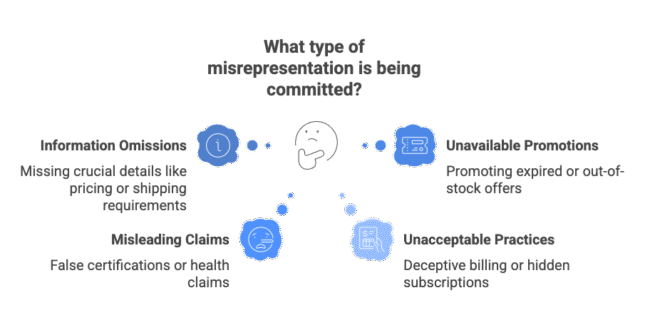
Here is the part most store owners miss. Google judges the whole picture: website, feed and account together. In the misrepresentation cases we take on, there is almost never one big violation. There is a stack of small gaps, a vague returns page here, a dead phone number there, a price mismatch on twenty variants, that together read as untrustworthy to an automated reviewer.
Because it is the single biggest cause of suspensions, we have covered it separately and in full: the three families of trigger, how to work out which one applies to your store, the fix order, and the appeal mechanics are all in our guide to the Google Merchant Center misrepresentation suspension, including the Australian Consumer Law angle that catches stores running a no-refunds policy.
What triggers flags on stores that are doing nothing wrong?
Some suspensions have nothing to do with intent. These triggers come up repeatedly in real cases:
Inconsistent data or policies
The number one issue we currently see. Return windows that differ between the policy page and the checkout, shipping costs that contradict the legal pages, business details that change from page to page. Any two pieces of the site disagreeing with each other reads as misrepresentation.
AI-generated product images
A huge red flag, and it falls directly into misrepresentation. Either use real photos of your products, or make sure any AI images are quality work that is not obviously generated. Do not strip their metadata: Google’s product data specification requires images made with generative AI to carry the IPTC DigitalSourceType tag that declares it, and tells you not to remove those tags.
Google cannot crawl the site
Bot blockers, aggressive firewalls, geo-blocking of specific countries, or a robots.txt mistake that locks Google’s crawlers out. If Google cannot see the store, it assumes the worst.
Broken structured data
Product schema that disagrees with the visible page price or availability creates a mismatch signal between the feed, the page and the markup.
Fabricated GTINs
Made-up barcodes to fill a required field will get the whole account suspended, not just the products disapproved.
Copied manufacturer photos and descriptions
Resellers using stock manufacturer content with no original product data look like every other grey-market storefront Google has already suspended.
Checkout friction
An insecure checkout, a disabled back button, or forcing account creation before purchase all appear in Google’s own list of suspension reasons.
Lack of trust factors overall
No real about page, no visible support channel, no reviews anywhere, no proof a real business sits behind the store. None of these alone suspends an account, but a store with none of them starts every review on the back foot.
Most of the time it is not one of these on its own. It is an accumulation of issues that trips Google’s systems: each one small enough to ignore, together enough to flag the account. We have also started to see a correlation lately with messy digital footprints, stores whose business details do not line up across directories, socials and the website, which is why having your NAP consistency in order is critical in 2026 and beyond.
Does a Merchant Center suspension affect Google Ads?
It can. A Merchant Center suspension immediately stops Shopping ads, free listings, and the product feed that Performance Max and dynamic remarketing campaigns rely on. Those campaigns lose their product inventory even though the Google Ads account itself is still active.
Some violations go further. Counterfeit, restricted products and repeated egregious violations can trigger a linked Google Ads account suspension on top of the Merchant Center one. They are separate policy teams and separate appeal processes, which is also why fixing one does not automatically fix the other. If both are down, they need to be handled as two cases. We cover the Ads side separately in Google Ads account suspension recovery, so each case gets the evidence it actually needs.
One thing a Merchant Center suspension does not touch: your organic rankings. Web search listings are unaffected. The damage is contained to Shopping surfaces, which for most stores means the channel doing most of the selling goes dark overnight.
How does the GMC suspension review and appeal process work?
The mechanics matter, because the process is unforgiving of wasted attempts.
- Suspension notice. Google emails the policy it believes you violated and lists it under “Needs attention” in Merchant Center. Read it verbatim and screenshot it, including any sub-reasons.
- Fix first. Google’s reviewer, which in 2026 is automated before any human sees the case, crawls the live store at review time. If the violation is still visible, the appeal is denied automatically.
- Request a review. Through the “Fix” or “Request review” flow in Merchant Center. You cannot attach an explanation on the standard path. The button is the whole appeal, which is why the fix has to be verifiable on the live site.
- Wait for the decision. Google’s stated window is 3 to 7 business days, but that is the ceiling, not the norm. In the cases we handle, the decision most often lands within a couple of hours, which tells you how automated the review has become. You get an email notification either way.
- Denied? Cool down period. After failed reviews, the review button is disabled. The first cool down is typically one week, and it gets longer with each rejection. The account will remain suspended the whole time.
- Appeal limits. Google does not publish a hard cap on review requests. What it documents is the cool down above, lengthening with each failure until the appeal path is effectively closed. In the accounts we see, that usually means one to three useful attempts.
That last point is why the order of operations matters so much. Every appeal filed before the underlying problem is fixed burns an attempt and tightens the next review. Most of the recovery cases we take come back on the first attempt, and the single biggest reason is boring: nothing gets filed until the fix is live and verifiable.

The four suspension categories at a glance
| Suspension reason | What Google is flagging | Where you will see it | First fix |
|---|---|---|---|
| Misrepresentation | Inconsistent or unverifiable business, pricing or policy information | Email + “Needs attention” tab | Full consistency audit: site vs feed vs Merchant Center settings |
| Website needs improvement | Missing trust signals, placeholder content, broken checkout | Account-level issue banner | Complete contact info, policy pages, working checkout |
| Feed and product data | Price and availability mismatches, invalid GTINs, bad images | Item disapprovals in Products tab | Fix the feed source data, then re-verify against landing pages |
| Policy violations (counterfeit, restricted, healthcare, copyright) | Products Google prohibits or restricts on Shopping | Email naming the specific policy | Remove or certify the affected products before anything else |
What not to do while suspended
These patterns come straight from cases that arrived on our desk after two failed appeals:
Filing appeal after appeal
Automated reviewers see the same unfixed problem and deny again, and each denial extends the next cool down.
Opening a new Merchant Center account
Google connects accounts through the domain, business name, payment method, IP address and Google account. A duplicate account is circumvention: the new account is typically suspended at creation, and the original can be escalated towards a permanent ban.
Mass-editing the feed on day one
In most misrepresentation cases the trigger is on the website, not in the feed. Wholesale feed edits mid-review add churn and sometimes new data-quality errors.
Appealing while changes are still rolling out
Google reviews the live state at the moment of the request. Half-deployed fixes get reviewed as broken.
Sending a generic “please review my account” plea
Where an appeal path does allow text, the appeals that succeed name the policy clause, describe the specific change made, and say where on the site it can be verified.
How do I prevent a Merchant Center suspension?
Prevention is the same audit as recovery, done before Google forces it:
- Keep business name, physical address, phone and email identical across the website, the legal pages and the Merchant Center settings, and display at least two contact methods prominently, footer included.
- Maintain real, specific policy pages: privacy, shipping, returns and refunds, terms of service. Generic templates that reference another business are a known trigger.
- Show accepted payment methods before checkout starts.
- Upload your products correctly and make sure every required field is populated. This one bites stores using automated feed syncing: the app pushes products with missing identifiers, sizes or images, and nobody checks until the disapprovals pile up.
- Watch item disapprovals weekly in the Products tab and fix price, availability and GTIN issues as they appear, before they accumulate into an account-level signal.
- Check the store monthly in incognito on mobile and desktop: checkout works, no placeholder pages, SSL valid, no market you sell into blocked.
- Keep your digital footprint clean and your reviews healthy. Google looks well beyond the domain: consistent business details across directories and socials, and third-party reviews that get answered. Our Google review response templates cover the awkward ones.
Google Merchant Center suspension FAQ
How long does a Google Merchant Center suspension last?
Until you fix the violations and pass a review. Suspensions do not expire on their own. Google’s stated review window is 3 to 7 business days, though in our recent cases the decision often lands within a couple of hours.
How many times can I appeal?
Usually between one and three attempts, depending on the account. After that, Merchant Center shows a “Cannot Appeal” state and the appeal path is closed. This is why the first attempt should never be a test balloon.
Can I just start a new Merchant Center account?
No. Google links accounts by domain, business details, payment method and Google identity, and treats replacement accounts as circumvention. If the appeal path is genuinely exhausted, a compliant fresh start is sometimes possible, but it means a new entity done properly, not a copy of the old setup. That scenario is covered under Merchant Center setup, which builds the new account properly rather than copying the old one.
Will a suspension hurt my organic rankings?
No. The suspension applies to Shopping ads and free product listings. Your organic web search rankings are a separate system and are not affected.
Why was my account suspended again after reinstatement?
Usually because the reinstatement fixed the surface issue but not the underlying compliance gap, and Google’s automated systems re-flagged it. Occasionally Google’s automation re-flags something a human reviewer already cleared. Either way, repeat suspensions need the case history rebuilt, not the same appeal re-sent.
Can Google support tell me exactly what is wrong?
Sometimes support will point at a data issue or hint at the area, but the guidance is usually generic. The suspension email and the “Needs attention” detail are more reliable starting points than a support chat.
When to get help
If the first appeal is still available and the store is fundamentally sound, a careful self-diagnosis using the checklist above is realistic. Set aside proper time for it, and do not file until every gap is closed on the live site.
If one or two appeals are already gone, the maths changes. You are on the last attempt, the cool down periods are growing, and a wrong move can close the account permanently. That is the point where specialist help pays for itself: this is diagnosis work, and the appeal is mechanical once the root cause is identified.
We run a fixed-scope Google Merchant Center suspension recovery service: diagnosis the same business day, appeal typically submitted within 24 to 72 hours, and 30 days of post-reinstatement monitoring. For post-two-denial and restricted-category cases there is a separate guaranteed GMC recovery tier with no-result-no-fee terms.
Either way, the order never changes: diagnose, fix, verify, then appeal. Every store that skips a step pays for it in burned attempts.