
The Website Requirements That Clear a GMC Suspension
Google's Merchant Center website requirements, consolidated from four separate policy documents, with the test that proves each one passes before you request a review.

- Google’s website requirements are scattered across four documents. Merchants read the suspension email, then the misrepresentation policy, and never reach the editorial, landing page and checkout requirements where most of the actual fix list lives.
- Contact details, a working returns policy, shipping and legal pages, a checkout anyone can complete, and a total price that never rises are the five that account for most of what we find on suspended stores.
- Every requirement has a test. If you cannot describe how you verified it, you have not fixed it.
- Google reviews the live site, not the dashboard. Once technical fixes are live, Google says a fresh crawl usually finishes within 24 to 48 hours.
- A store can satisfy every requirement here and still be suspended over product data. This list clears the website half of the problem, which is the half most merchants get wrong.
Your account is suspended, the email names a policy, and nothing in it tells you which page to open. So you start guessing, usually in the feed, because that is what most published advice points at.
The reviewer is not reading your feed first. It opens your website and checks it against a set of requirements Google has already published. The reason so few merchants work through those requirements is filing: they sit under Shopping ads policy, landing page guidance and checkout guidance, none of which is titled anything a suspended merchant would search for.
This is that list, pulled into one place. What Google requires on the site itself, where each requirement is published, and the test that tells you whether you actually pass it.
Where Google publishes the website requirements
There is no single page called “website requirements”. There are four, and they overlap without cross-referencing each other properly.
The Shopping ads policies split into four areas, and the fourth is site requirements, which Google describes as standards covering both your ads and your website. That is the branch most merchants never open.
Underneath it sits editorial and professional requirements, which is where the named site failures live: website needs improvement, insufficient contact information, missing return and refund policy, and usefulness. Those four labels are what a reviewer is choosing between when it decides your site is the problem.
Landing page requirements governs what has to be visible on a product page and how stable that page has to be while it loads. Checkout requirements governs everything from the buy button onwards, and it is far more prescriptive than merchants expect.
There is a fifth document worth reading that is not a policy at all. Google’s guidance on building trust with your customers is the closest thing to an explanation of what the reviewer is actually looking for, and it makes one thing explicit that no policy page does: the assessment is ongoing, and Google says it may review signals from across the web, not only from your domain. That is why stores with a messy footprint outside their own site struggle to clear a review, and why NAP consistency belongs on a Merchant Center fix list at all.
Across the 50 plus ecommerce stores we have recovered since the start of 2025, the website half of the diagnosis almost always resolves into the eight requirements below.

The work is a matching exercise. Every requirement points at something specific on the site, and one unmatched row is enough to hold a review.
Requirement 1: Contact details a shopper can actually use
Google’s editorial requirements name insufficient contact information as its own failure, and it covers three states: details missing from the website, details missing or unverified in Merchant Center, or both. Merchants regularly fix one side and leave the other, then wonder why the review failed.
What Google expects on the site is a contact method a real shopper could use, and it accepts several: a contact form, an email address, a phone number, or a link to your business profile on social media. What it does not accept is contact details that exist only inside your structured data or a hidden footer block. If it is not visible on the page, it does not count.
Two things push a marginal store over the line. Use an email address on your own domain rather than a free provider, because a Gmail support address on a store selling four-figure products reads exactly the way you would expect. And make the physical business address and phone number in Merchant Center identical to the ones on the site, character for character, including how you abbreviate the street type.
Use our templates. Every requirement below that asks for a page has a template behind it, and these are the six we hand clients inside a paid Merchant Center report. Copy them, then rewrite them for your business. A template still reading like a template is its own violation, so treat these as a structure to fill, not copy to paste.
- Contact page template
- Refund policy template
- Shipping policy template
- Terms of service template
- Privacy policy template
- Payment policy template
The test: open your site logged out, on a phone, and try to find a way to contact the business within two taps of any product page. Then open your Merchant Center business information and compare it to the footer, side by side, without trusting your memory of what it says.
Requirement 2: A returns and refunds policy that actually works
Missing return and refund policy is the second named failure in the editorial requirements, and Google’s definition is wider than merchants assume. It covers policy pages that are empty, policies that do not state all the requirements for a return or cancellation, and policies that are not clear or easy to find. A page that exists but says almost nothing fails on the second clause.
In October 2025 Google published a clarification of the Misrepresentation policy adding examples around non-delivery and inoperable return and refund processes, and was careful to say it was a clarification rather than a change in enforcement. That is the part worth sitting with. A returns page can be well written, specific, linked from the footer, and still fail, because the form on it emails nobody.
Australian stores have a second problem stacked on the first. The ACCC is explicit that consumer guarantees cannot be removed by a business displaying a no refunds sign or stating that refunds are unavailable after a set number of days. A store running an all sales final policy is breaching Australian law and handing Google a policy violation with the same page. We cover how that plays out inside a misrepresentation suspension in more detail.
Match it to Merchant Center. The policy on your site is only half of it. Merchant Center holds its own default return policy at account level, and a return_policy_label attribute for products that run a different one. If the site says 30 days and the account setting says 14, you have published two contradictory answers to the same question, which is the exact shape of an omission finding. Open Shipping and returns in Merchant Center and read it against the live page before you touch anything else.
The test: submit your own returns request, from an address that has nothing to do with the business, and wait. This is the check we run first on every suspended store we audit, because it is the one item on the list a merchant cannot answer from memory. If nothing arrives, or if the reply contradicts the published policy, the requirement is not met no matter how good the page reads.
Requirement 3: Shipping, terms and privacy pages written for your store
Google’s fix guidance for a store flagged as needing improvement lists what a compliant site has to contain: contact information and policy pages including a clear about page, a return policy, shipping information and business information. The wording is deliberately open ended, which means the reviewer has latitude.
Shipping is where most stores are thin. Handling time, transit time, cost, and where the goods actually ship from all need to be stated. Stores that dropship or fulfil offshore tend to omit origin, which is precisely the omission that reads as concealment.
Terms of service and a privacy policy are expected, and they need to be written for this store. A template that still references another business, another jurisdiction or another product category is worse than a short honest page. Reviewers pattern-match against boilerplate, and boilerplate that names someone else is a fast fail.
The about page matters more than its traffic suggests. Google asks for a clear explanation of what the company does, and its own trust guidance asks for something that shows authenticity and tells customers who is behind the store. An about page that describes a philosophy rather than a business does not satisfy either.
Match it to Merchant Center. Same trap as returns, and it bites harder because shipping has more moving parts. Rates, handling time, delivery timeframes and any minimum order value all live in your Merchant Center shipping settings as well as on your shipping page. Google compares the two. Free shipping thresholds and surcharges are the usual mismatch: enforced at the cart, never declared in the account.
The test: open each policy page and ask whether a competitor could publish it unchanged. If they could, it is boilerplate and it is not doing the job.
Requirement 4: A checkout anyone can complete
The checkout requirements are the most specific document Google publishes about your website, and they are the ones almost nobody reads. Several are easy to fail without any awareness that a rule exists.
- Individuals have to be able to buy. Business fields such as company name or company ID number must be optional, not required.
- Minimum order values have to be declared in your Merchant Center shipping settings, not just enforced silently at the cart.
- You may require an account, but the signup has to be straightforward: free, and not dependent on downloading an app or switching device to finish the purchase.
- Guest checkout or a one-time passcode has to be available as a path through.
- Checkout has to be secured with a valid SSL certificate, covering payments, transactions and personally identifiable information. Any third-party payment option has to be HTTPS-secure too.
- Collect only what the order needs. Google names company name as an example of a field that should not be mandatory for a consumer sale.
- Customers must not be blocked from completing checkout because of where they are connecting from. Editorial requirements call out shoppers on certain IP addresses being unable to finish as a failure in its own right.
That last one catches more Australian stores than you would think. An aggressive firewall rule or a geo-block added during a card testing incident, left in place afterwards, produces a checkout that works for you and fails for the reviewer.
This is what the last step should look like. Every policy page reachable from checkout itself, the accepted methods shown before the customer commits, the total and the tax stated, and a secure card form.
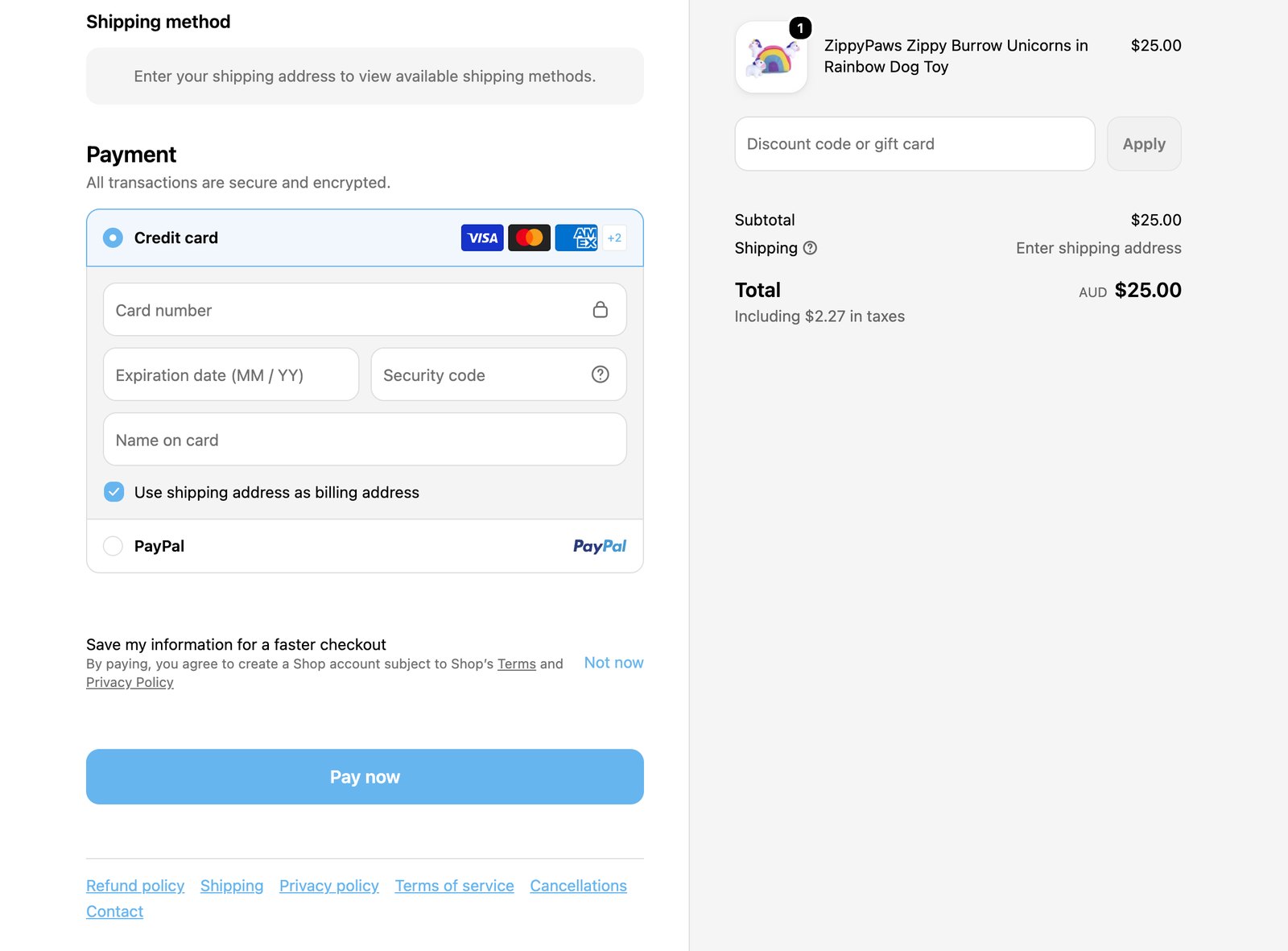
Give payment methods their own page. Card logos in the footer are not a disclosure. A short payment page that names every method you accept, what happens with pre-authorisations, which currency the customer is charged in, and any surcharge attached to a method, answers the transparency question before a reviewer has to go looking. The payment policy template above is the structure we use. It costs an hour and it is one of the few pages that helps a marginal account clear on the first review rather than the second.
The test: complete a real purchase on your own store, logged out, on mobile, without touching any admin bypass, and pay for it. Refund yourself afterwards. Reading the checkout is not testing the checkout.
Requirement 5: A total price that never goes up
Google’s position on pricing at checkout is stricter than the general advice suggests. The price has to stay consistent through the whole checkout process, not just between your product data and the landing page. It can go down if a promotion applies after the item enters the cart. It cannot go up.
Non-government fees are the trap. Service fees, handling fees and carrier fees have to be disclosed in Merchant Center, bundled with the applicable shipping cost, rather than appearing at the last step. Google also states that adding any product or service at checkout that increases the total is a violation, with government mandated fees the only exception. Any pre-ticked add-on, insurance box or mandatory protection plan is therefore a policy problem, not a conversion tactic.
There is one piece of latitude here worth knowing, because it is the safe direction to err in: Google permits overestimated shipping rates in Merchant Center, as long as the rate charged at your checkout is not higher.
Tax handling depends entirely on the country you target, and Google splits the world in two. Australia sits in the group where the price attribute has to include GST or VAT and match the landing page price. The United States and Canada are the opposite: taxes stay out of the price attribute and are shown at checkout instead. Getting that backwards produces a price mismatch on every product at once.
The test: take one product from listing to paid order and write down four numbers as you go: the feed price, the price on the product page at first paint, the price in the cart, and the amount actually charged. Four identical numbers is a pass. Anything else is your suspension.
Requirement 6: A site that reads as finished
Website needs improvement is the vaguest label Google applies and the one merchants argue with most. Its own fix guidance is blunt about what triggers it: placeholder images, templated text and broken links.
Specifically, Google tells merchants to hunt for lorem ipsum text and default template images such as an “add customer reviews here” block, and says these prevent a store being verified as a trusted business. It also wants links that resolve, including the social media links in your footer, and no link that 404s or silently bounces back to the home page.
Spelling and grammar are a named requirement too, alongside gimmick use of capitals, punctuation or symbols. That rule exists mainly for ad text, but the site is judged in the same pass, and a store with obvious errors through its product descriptions is not helping its case.
The pattern underneath all of this: a theme installed, partly customised, and shipped with the demo content still in the corners nobody visits. Nothing about it is dishonest. It reads as unfinished, and unfinished reads as untrustworthy to an automated reviewer.
Three things sit underneath “finished” that merchants rarely connect to a suspension.
Thin category pages. A collection page holding two products and no copy reads as an abandoned section of the store.
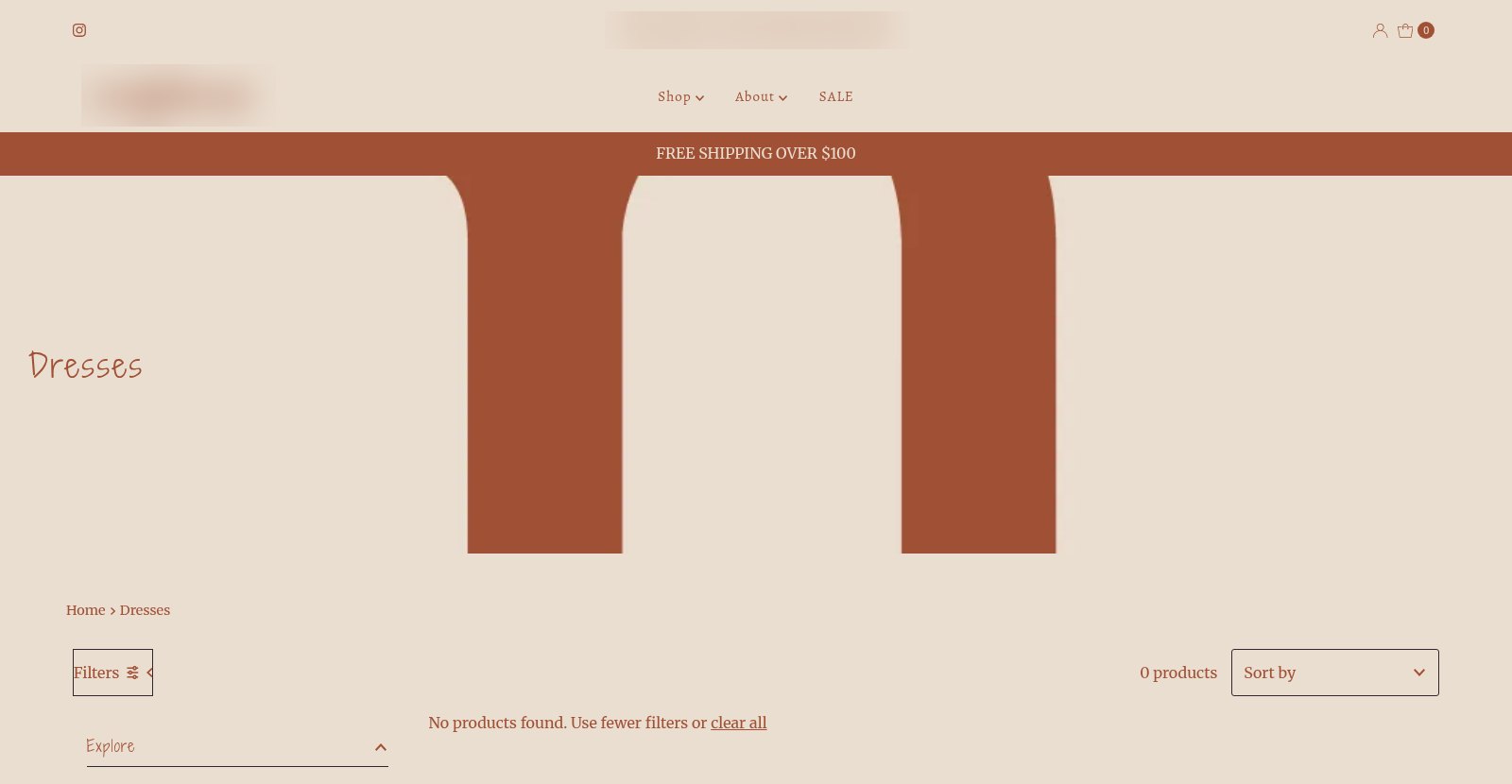
That is a live Australian clothing store, and the category is Dresses. Not a discontinued line, not a filtered view: the shop’s most obvious category, empty. A shopper who clicks it leaves. A reviewer who lands on it has just been shown that the store is not finished. Google’s usefulness rules are about whether a shopper can act on what they land on, and an almost-empty category fails that on its face. Either populate it, write something real on it, or take it out of the navigation.
Dead ends you are not tracking. Broken links are a named trigger, and most stores never look. Deleted products, retired collections and old campaign URLs accumulate 404s quietly. Track them monthly and either restore, redirect to the closest live equivalent, or return a clean 410 if the product is genuinely gone. A redirect that dumps every dead product on the home page is its own failure: Google names landing pages that redirect to a generic page instead of the specific product.
Load speed. Google’s editorial requirements list sites that do not load quickly on common browsers and devices as failing, and its landing page rules treat a slow or unavailable page as a reason to disapprove. This is not a Core Web Vitals ranking argument, it is a compliance one: if the crawler times out or captures a half-rendered page, it reviews what it got.
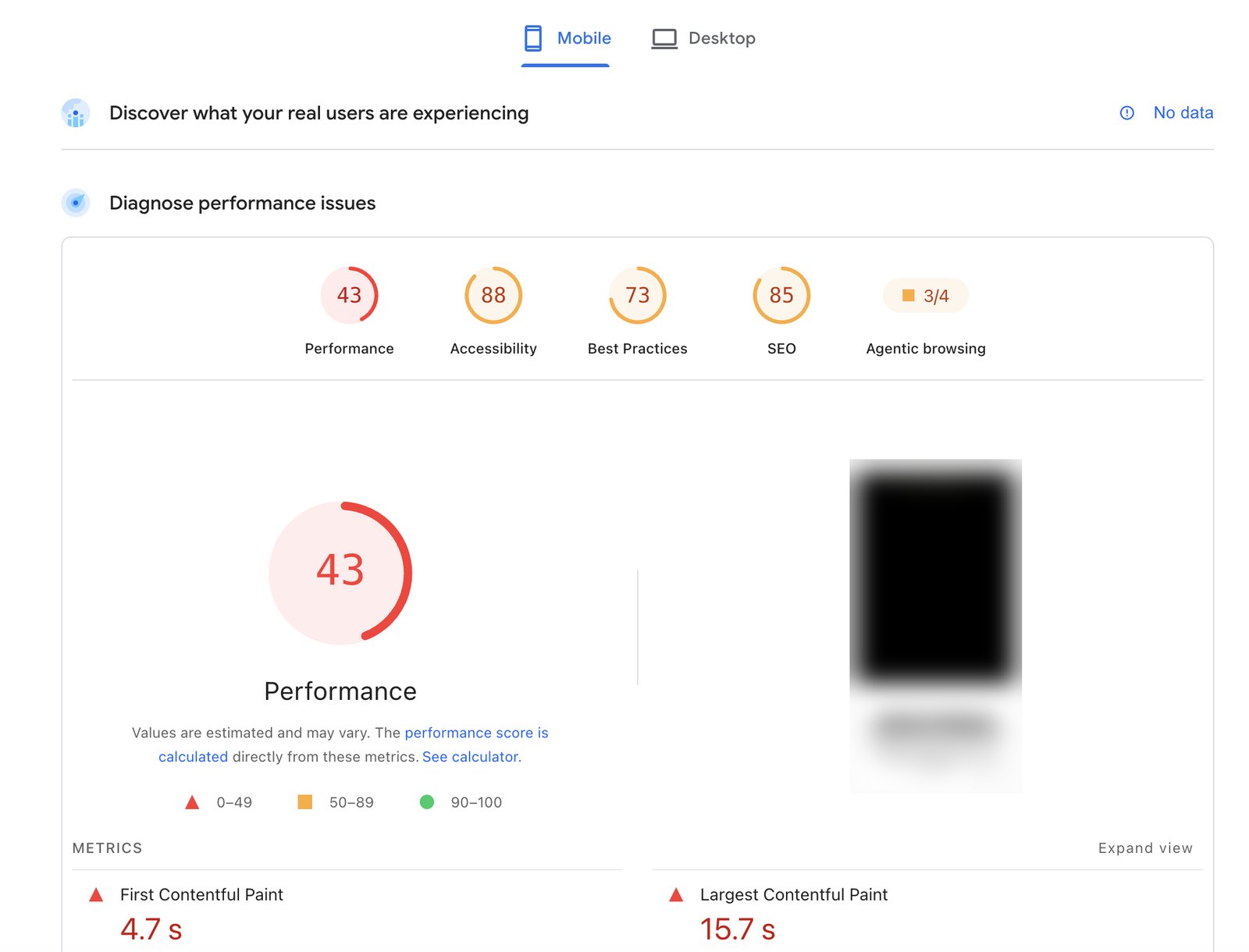
A largest contentful paint of 15.7 seconds is the number that matters there. Google’s crawler is not going to wait politely for the rest.
The test: crawl your own site and list every 404, every redirect that lands somewhere other than the intended page, and every page containing template filler. Fix the list rather than the pages you happen to remember.
Requirement 7: Pages Google can reach and read
Two of Google’s usefulness failures are about access rather than content. A site that requires a login to see the requested content fails. So does a site with pop-ups or interstitials that interfere with the shopper seeing what they clicked for, or one that disables the browser back button.
The landing page rules add more. The product in your feed has to be easily discoverable on the page it links to, and the link has to go to a specific product detail page rather than a category or search results page. Layouts that hide key elements fail, and Google names pop-ups and download banners covering product information as the example. Newsletter and language pop-ups are allowed, provided they close and do not block the product details.
Then there is the rule that quietly causes more price mismatch suspensions than any deliberate act. Google’s crawler captures the page after initial loading and treats whatever product data is showing at that moment as final. Currency converters, geo pricing, member discounts and sale timers that rewrite the price after load are all invisible to you and decisive to the reviewer.
The blunt version of this requirement: if Google cannot crawl it, Google assumes the worst. Bot blockers, firewall rules and a stray robots.txt directive all produce the same outcome as a site that genuinely has something to hide.
The test: fetch three product URLs with JavaScript disabled and read what comes back. If the price, availability or variant differs from what you see in a normal browser, that gap is what Google compared your feed against.
Requirement 8: A business Google can verify off your site
Google’s trust guidance is the only document that admits the assessment reaches beyond your domain. It asks for the official business name used across the web, no mismatch between the registered business and the domain name, and a Merchant Center domain that matches the claimed one. It suggests linking social profiles from the site, creating and verifying a Google Business Profile, and showing reviews and testimonials that a shopper could trace.
None of that is a hard requirement in the way SSL on checkout is. It is the difference between a marginal case clearing on the first review and a marginal case sitting in a cool down.
For an Australian store, the practical version is short. The trading name should be registered and connected to the ABN you actually trade under. The business name on the site, in Merchant Center and on the Google Business Profile should be the same entity. A real Australian address and a working Australian phone number do more for this than any amount of feed tidying.
The test: search your business name and check what comes back. If the first page shows three different versions of your address, so does Google’s view of you.
What Google does not require
Half the panic on merchant forums is about requirements that do not exist. For the record, and to save you the work:
- Google does not publish a minimum product count. The only related rule is that your data source cannot be empty when you request a review, which is why merchants who delete their catalogue in a panic lock themselves out of the review button.
- No Google policy asks for your ABN in the footer. What is required is a visible, verifiable business identity, not a specific registration number in a specific place. Publishing it is still a reasonable trust signal for an Australian store.
- A phone number is not mandatory on its own. Google names a contact form, an email address, a phone number or a social profile link as acceptable contact methods. Most stores should still publish a number, but a missing one is not automatically the violation.
- Live chat appears nowhere in the requirements, and adding it will not clear a suspension.
- You are allowed to require account creation, as long as the signup is free and does not force an app download or a device change.
- Shipping does not have to be free, and prices do not have to be the lowest available. Google cares whether the total is disclosed before commitment, not what it is.
Fixing things Google never asked for is not neutral. It burns the days you have before the next review window and it changes the site the reviewer is about to look at.
The website requirements checklist
| Requirement | Where Google states it | The test that proves it |
|---|---|---|
| Visible contact method | Editorial and professional requirements | Findable logged out on mobile within two taps, and identical to Merchant Center |
| Return, refund and cancellation policy | Editorial and professional requirements | Submit a real request from an outside address and confirm a reply arrives |
| Shipping terms including origin | Website needs improvement fix guidance | Handling time, transit time, cost and dispatch location all stated |
| Terms and privacy written for this store | Website needs improvement fix guidance | No competitor could publish the page unchanged |
| Checkout completable by anyone | Checkout requirements | Buy your own product logged out on mobile and pay for it |
| Business fields optional | Checkout requirements | Company name and company ID are not required to complete an order |
| Valid SSL through checkout | Checkout requirements | Padlock on every step, including third-party payment pages |
| Total price never increases | Checkout requirements | Feed, first paint, cart and charged amount are four identical numbers |
| No placeholder or template content | Website needs improvement fix guidance | Site-wide crawl returns no filler text or demo images |
| No broken or misdirected links | Website needs improvement fix guidance | Crawl returns no 404s and no redirects to the home page |
| Product page reachable and stable | Landing page requirements | Fetch with JavaScript disabled and confirm the price does not move |
| Consistent identity off site | Building trust with your customers | Name, address and phone match across profile, socials and registry |
How to confirm Google has re-read your site
This is the step that separates a review that clears from one that burns a cool down.
Google’s fix guidance is unusually specific about timing. Once your technical fixes are live, a small edit or selecting appeal starts a fresh crawl, and Google says those crawls usually finish within 24 to 48 hours. It also warns that changes take some time to be reflected, which is the polite version of do not request a review the same afternoon.
Before you touch the review request button:
- Confirm every fixed page returns a 200 to a logged out request, not a 302 to a staging URL or a maintenance page.
- Check the last crawl date in Search Console URL Inspection for your policy pages and two product pages. If the last crawl predates your changes, Google has not seen them yet.
- Re-run the four price numbers on a product you have not looked at before, not the one you have been testing all week.
- Screenshot the corrected pages with a visible date. If the case escalates to a human reviewer, a documented fix reads differently to a claim.
- Then request the review, once.
The ordering matters because the review is a snapshot. Google looks at the live state at the moment of the request, so a half-deployed fix gets reviewed as broken and costs you an attempt you cannot get back.
Common questions about Merchant Center website requirements
Which website requirement causes the most suspensions?
Google does not publish a breakdown, so anyone giving you a percentage is guessing. What it does publish is the four named site failures: website needs improvement, insufficient contact information, missing return and refund policy, and usefulness. In our own audits the returns process and the checkout are the two we find broken most consistently, for the same reason: both are set up once at launch and never tested again from the shopper’s side.
Does my website have to be an ecommerce store?
It has to sell the products in your feed. A landing page has to show the product with a price and a buy button, and it has to be a specific product page rather than a category or search page. A brochure site that sends shoppers to a marketplace to buy does not satisfy that.
Will fixing my website clear a feed problem?
No. Website requirements and product data requirements are enforced separately, and an account can be suspended over either. The useful difference is that editing product data triggers an automatic re-review without spending an appeal, whereas website fixes need a review request. Fix the site first, then the data, then request once.
How long should I wait after fixing the site?
Long enough for Google to have crawled the changes, which its own guidance puts at roughly 24 to 48 hours after fixes go live. Verify with URL Inspection rather than counting days.
Do these requirements apply to free listings as well as Shopping ads?
Yes. The site requirements sit inside the Shopping ads policies, and free product listings are governed by the same standards. A suspension takes both surfaces down at once, which is why the revenue impact is usually larger than merchants estimate from their ad spend alone.
My site passed a manual review before. Why is it failing now?
Because enforcement tightened and the site did not change with it. Google added examples around non-delivery and inoperable refund processes in late 2025, and the trust threshold for thin or templated stores has moved. A site that cleared in 2023 on the strength of being merely functional is not automatically clearing in 2026.
When the checklist is not enough
If this is your first suspension and the review path is still open, work the list properly and you have a real chance of clearing it yourself. Most of it is a week of unglamorous verification rather than anything clever.
The arithmetic changes if you have already been denied. Cool down periods lengthen with each failed attempt, so a second guess is more expensive than the first, and a store that has burned two attempts is working with very little margin. That is the point where the value is in the diagnosis, not the appeal, because the appeal is mechanical once you know what the reviewer is objecting to.
For the wider picture of why accounts get pulled and how the review process behaves, start with our guide to Google Merchant Center suspension. If you would rather not spend an attempt finding out which requirement you are failing, our Google Merchant Center suspension recovery service delivers a written diagnosis before anything is submitted, and nothing gets filed until the fix is live and verifiable.
If you are launching a new store rather than recovering an account, the same website requirements are checked before the account goes live in our Google Merchant Center and Shopping setup service.
Written by Dorian Menard, founder of Search Scope. Requirements verified against Google’s Merchant Center documentation in August 2026. Google’s policies change, so check the linked pages before acting on anything time-sensitive.