
GMC Misrepresentation Suspension: What Triggers It and How to Fix It
Suspended for misrepresentation? The three trigger families, how to work out which one is yours, and how to request a review without burning an appeal.

- Misrepresentation is Google’s trust judgement about your business, not one broken field in your feed. It is classed as egregious, which is why the suspension often arrives with no warning at all.
- The triggers fall into three families: business identity, site and offer transparency, and product and feed accuracy. In the cases we have worked on, the first two do more damage than the feed.
- Fix the live website first. Google re-reads your site, not your dashboard, and its crawler treats whatever the page shows on initial load as final.
- You get one courtesy review during a 7 or 28 day warning. After a second failed attempt a one-week cool down may begin and can lengthen each time. Google support cannot shorten it.
- Editing product data triggers an automatic re-review without spending an appeal. A bulk appeal on an uncleaned catalogue can cost you the right to appeal those products again.
Your Merchant Center account is suspended, your products have dropped out of Shopping, and the notice says “Misrepresentation” with nothing underneath it that tells you what to change. If your Google Ads account is linked, that has probably stopped too.
Here is what the label means. Google uses misrepresentation to describe offers that mislead shoppers about who you are, what you sell, or what the purchase actually involves. It is graded as an egregious violation, which is why so many merchants never see a warning email first.
The useful part: misrepresentation is not one violation. It is three separate families of trust failure, and most published advice concentrates on the one family that is easiest to write about. This guide covers how to identify which one is yours, how to fix it in an order that works, and how to request a review without burning attempts you cannot get back.
What a misrepresentation suspension actually means
Google’s Shopping ads policies cover four areas: prohibited content, prohibited practices, restricted content, and site requirements. Misrepresentation sits under prohibited practices, described as “Things you can’t do if you want to list products with us”.
The policy itself prohibits two things:
- “Offers that prompt customers to initiate a purchase, download, or other commitment without first providing all relevant information and getting the customer’s explicit consent.”
- “Offers that represent you or your products in a way that isn’t accurate, realistic, and truthful.”
Neither one mentions your feed. Both are about whether a shopper landing on your store gets an honest, complete picture before they hand over money.
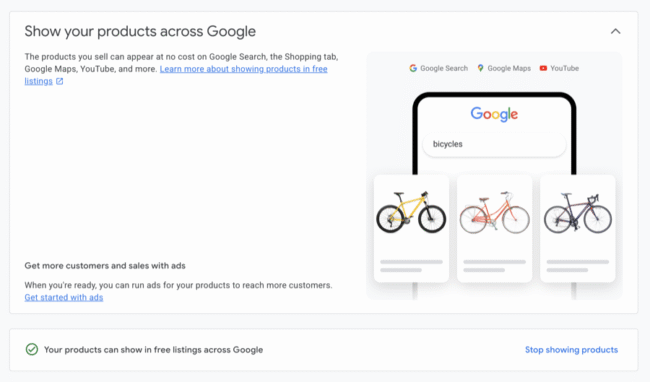
When a misrepresentation suspension hits, this is the surface that goes dark: your products stop showing in Shopping ads and free listings across Google.
Google then explains the severity: “Violations of this policy are taken very seriously and are considered egregious. An egregious violation of Shopping policies is a violation so serious that it’s unlawful or poses significant harm to our users.”
That grading is why the suspension arrived without notice. Google’s documentation on issues and account status states it directly: “In some cases when an egregious account-level issue is detected, no warning is given and the account is suspended immediately.”
Worth knowing before you start: enforcement is not purely robotic. Google says it uses “a combination of Google AI and human evaluation”, and that more complex or severe cases are often reviewed by specially trained experts. So a documented, specific fix may end up in front of a person. A guess will not read any better to a machine.
Suspension, warning or item disapproval: work out what you have
Merchants routinely fix the wrong problem because they have not identified which state the account is in.
| State | What you see | What still serves | What you can do |
|---|---|---|---|
| Account warning | Warning email with examples | Products appear, “however their performance may be limited” | One courtesy review inside a 7 or 28 day window |
| Account suspension | Red banner, products disabled | Nothing | Request a review, subject to cool down |
| Item disapproval | Issues in the Needs attention tab | Everything except the affected products | Fix the product data, which triggers automatic re-review |
Google’s cool down documentation also refers to a preemptive item disapproval state, which behaves like a suspension for the purposes of requesting a review: you wait the cool down out either way.
If you are in a warning you have breathing room and one free swing. Do nothing and Google decides for you: “If you don’t manually request a review during the warning period, your product data and website will be reviewed once more at the end of the warning period.”
If your Google Ads account went down at the same time, that is a linked account suspension and it resolves in a specific order, covered on our google ads suspension recovery page. For every other reason an account gets pulled, start with google merchant center suspension causes.
The four things the policy actually prohibits
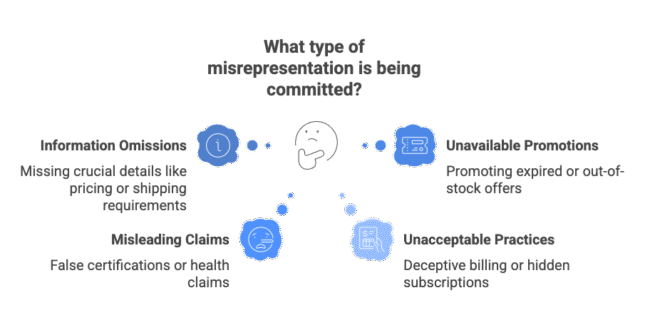
Google names four sub-policies, and the names tell you where to look.
Unacceptable business practices. Hiding or misrepresenting information about your business or products. Impersonating a brand. Claiming to be an authorised reseller when you are not. Concealing qualifications or licences. Google’s examples include charging for products that are normally free, and refusing refunds despite a stated refund policy.
Misleading or unrealistic offers. Claims that entice a shopper with an improbable result presented as likely. Implied affiliations that do not exist. Health claims contradicting scientific consensus.
Omission of relevant information. Failing to disclose the payment model and full expense before purchase. Missing terms, shipping information or refund policies. This is the biggest bucket in practice, and where most legitimate Australian stores get caught.
Unavailable offers. Promoting products or promotions that are not actually available. Out-of-stock items still listed as buyable. Expired discounts.
In October 2025 Google updated this page and said why. The Merchant Center announcement noted it had added “additional examples around non-delivery and inoperable return/refund processes”. That is a signal about where enforcement is concentrated. A returns page that exists but whose form silently fails is exactly the kind of thing Google means.
The three families of trigger, and which one is usually yours
Most articles on this topic were written by feed management companies, so they frame misrepresentation as a data quality problem. That framing is incomplete, and it sends merchants digging through attribute mappings when the real problem is on their About page.
Business identity and contactability
Google needs convincing that a real, identifiable business is behind the store. Its editorial and professional requirements include an issue labelled “Insufficient contact information”, covering “Websites that are missing required contact information, have unverified business information in Merchant Center, or both”.
What trips stores up: business name, address and phone that do not match exactly across website, Merchant Center, Google Business Profile and socials; a support email on a free provider rather than your own domain; a trading name that is not registered to the entity behind it; an About page that describes a vibe rather than a business; claims about company age or awards that registry records contradict; contact details that exist only in hidden markup rather than visibly on the page.
Google’s own fix wording is blunt: “Describe your business on your website: Make sure your website has updated contact information and a clear explanation of what your company does, like on an ‘About us’ page.”
Site and offer transparency
The omission bucket, and where the October 2025 clarification landed.
Missing, incomplete or copied returns, refunds, shipping, terms and privacy pages. A returns process that does not function, because a form that 404s or emails nobody is an inoperable refund process. Fake scarcity: countdown timers that reset, “only 2 left” counters hard-coded into a template. Testimonials that cannot be traced to a real person or platform. Fees that appear for the first time at checkout, when Google requires you to “Clearly disclose to the user any payment for mandatory fees required to purchase the product”. Superlative or health claims with nothing behind them. A checkout without “a secure checkout process that is protected with a valid SSL certificate”.
Google also flags “Website needs improvement”, covering “Websites that aren’t fully-functional, don’t have business specific content, have information that is difficult to understand, or display product content that is incomplete”. Broken links, templated content and placeholder text all count. Theme demo content left live counts.

Product and feed accuracy
Price in the feed that does not match the page or checkout, including tax-inclusive versus tax-exclusive mismatches and rounding drift. Availability that disagrees with reality in either direction, including “sold out” showing on products a shopper can still buy. Condition misstated, with used goods described as new. Duplicate products and manufacturer descriptions pasted across the catalogue. Wrong brand attribution or missing identifiers.
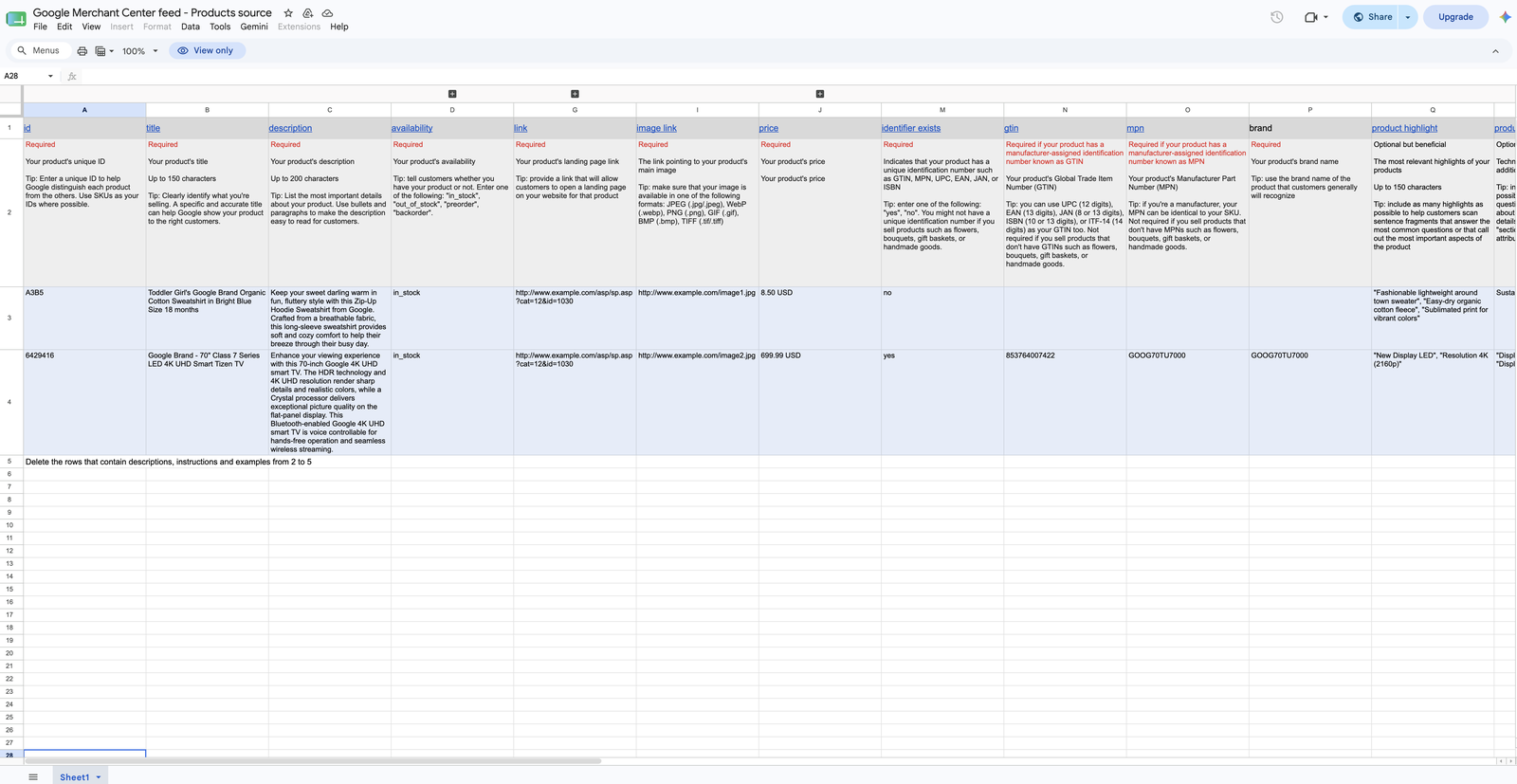
Google removes most of the guesswork here. It publishes a product data template that lists every attribute it expects, which ones are required, and what each should contain. If your feed matches this, the feed side of misrepresentation largely takes care of itself.
The rule underneath most price mismatch suspensions sits in Google’s landing page requirements, and it is the most useful sentence in the documentation for anyone running a modern theme:
“Make sure your pricing and availability information is consistent through the process of page load. Do not change displayed product information after initial loading. This includes and is not limited to availability, pricing and the selected variant. Automatic crawlers will capture the page after initial loading and any product data displayed on the page at that time will be treated as final.”
If a script rewrites your price after load for currency conversion, geo pricing, member discounts or a sale timer, Google reads the pre-script price and compares it to your feed. You can stare at that product page all day and see nothing wrong.
How to work out which trigger is yours
Skipping this step is what burns appeals.
Document the state before changing anything. Screenshot the exact wording of the account issue, the date, and any sub-issues. The precise language often indicates the family. Once you start editing, that evidence is gone.
Separate account-level from product-level. Products, then the Needs attention tab, then view setup and policy issues. Different problems, different remedies.
Compare Merchant Center settings against the live site, field by field. Business name, address, phone, support email, returns window, shipping timeframes. Do not resolve a mismatch by editing Merchant Center to match the site when the site is the thing that is wrong.
Check three product pages properly. Logged out, incognito, mobile and desktop. Record the feed price, the price on first paint, the price after the page settles, and the price at checkout. If those four are not identical, you have found a trigger.
Test your own returns process. Submit the form. Confirm the email arrives. Follow your stated policy from the shopper’s side.
Check what your domain does. A store domain redirecting to a myshopify address, or a second live storefront on another domain selling the same catalogue, both read as identity problems.
Fix it in this order, because Google re-reads your site, not your dashboard
The most common failed appeal follows one pattern: the merchant updates Merchant Center settings, clicks Request review the same afternoon, and gets denied because Google went back to the live website and found it unchanged.
The order that works:
- Fix the live website first. Legal pages, contact details, About page, scarcity widgets, claims, checkout disclosure.
- Verify the fixes are public. Logged out, incognito, mobile and desktop, returning a 200 status. Not behind a login, not buried under a pop-up.
- Align Merchant Center to the corrected site, not the reverse.
- Sync the surrounding surfaces. Google Business Profile, social profiles, domain registration. Same legal name, same address, same phone.
- Let the crawler catch up before you do anything else. Google re-reads the live pages, so give it time to fetch the corrected versions, and confirm with URL Inspection in Search Console that the last crawl date is after your changes went live.
- Then request the review.
Product data is the useful exception. Google states that if you edit product data through your upload method or directly in Merchant Center, “the affected products will be automatically re-reviewed”, and if you remove violating products from your data source, “no further action or review request is necessary”. Product-level fixes need not cost you an appeal.
Identity verification, and why the review button is greyed out
Merchants often think the Request review button is broken. Usually it is not.
Google’s request a review documentation states: “Before the review button becomes available, you need to complete other actions in some cases, such as Identity Verification (IDV).” For account-level suspensions you may be required to upload clear, government-issued IDs or business registration documents before a review is possible.
There is a quieter blocker too. Your product data source cannot be empty. Google’s instruction is to “manually add at least one product in ‘All products’ under ‘Products’ to prompt eligibility for a review”. Merchants who delete their whole catalogue in a panic lock themselves out this way.
Since September 2025 there has also been video verification. Search Engine Roundtable reported that Google began testing a video step for lifting suspensions, working much like Google Business Profile verification: a single continuous unedited video of three to five minutes covering the storefront with signage and street address, staff-only areas such as storage or point of sale, and packaging of top products.
Two caveats. It appears to be a limited rollout rather than a standard step, so you may never see it. And accounts differ on the format, some describing a recorded upload and others a live call. Prepare honestly if you are asked, and do not go looking for it.
Requesting a review without burning your chances
This is the part that costs merchants most, and is documented worst elsewhere.
Choose the right path. Google’s wording: “If you’ve identified and resolved the issue, select ‘I fixed the issue’, then select ‘Request review’. If you believe our findings are an error, select ‘I disagree with the issue’, then select ‘Request review’.” The first is for a genuine correction. The second is an appeal against the finding, and only worth using when you can support it.
Know the clock. “You can request one courtesy review of your account at any time during the warning period of 7 or 28 days.” Reviews take up to 7 business days, with Google’s suspension guidance putting the typical range at 3 to 7. Approved products can show again within 24 hours.
Understand the cool down. This is the trap. Google states: “If your issues aren’t resolved by the second review attempt, a one-week cool down period may begin.” During it, “the review button will be disabled and your account will remain suspended or in a preemptive item disapproval state”. It compounds: “With each unsuccessful re-review afterwards, an increase of the cool down period may be applied.” Google support cannot bypass or shorten it. The expiry date sits under Products, Needs attention, view setup and policy issues.
Be careful with bulk appeals. With thousands of SKUs, the bulk option looks like a gift. Google’s warning is explicit: “Before submitting a bulk appeal, you must review your offers and remove any policy-violating items from your data source. Submitting a bulk appeal for a large set of offers risks immediate failure if violations are found. This may limit your ability to submit subsequent appeals for those products.”
Read that last sentence again if you run a large catalogue. A bulk appeal on an uncleaned catalogue does not just fail, it can cost you the ability to appeal those products later.
One clarification on something repeated widely elsewhere: Google does not publish a fixed number of appeals before permanent loss of the account. It publishes a cool down that lengthens each time you fail. The practical effect is similar, which is why guessing is expensive, but the specific claim that you get exactly three attempts is not in Google’s documentation.
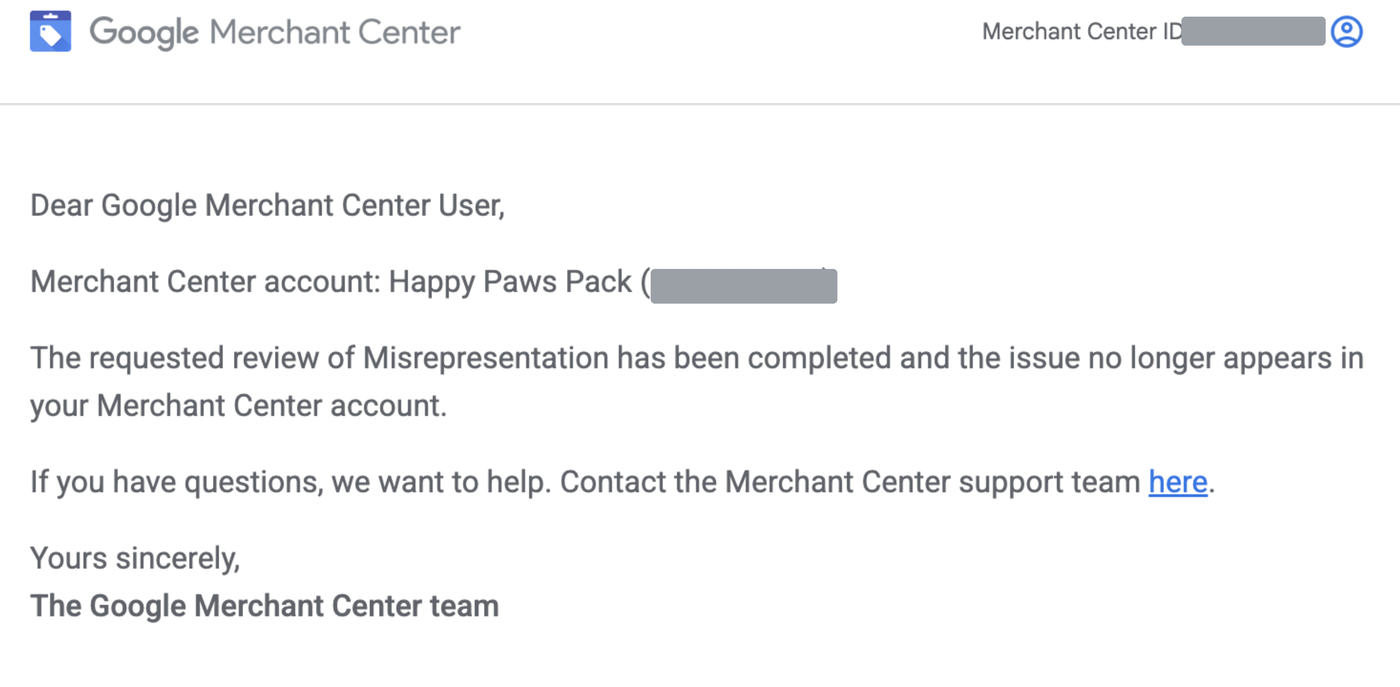
Get the fix and the review right, and this is the email you are working towards. It confirms the misrepresentation review is complete and the issue has cleared from the account.
What one suspended Australian store actually looked like
We have recovered 50 plus ecommerce stores since the start of 2025, and misrepresentation accounts for about half of every suspension that lands on our desk. It is the most common case we see and the most stubborn to fix, because the policy is broad enough that the trigger is almost never where the merchant is looking. The audit below is one of those cases.
In June 2026 we audited an Australian handmade goods retailer whose Merchant Center account had been suspended for misrepresentation. They had been through roughly two appeals already, and their most recent re-review failed on 1 June 2026. They were convinced the problem was their feed, because that is what everything they had read told them.
We ran our 87-point audit across the store, the feed and the surrounding business footprint. It returned 24 findings, 11 of them critical, and the critical ones clustered in identity, product claims and legal pages. The feed was a problem. It was not the main one.
Some of what was actually wrong:
- A second live storefront on a different domain selling the same catalogue.
- No legal entity visible anywhere on the site, and a trading name that was not registered.
- A company age claim on the About page that public registry records contradicted.
- Fake scarcity hard-coded across the entire catalogue rather than driven by real stock levels.
- Products showing “Sold out” that were still purchasable.
- Raw AI chat output left inside a live product description, including the assistant’s preamble.
- Testimonials with no traceable source, and a used, visibly rusted item sold with new-product copy.
- Business contact details present only inside hidden page metadata.
- Three required legal pages missing entirely, and a shipping policy that failed every check in our framework.
That is one store, not a dataset, and turning it into a percentage would be dishonest. What it shows is a pattern we keep seeing: the merchant reads a feed-focused checklist, spends a week on attribute mappings, appeals, fails, and never touches the identity and transparency problems driving the suspension.
If you have been denied more than once, that is usually why. Plenty of stores work through this themselves. If you would rather not spend another appeal finding out, our google merchant center reinstatement service starts at $599 per account for standard cases where the first appeal path is still open, and includes a written diagnosis before anything is submitted.
What not to do
Do not delete the account and start again. Google’s wording: “It’s not recommended to delete your suspended account and create a new one for the same business. Deleting an account won’t fix the suspension issue, it’ll be flagged again as the newly created account may also be suspended.”
Do not use review requests to test guesses. Every failed attempt shortens your runway and lengthens the next wait.
Do not fix only the Merchant Center settings. The dashboard is not what gets re-read.
Do not bulk appeal a catalogue you have not cleaned.
Do not pay anyone promising guaranteed reinstatement inside a fixed number of days. Nobody controls Google’s review queue.
The Australian layer most guides miss
Two things matter here that overseas guides will not tell you.
Your registered details need to line up. The business name on your website, in Merchant Center and on your Google Business Profile should match the entity that actually trades. If you operate under a business name, it should be registered with ASIC and connected to the ABN you use. A real Australian street address and a working Australian phone number do more for this than any amount of feed tidying.
Your refund policy may be breaking two rules at once. Australian Consumer Law is not overridden by your store policy. The ACCC states that “The basic rights covered by consumer guarantees can’t be taken away by anything a business says or does”, and that a business cannot remove them by “displaying a ‘no refunds’ sign, or otherwise saying that refunds are not available at all, or not available at all after a certain number of days”. The ACCC adds: “It is against the law for businesses to mislead consumers about their rights in these ways.”
An Australian store running an “all sales final” policy is therefore breaching Australian law and handing Google a textbook omission of relevant information at the same time. One compliant returns policy fixes both. If you sell overseas, the same logic applies to whichever consumer protection regime covers your buyers.
Pre-review checklist
Work through these before you touch the review button.
Identity and contactability
- Legal entity name visible on the site, trading name registered and matching.
- Physical address and phone visible, real, and identical to Merchant Center.
- Support email on your own domain.
- About page explains what the business is, who runs it, and from where.
- No unverifiable claims about company age, awards or credentials.
- Name, address and phone identical across site, Merchant Center, Google Business Profile and socials.
- One storefront on one domain, with no redirect to a myshopify address.
Site and offer transparency
- Returns and refunds policy present, specific, and compliant with Australian Consumer Law.
- Shipping policy states handling times, transit times, costs and origin.
- Terms and privacy pages present and written for this store.
- Returns form and support email tested end to end.
- No countdown timers or scarcity counters that are not driven by real data.
- All testimonials traceable to a real source.
- No mandatory fee appearing for the first time at checkout.
- Valid SSL across every page, including checkout.
- No placeholder text, demo content, broken links or theme filler.
- Checkout completable by anyone, not gated by location or forced account creation.
Product and feed accuracy
- Feed price, first-paint price, settled page price and checkout price all identical.
- No script rewriting price, availability or variant after initial load.
- Availability accurate in both directions.
- Condition accurate for every used or refurbished item.
- No duplicated products or copied collections live, and brand and identifiers correct.
The full 87-point version is what we run in a paid audit. These 22 will find most of what a first appeal needs.
Frequently asked questions
Why was I suspended without a warning?
Because misrepresentation is classed as egregious. Google’s documentation states that when an egregious account-level issue is detected, no warning is given and the account is suspended immediately.
Which product caused it?
Often no single product did. Account-level misrepresentation is a judgement about the store as a whole, so check the account issue separately from the item issues in the Needs attention tab.
How long does a review take, and how long is the cool down?
Reviews take up to 7 business days, typically 3 to 7. Google states a one-week cool down may begin after a second unsuccessful attempt, and that it may increase with each further failure.
Can I open a new Merchant Center account instead?
No. Google states the new account may be suspended for the same reason, and you lose your account history.
Does dropshipping automatically trigger misrepresentation?
Not automatically, but dropshipping models fail the same checks more often: shipping times that do not reflect reality, availability that depends on a third party, and thin business identity. The requirements are identical, they are just harder to meet.
Will a human ever look at my account?
Sometimes. Google says enforcement uses a combination of AI and human evaluation, and that more complex or severe cases are often reviewed by specially trained experts. That is an argument for a documented fix rather than a vague one.
When to get help
If this is your first suspension and the first appeal path is still open, work through the checklist. Most stores can do this themselves with a careful week.
If you have been denied twice, you are sitting in a lengthening cool down, or your Shopping and Performance Max revenue is large enough that another failed attempt is genuinely expensive, the arithmetic changes. For chronic cases with multiple denials or restricted categories we run a separate guaranteed recovery for chronic cases tier on no-result-no-fee terms, scoped on a call first because we only take cases we can guarantee.
Either way the sequence matters more than the speed. Diagnose properly, fix the live site, verify it is public, then appeal once with evidence. If the organic side of the store needs rebuilding while Shopping is down, that is a scoping conversation with an SEO consultant rather than a package.
Written by Dorian Menard, founder of Search Scope. Policy references verified against Google’s Merchant Center documentation in July 2026. Google’s policies change, so check the linked pages before acting on anything time-sensitive.