
How to Claim and List Your Business on Bing Places
How to claim and verify your Bing Places listing, why it's now an AI-search play (Copilot and ChatGPT use Bing), and how to import from Google in minutes.

Let me be straight about Bing first: its search share in Australia is small, in the high single digits by Statcounter’s measure. So why bother claiming a Bing listing?
Because in 2026, Bing is no longer just “the other search engine”. It is the index behind Microsoft Copilot, and a large share of ChatGPT’s search answers come from Bing’s results too. Claiming your Bing listing is now as much an AI-search play as a search-engine one, and it takes about ten minutes because you can import everything from Google. Here is how, and why it is worth it.
- Bing’s direct search share is small in Australia, but it powers Microsoft Copilot and feeds a big share of ChatGPT’s search answers.
- Claiming is free. Manage your listing at bing.com/forbusiness (the old bingplaces.com now redirects there).
- The fast path: import your existing Google Business Profile, which carries over your name, address, hours and categories.
- Verify by phone, email or postcard, then keep your name, address and phone identical to Google and your other listings.
- Treat it as a low-effort AI-visibility win, not a major traffic source.
Why Bing Places for Business is worth ten minutes in 2026
The old argument for Bing was demographics: it skews to desktop, Windows and a slightly older, higher-income user. That is still true, but it was never enough on its own to make most businesses care.
The new argument is AI. Microsoft Copilot is grounded on the Bing index, so when someone asks Copilot for a local recommendation, it draws on Bing’s data. ChatGPT’s search has historically leaned heavily on Bing too: Seer Interactive’s late-2024 analysis found that 87% of SearchGPT citations matched Bing’s top organic results. Be aware that the relationship is less clean in 2025-2026: OpenAI launched its own OAI-SearchBot crawler in late 2024, so ChatGPT now blends Bing results with content it has crawled itself. The honest framing is that Bing Places is still worth claiming because it feeds Copilot directly and remains a meaningful source for ChatGPT, but it is no longer the single AI-search lever it briefly looked like in late 2024. Bing also underpins other tools like DuckDuckGo.
So a verified, accurate Bing listing is one of the cheapest ways to make sure AI assistants describe your business correctly. As AI search grows, the businesses with clean, verified data across more than just Google will be the ones these tools can confidently recommend. Microsoft has leaned into this directly, even adding an AI Performance report to Bing Webmaster Tools to show how often your content is cited in AI answers.
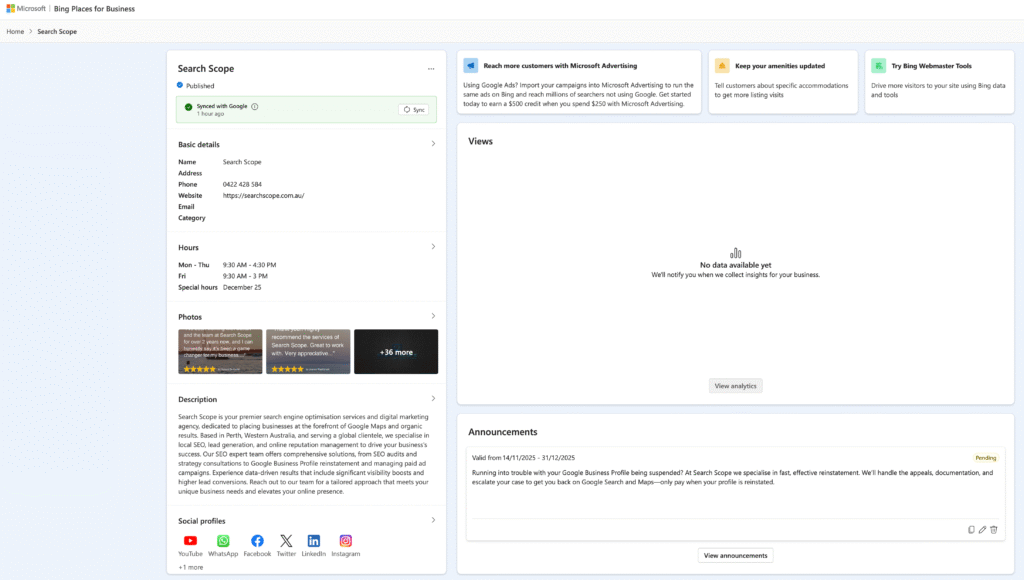
How to claim and list your business
Step 1: Sign in and find your business
Go to bing.com/forbusiness (Microsoft moved Bing Places here in its late-2025 relaunch; bingplaces.com still redirects) and sign in with a Microsoft account. Search for your business by name and location, then claim the existing listing or create a new one.
Step 2: Import from Google (the fast way)
The quickest setup by far is to import your Google Business Profile. Microsoft improved this in the 2025 relaunch, and it carries across your name, address, phone, hours and categories, so you are not retyping everything. Use the account linked to your Google profile to make the match clean. If you have no Google listing, fill the details in manually.
Step 3: Complete the profile
Whether you imported or started fresh, make sure the essentials are right:
- Name, address and phone, exactly as they appear on Google and your website.
- The most specific category that fits, not a generic catch-all.
- Real photos, accurate hours (including special and holiday hours), and your website and social links.
- For a business without a storefront, set a service area rather than a public address.
Step 4: Verify ownership
Verify by phone, email or postcard (a mailed PIN takes a couple of weeks, so the phone or email options are faster where offered). Until you verify, the listing will not appear in Bing search or Maps. After verifying, allow a little time for the listing to publish, and avoid making a flurry of edits straight away as that can restart the publishing cycle.
Keep it consistent
Bing, like Google, cross-references your details against the rest of the web. Inconsistent name, address or phone information undermines trust and muddies both Bing Maps and the AI answers built on Bing’s data. So keep your Bing listing identical to your Google Business Profile, your Apple listing, and your directories. This is the same NAP consistency discipline that underpins all of local SEO, and Bing Places is one of the citation sources worth having right.
One genuine difference worth knowing: Bing aggregates reviews from sources like Yelp and Facebook rather than showing Google reviews. So if you want your Bing profile to reflect strong ratings, encourage reviews on those platforms too, not only Google.
Where Search Scope fits
Bing is a small, easy win that most businesses skip, and the AI-search angle now makes it worth the ten minutes. We set it up and keep it aligned with your Google and Apple listings as part of broader local search marketing Perth and AI search optimisation. If you would rather have your whole local presence handled across every engine that matters, and we will get it done.
FAQ
Is Bing Places free?
Yes. Creating, verifying and managing your Bing Places listing is free, the same as Google Business Profile and Apple’s listings.
Is Bing worth it if hardly anyone in Australia uses it?
For direct search traffic alone, the payoff is modest, Bing’s share here is small. The reason it is worth doing in 2026 is AI: Bing powers Microsoft Copilot and feeds a large share of ChatGPT’s search answers, so a clean Bing listing helps those tools describe and recommend your business accurately. The listing is only half of it: optimising your site for Bing and Copilot covers the organic side. It is a low-effort AI-visibility play.
What’s the fastest way to set it up?
Import your existing Google Business Profile. It carries over your core details so you are not entering everything by hand, then you just verify and tidy up the listing.
How do I verify my business?
By phone, email or postcard, depending on what Bing offers for your business. A mailed PIN takes around two weeks; phone or email options are quicker. Your listing will not show publicly until it is verified.
Does Bing show my Google reviews?
No. Bing aggregates reviews from sources like Yelp and Facebook rather than Google. If you want strong ratings reflected on Bing, build reviews on those platforms as well as Google.