
Google Business Profile Posts: Do They Actually Move Rankings?
Do Google Business Profile posts actually help local rankings? The three post types, what to publish, AI search impact, and how to measure results in GA4.

Google Business Profile posts are one of the most visible, and most underused, features of any local business listing. If someone searches for your business or your service category right now, your Google Business Profile is probably the first thing they see.
Not your website. Your GBP. And if the posts section of that profile is blank or sitting on content from six months ago, you are handing an advantage to every competitor who bothered to keep theirs active.
This guide covers what you actually need to know about Google Business Profile posts: what they are, how the three post types work, whether posting actually moves your rankings, and how to measure the results in GA4. There is also a section on what is changing with AI search that most guides have not caught up with yet.
- Google Business Profile posts are short updates published directly to your listing on Google Search and Google Maps, covering announcements, offers, and events.
- They are not a confirmed direct ranking factor, but they do influence relevance, engagement, and profile freshness signals that feed into local search visibility.
- Update posts are archived after about six months. Offer posts last until their end date. Event posts disappear when the event ends.
- Businesses that stop posting are not penalised immediately, but a dormant profile looks stale to both Google and potential customers.
- Use UTM parameters on every post link. Gut feel is not attribution.
- GBP posts now feed into AI Overview summaries. An entity-clear, consistently active Google Business Profile has a compounding advantage in generative search.
What Are Google Business Profile Posts?
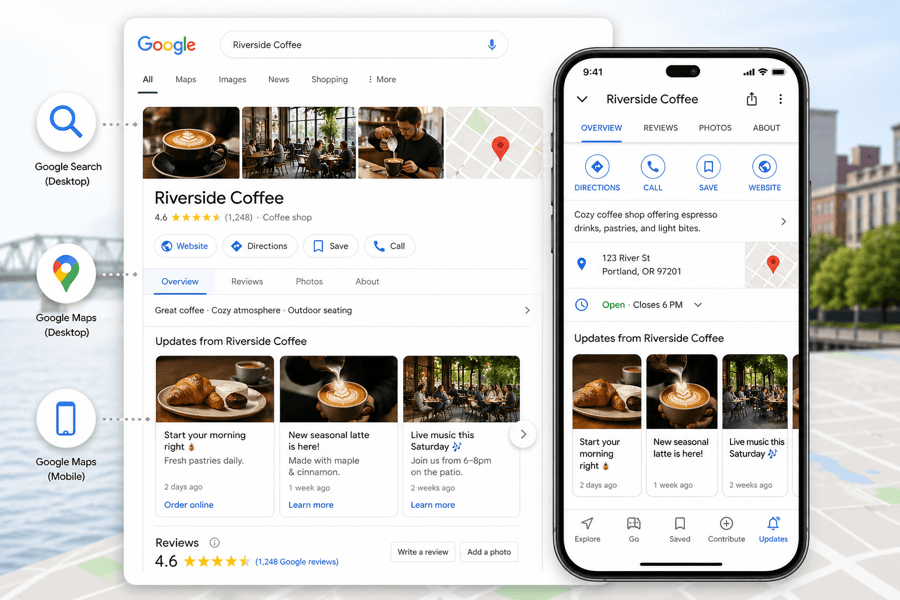
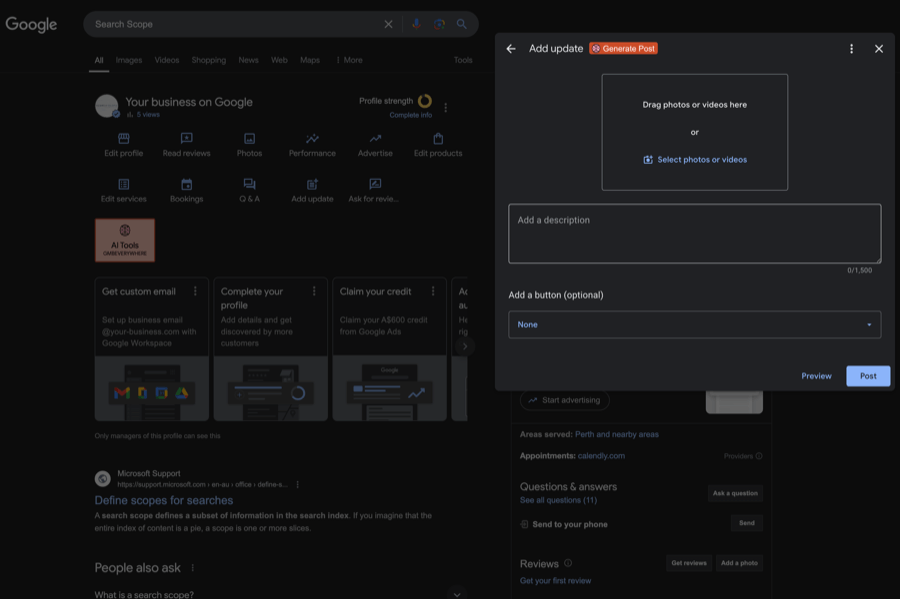
Google Business Profile posts are content updates you publish directly to your business listing on Google. They can include text, images, videos, and a call-to-action button. Potential customers see them on Google Search and Google Maps when they find your business.
The working character limit in the dashboard is 1,500 characters, though only the first 100 to 150 appear before a truncate. Google launched the feature back in 2017, when the product was still called Google My Business, and originally framed it as micro-blogging. That framing is wrong, and it is the reason most businesses use GBP posts poorly.
The people reading your Google Business Profile posts are not subscribers. They are not following your brand. They are mid-decision, right now, comparing you against two or three other businesses in the Map Pack. Write for that moment, not for a newsletter audience.
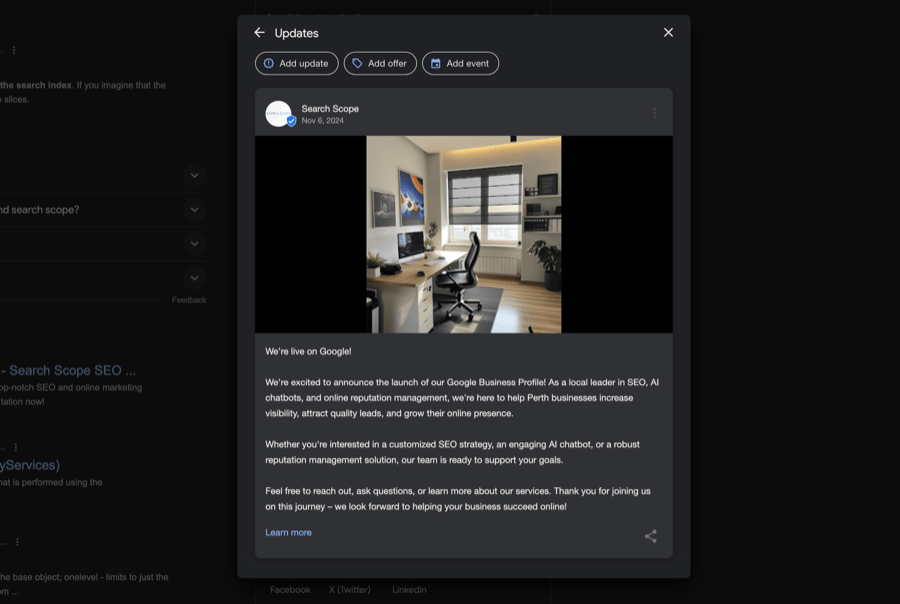
Where do Google Business Profile posts appear?
On desktop Search, posts sit in the knowledge panel carousel near the bottom of your profile, below reviews. On Google Maps desktop, they show up just under your primary business information. On mobile, users need to scroll further down in the Overview tab, or find them under the Updates tab in the Google Maps app.
Your opening image and your first sentence do almost all the work. If they do not stop the scroll, the rest of the post is wasted.
How long do GBP posts stay live?
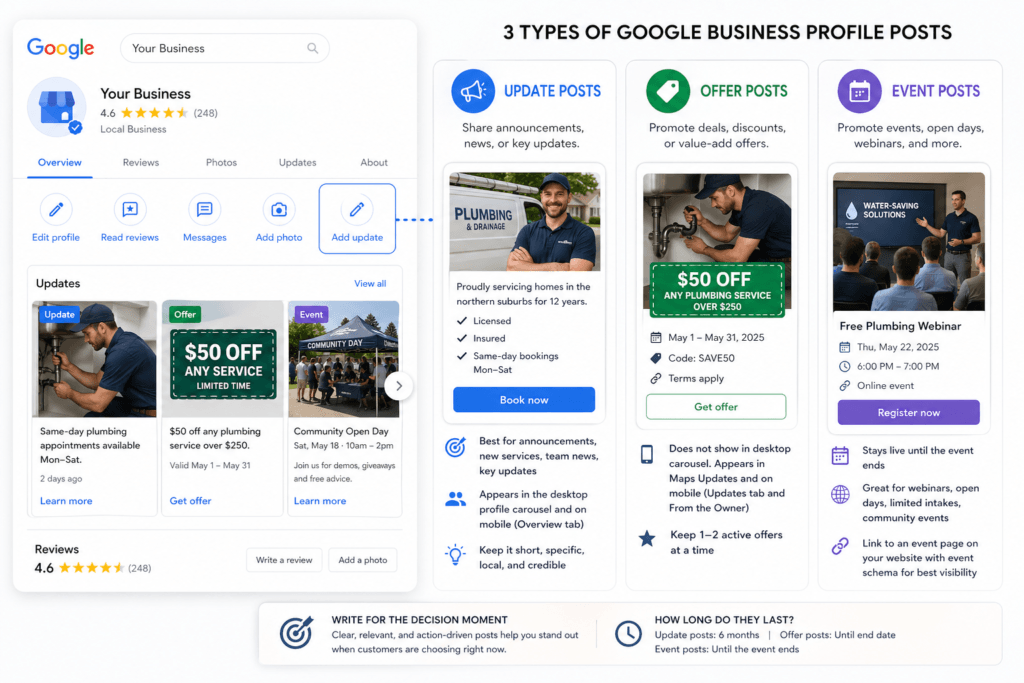
Update posts are archived after about six months. Offer posts last until their end date. Event posts expire when the event ends.
Posts appear in reverse-chronological order. A newer Update will push your active Offer post below it in the carousel even if the offer is still valid. If you have not posted in a while and all your updates have expired, Google replaces the section with a prompt that reads “view previous updates on Google.” Every potential customer who lands on your profile sees that.
Types of Google Business Profile Posts
There are currently three post types in the Add Update tab of your Google Business Profile dashboard. Each serves a different purpose. Most businesses use one and ignore the other two.
| Post Type | Best Use | Duration | CTA Options |
|---|---|---|---|
| Update | Announcements, new services, team news, anything that differentiates at the decision stage | Archived after about six months | Book, Order Online, Buy, Learn More, Sign Up, Call Now |
| Offer | Discounts, free consultations, packaged deals, time-limited promotions | Until your set end date | View Offer (with optional coupon code and redemption link) |
| Event | Open days, webinars, intake windows, sponsorships, anything with a date and a reason to act | Until the event ends | Any standard CTA button linking to your event page |
Update Posts
Update posts support an image, copy, and an optional CTA button. Use them for announcements, new services, team news, or anything that differentiates your business at the decision stage.
The mistake is repurposing blog content here. A 600-word article summary does not convert a prospect deciding between three plumbers in the next five minutes. An Update post that works looks like this: “We have been servicing homes in the northern suburbs for 12 years. Licensed, insured, same-day bookings available Monday to Saturday.” Specific, local, credible, done.
Offer Posts
Offer posts require a start date and end date. They are designed for promotions, discounts, and packaged deals. You can add a coupon code and a redemption link. Offer posts currently do not show in the desktop profile carousel. They appear in the Maps Updates section and From the Owner on mobile.
The offer does not have to be a discount. A free initial consultation, a no-obligation site assessment, or any value-add that gives a potential customer a reason to act now qualifies. If you have a standing offer that runs year-round, set it as an Offer post with a 12-month window and leave it running.
Keep active Offer posts to one or two at a time. Google shows them all on mobile, and a cluttered profile looks unmanaged.
Event Posts
Event posts include the event name, date range, optional description, and a CTA link. They stay live until the event ends.
Service businesses assume this post type is for hospitality. It is not. A limited intake window, a free webinar, a consultation open day, a community sponsorship: all work as event posts. If it has a date, a location or link, and a reason to show up, publish it.
One thing worth noting: Event posts do not automatically feed the Events section in your Google Business Profile. That section pulls from external sources. If you want your events in both places, create a dedicated event page on your website with event schema markup and link to it from the post.
How Google Business Profile Posts Affect Local SEO
Straight answer: GBP posts are not a confirmed direct ranking factor. Google has never stated that publishing a post will move you up the Map Pack.
What they do influence is the set of signals that feed into the local algorithm. So the answer is not “yes” or “no.” It is “not directly, but yes via the signals they feed.” That distinction is where most guides hedge and most operators stop reading.
An active Google Business Profile signals relevance. Freshness matters. When your post copy includes location-relevant terms, service keywords, and entity mentions consistent with your primary business category, you reinforce how Google understands and classifies your business.
Businesses with active, relevant profiles tend to rank higher in local Map Pack results over time. Not because of any individual post, but because the aggregate profile of a managed listing outperforms a dormant one. Posts compound with the rest of your listing’s signals: categories, services, and profile attributes. The pattern is consistent across the major local-search ranking-factor studies: active profiles with regular posting, photos, and review velocity tend to outperform listings that sit untouched.
There is also the user behaviour side. A post with a clear CTA that generates clicks, calls, or direction requests produces engagement data. Google tracks that. A profile that consistently drives engagement is one Google has more confidence surfacing.
Stopping posts does not trigger an immediate penalty. But a dormant Google Business Profile in a competitive local market is handing a trust advantage to every competitor who stayed active.
GBP Posts and AI Search: What Changed and Why It Matters
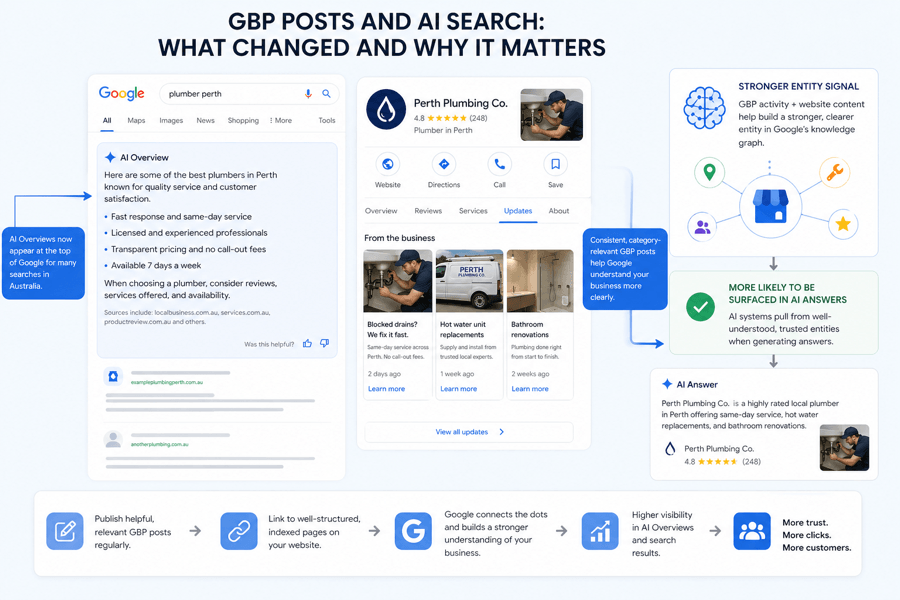
AI Overviews now appear for a growing share of searches, and they treat your Google Business Profile as an entity record, not a listing. Consistent, category-relevant posting activity is one of the signals that reinforces how clearly Google understands your business.
GBP posts that link to well-structured, indexed pages on your website strengthen that entity signal further. A dormant profile reads as a weakly-defined entity. An active profile that consistently references your services, location, and category reads as a confidently-defined one, and that is the version AI systems pull into generative answers.
If you are serious about local SEO and Google Maps visibility across Australia, this is worth acting on now. Most competitors are not. The Search Scope GEO Checklist is a free starting point if you want to see where your business currently stands in generative search.
If you would rather skip the DIY route, and we will walk through your profile with you.
Google Business Profile Post Best Practices
How often should you post?
Once a week is a solid baseline. Twice a month keeps a profile from looking abandoned. Less than that, and you are losing ground to anyone in your Map Pack who posts consistently.
Keeping your Google Business Profile fresh signals to Google that your business is active and helps you stay visible to potential customers searching nearby. Update posts stay active for about six months, but the carousel shows the most recent post first. If your last Update was three weeks ago, that is what prospects see. If a competitor posted yesterday, they look more current.
A sustainable weekly rhythm for most Australian service businesses:
- One Update post per week
- One active Offer post at all times if you have something worth promoting
- Event posts added as relevant
Do not auto-repeat the same post on a fixed schedule without variation. Google may downweight it, and regular visitors to your profile will notice.
Stuck on What to Post? Idea Generator
The reason most profiles go quiet is not laziness, it is running out of ideas by week three. Pick your business type for a month of concrete, decision-stage post ideas you can rotate. Tag every link with UTM parameters and lead with a real photo, not stock.
Post idea generator
How to create effective Google Business Profile posts
Copy
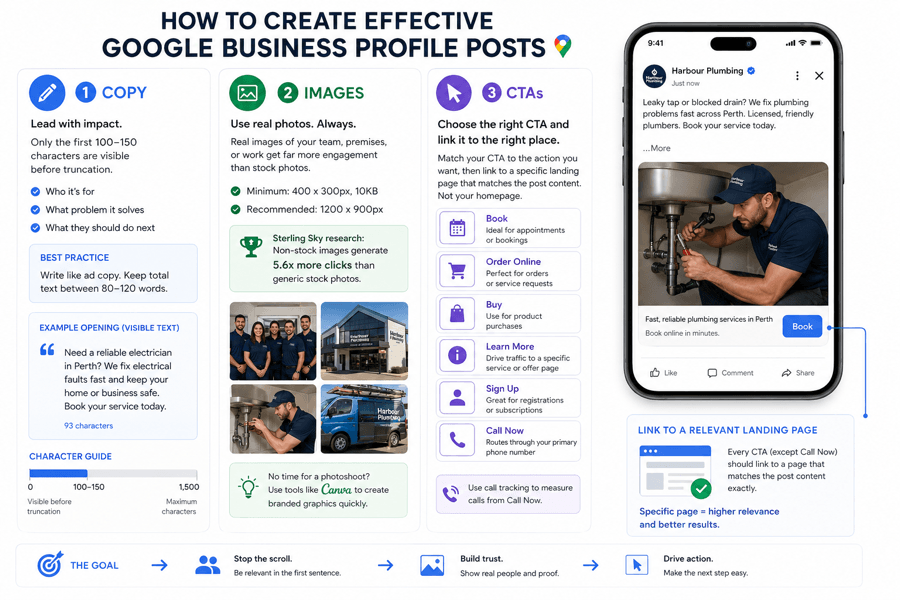
You have 1,500 characters. Only the first 100 to 150 are visible before truncation. Your opening sentence needs to carry the most important message. Write it like ad copy: who is this for, what problem does it solve, what do they do next. Keep total text between 80 and 120 words.
Images
Google’s technical minimum is 400 x 300 pixels and at least 10KB. Use 1200 x 900 pixels in practice. Real photography of your team, premises, or work significantly outperforms stock images. Research by Sterling Sky found non-stock images generate 5.6 times more clicks than generic stock photography across more than 1,000 posts analysed. It remains the canonical study on the topic, and three years later, nothing in our own client data contradicts it.
CTAs
Your options are Book, Order Online, Buy, Learn More, Sign Up, and Call Now. Call Now routes through your primary GBP phone number and requires call tracking to measure accurately. For every other option, link to a specific landing page that matches the post content. Not your homepage.
Post rejection
Posts get rejected for low-quality images, misspellings, phone numbers in the post body, links to untrusted domains, or content in a restricted category. Google’s content policies for GBP posts cover the full list, including regulated industries like alcohol, tobacco, gambling, and financial services where product content is not allowed. If a post is rejected you will see it labelled in your dashboard and receive an email. Editing and resubmitting usually clears it. If you keep hitting rejections despite clean content, run your image through Google’s Vision SafeSearch API to check whether it is triggering an explicit content filter.
How to Measure Whether Your GBP Posts Are Working
GBP Performance gives you impression and click data but does not separate post-click traffic from other profile interactions. Real attribution requires UTM parameters on every link you publish in a post.
Tag every post link with a UTM source set to “google_business_profile”, a medium set to “gbp_post”, and a campaign name that identifies the specific post or promotion. Build these using Google’s Campaign URL Builder, then paste the tagged URL into the CTA link field. This takes 30 seconds per post and turns your GBP into a measurable channel.
In GA4, go to Reports, then Acquisition, then Traffic Acquisition, and filter by source. If your conversion events are configured, you can track which post types are driving form fills, bookings, or calls. That is the difference between thinking your posts are working and knowing they are working.
What Happens When You Stop Posting on Google Business Profile
No immediate penalty. Your profile does not drop in the Map Pack the day you stop.
What happens over six months is that your Update posts are archived and Google replaces the section with a “view previous updates” prompt. That is visible to every potential customer who lands on your profile. In a competitive Map Pack where other businesses are posting weekly, a dormant Google Business Profile is handing them a trust advantage for free. Dormant is common: in our Perth Google Business Profile study, 43% of sampled local-service profiles showed any visible post and 12% showed one from the previous 90 days.
There is a secondary issue. Profiles with low owner engagement are more vulnerable to suggested edits being applied. When Google or users suggest changes to a neglected listing, those changes are more likely to go through. Regular posting signals active management and reduces that risk.
For businesses that have previously dealt with a Google Business Profile suspension, posting activity is part of demonstrating to Google that the listing is genuinely managed and legitimately operating.
A consistently active profile looks different to Google from one that sits untouched, and it reinforces your overall online presence.
Frequently Asked Questions
What should I post on my Google Business Profile?
Post content that helps a potential customer at the decision stage: social proof, specific service details, current promotions, operational updates, and anything that differentiates you from the listing next to yours in the Map Pack. Do not repurpose long blog posts. Think about what would make someone choose you over a competitor right now.
Is it worth posting on Google Business Profile?
Yes. Not because a single post will move your Map Pack ranking, but because a consistently active Google Business Profile outperforms a dormant one at every point in the customer decision. Posts help build trust, keep your profile current, and convert more of the people already looking at your listing. It costs nothing and takes fifteen minutes per week.
Can you schedule Google Business Profile posts?
Google allows recurring posts set to weekly, monthly, or custom schedules through the standard dashboard. For third-party scheduling across multiple locations, tools like BrightLocal and Local Dominator connect via the GBP API and give you more control over timing and consistency.
Do GBP posts expire?
Update posts are archived after about six months. Offer posts expire on their set end date. Event posts expire when the event ends. All expired posts remain accessible through the View All archive on your Google Business Profile.
What image sizes does Google require for GBP posts?
Minimum is 400 x 300 pixels at least 10KB. Recommended is 1200 x 900 pixels in JPG or PNG. Use real photography where possible: it outperforms stock by a wide margin and produces better engagement on Google Search and Google Maps.
What does a Google Business Profile post look like?
Posts appear as a card with your image, the first few lines of your copy, and a CTA button. On desktop they sit in a scrollable carousel in the knowledge panel. On mobile they appear in the Updates or Overview tab. The image does most of the work. Research by Sterling Sky found that posts with non-stock images average 5.6 times the click-through rate of text-heavy or stock-image posts, which is why real photography is worth prioritising from the start.
The Bottom Line
Google Business Profile posts are one of the lowest-cost, highest-visibility activities available to any business with a local presence. The mechanics are simple. The cost is zero. The return is a Google Business Profile that looks active, builds trust faster, and converts more of the people who are already searching for you.
The businesses treating their Google Business Profile as a static listing are not wrong. They are just making it easier for their competitors.
If you want a local SEO strategy built around your full Google Business Profile optimisation, not just the posts, or let us manage your Google Business Profile for you.