
Technical SEO Audit Checklist For Local Businesses
A practical technical SEO audit checklist for AU local businesses: speed, Core Web Vitals, crawlability, local schema, and the indexation checks that matter.

You know how crucial technical SEO is for getting your local business noticed online. It’s the engine under the bonnet, making sure your website is fast, easy for Google to understand, and pops up when locals are searching.
In my experience running Search Scope here in Perth, I’ve seen countless businesses with great services fail to get traction simply because their website’s technical foundation wasn’t right. Getting this right isn’t just about ticking boxes; it’s about directly connecting with customers in your area who are ready to buy.
A solid technical audit is the fastest path to uncovering what’s holding you back.
This isn’t just a list. It’s a practical guide to finding and fixing the exact issues that matter for local rankings, backed by what we see working for Australian businesses every day.
- Speed & Mobile Friendliness: Make your site fast and easy to use on a phone. Australian traffic splits roughly 53% desktop to 44% mobile (Statcounter, June 2026), but local “near me” searches skew heavily to phones, so mobile is where the ready-to-buy traffic sits.
- Local Signals: Ensure your business name, address, and phone number (NAP) are identical everywhere online.
- Google’s Rules: Check that your site is easy for Google to crawl and that you’re using tools like Schema markup to explain what your business does.
- Security & Content Health: Use HTTPS and clean up any duplicate content that could be confusing search engines.
Your Technical SEO Audit Checklist for Local Businesses
Let’s walk through the essential checks that form the backbone of a strong online presence for any local business in Australia. These steps directly impact how easily customers find you.
How Can I Improve My Website Speed and Performance?
Website speed is a major factor for user experience and search rankings, especially for local businesses. A Google and Deloitte study found that even a 0.1-second improvement in mobile site speed lifted retail conversions by 8.4% and average order value by 9.2%. When a local customer is searching for a service, a slow-loading site is a deal-breaker.
Page Speed Testing and Improvements
Start by getting a baseline. Use Google PageSpeed Insights to analyse your site’s performance. It gives you a score and specific recommendations for both mobile and desktop.
Focus on these high-impact areas first:
- Image Compression: Large images are the most common speed killer. Use tools like TinyPNG or ShortPixel to shrink file sizes without sacrificing quality. Switching to modern formats like WebP produces files 25 to 34% smaller than comparable JPEGs.
- Browser Caching: This stores parts of your site on a visitor’s device, so it loads instantly on their next visit. Most caching can be enabled with a simple plugin if you’re using a platform like WordPress.
- Code Minification: This process removes unnecessary characters and spaces from your code. Note Cloudflare removed its Auto Minify toggle in August 2024 after measuring the benefit at under 0.1% of page size, so this is a build-step job now rather than a switch at the CDN.
- Server Response Time: For Australian businesses, local hosting matters. Choosing a provider with servers in Sydney or Melbourne, like VentraIP or SiteGround, can dramatically cut down latency for your customers.
Aim for a page load time of under 3 seconds. Google’s own research has long shown that over half of mobile visits are abandoned when a page takes longer than three seconds to load. That figure is from 2016, but the behaviour has not changed.
Is My Website Truly Mobile-Friendly?
Australia is still a desktop-majority market overall, but local service searches are a different story: those happen on a phone, often standing in a driveway or a car park. Your site has to work there.
Google retired its standalone Mobile-Friendly Test tool in late 2023, so do not go looking for it. Instead, use the mobile tab in PageSpeed Insights or run Lighthouse in Chrome, then check the site on a real phone. Then check these points manually:
- Responsive Design: Does your site’s layout adapt smoothly to different screen sizes? Text should be readable without pinching to zoom.
- Tap Targets: Are buttons and links large enough to be easily tapped? Aim for a minimum size of 48×48 pixels.
- Simple Navigation: Menus should be designed for touchscreens, with clear and concise options that make it easy for users to find what they need.
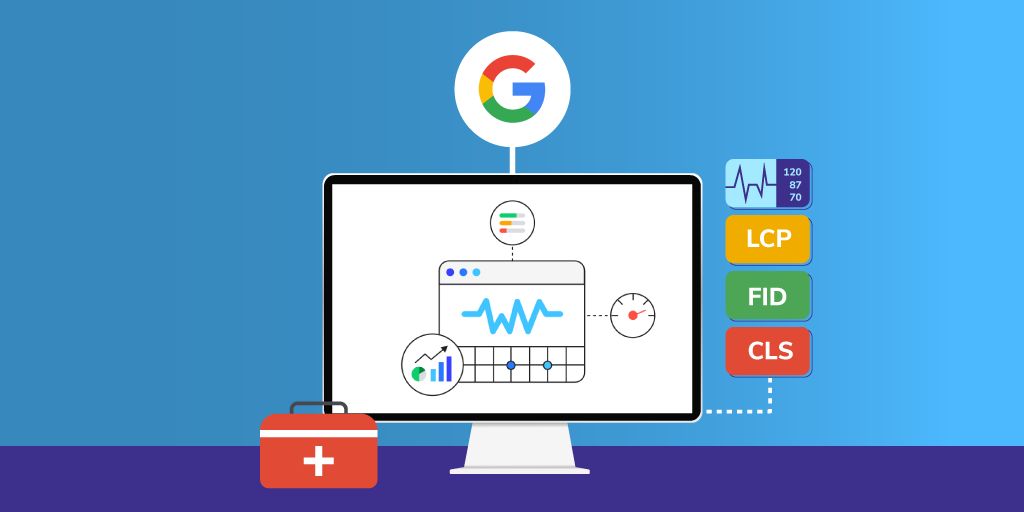
What are Core Web Vitals and Why Do They Matter?
Core Web Vitals are a specific set of metrics Google uses to measure the real-world user experience of your site. Passing these checks is a direct signal to Google that your site is high-quality.
Here’s the breakdown:
- Largest Contentful Paint (LCP): Measures loading performance. Your main content should appear in under 2.5 seconds.
- Interaction to Next Paint (INP): This metric replaced First Input Delay (FID) in March 2024 and measures interactivity. Your page should respond to clicks and taps in under 200 milliseconds.
- Cumulative Layout Shift (CLS): Measures visual stability. The page shouldn’t jump around as it loads. Keep your CLS score below 0.1.
You can track your site’s Core Web Vitals directly in Google Search Console. This is the best place to monitor real user data and get alerts if any issues pop up that could harm your local rankings.
The bar is lower than you think
A grounding reality check on the CWV threshold. The 2025 Web Almanac found only 48% of mobile sites pass all three Core Web Vitals. If your site fails one, you’re not behind some elite benchmark, you’re behind the median.
Two things worth knowing about how Google actually evaluates these. The thresholds must be met for at least 75% of real page visits, not synthetic lab tests, before you get a “Good” rating. And Google uses field data from the Chrome User Experience Report (CrUX), which PageSpeed Insights shows at the top of its report when it has enough traffic to report on you, with Lighthouse lab data below.
Lab data is useful for diagnosis. Field data is what Google ranks on. Check both, but treat field data as the verdict.
Optimising On-Page SEO for Local Search
On-page SEO helps improve your local search visibility in Australia. These elements tell search engines exactly where your business is located and what services you provide, making you more relevant to nearby customers.
How Do I Write Meta Tags for Local Customers?
Your title tags and meta descriptions are often the first impression a potential customer has of your business in search results. Make them count.
Title Tags
- Start with your main service and location (e.g., “Emergency Plumber in Fremantle, WA”).
- Keep titles under 60 characters to avoid them being cut off.
- End with your business name for branding.
Meta Descriptions
- Write a unique description for every important page, keeping it under 160 characters.
- Always include your suburb or city and a local phone number (e.g., 08 9123 4567).
- Finish with a clear call-to-action, like “Call for a free quote” or “Book online today.”
| Meta Element | Best Practice Example | Common Mistake |
|---|---|---|
| Title Tag | “Emergency Plumber Perth | 24/7 Service |
| Meta Description | “Need a licensed plumber in Perth’s northern suburbs? Smith’s Plumbing provides 24/7 emergency repairs. Call 08 9123 4567 for same-day service.” | “We are plumbers who provide plumbing services. Contact us today for all your plumbing needs.” |
What’s the Best Way to Structure Headers and URLs?
A logical structure for your headers and URLs makes your site easier for both users and search engines to navigate.
Header Structure
- Use one H1 for the main page title (e.g., “Your Trusted Electrician in Joondalup”).
- Use H2 subheadings for key sections, including location-specific terms.
- Maintain a logical hierarchy (H1 > H2 > H3).
URL Best Practices
- Keep URLs short and descriptive.
- Include your primary service and location where it makes sense, as detailed in this comprehensive guide.
- Use hyphens (-) to separate words.
A good URL structure helps Google understand the page’s purpose immediately. For instance:
example.com.au/services/plumbing-perth
example.com.au/locations/northbridge-plumber
For more tips on this, see the location page section below.
Getting Your Local SEO Technical Setup Right
This is where you connect your website directly to local search platforms. Getting these technical details correct is fundamental to appearing in Google Maps and local search results.
How Do I Properly Optimise My Google Business Profile?
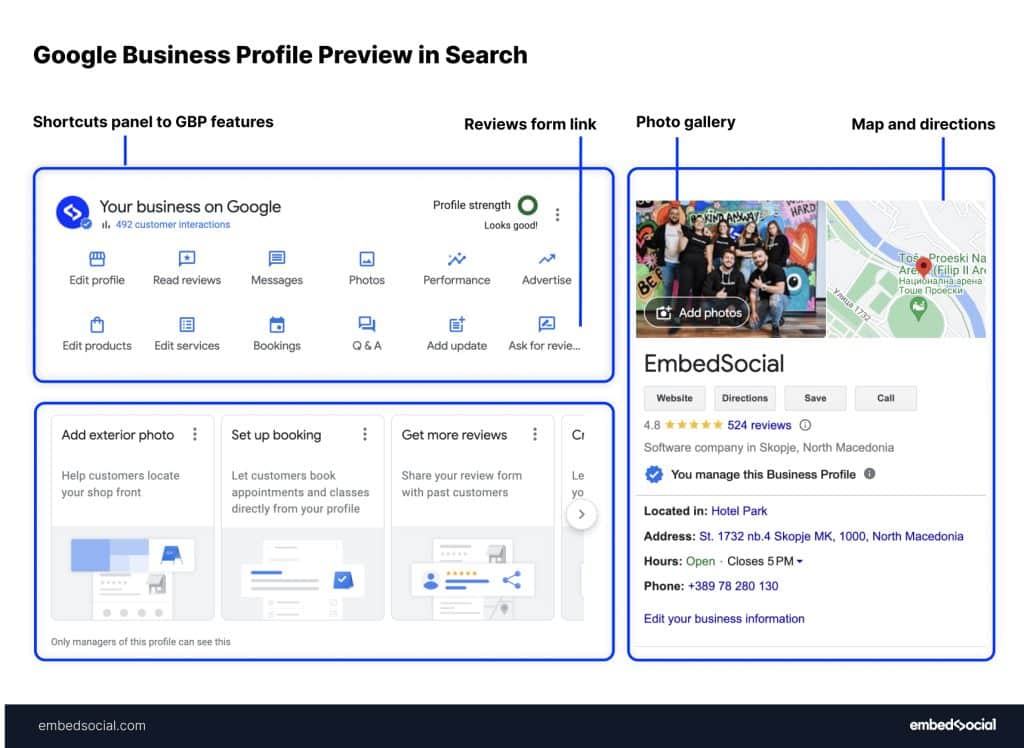
Correctly setting up your Google Business Profile is the most important step for local visibility. Think of it as your digital storefront.
Profile Verification and Completeness
- Complete the verification process. Google now leans on video verification and live video calls, with phone or email for some eligible businesses (mailed postcards have largely been phased out).
- Upload high-quality, recent photos of your work, team, and premises (Google’s minimum is 250 by 250 pixels and it recommends 720 by 720).
- Ensure your business hours are precise, especially for public holidays.
- Choose the most specific primary category possible (e.g., “Paediatric Dentist” instead of just “Dentist”).
Key Optimisation Tactics
- Write a full business description using all 750 characters and include local keywords naturally.
- Use the Google Posts feature regularly to share updates, offers, and events. This signals to Google that your business is active.
- Do not plan around Q&A or chat. Google retired public Q&A on profiles through late 2025 and shut chat messaging down in July 2024. Google now generates its own answers from your profile, reviews and website, so the questions customers ask belong on your service pages where you control the answer.
Why Is NAP Consistency So Important?
Ensuring your business details are consistent across the web is a huge trust signal for Google. This is known as NAP (Name, Address, Phone) consistency.
Inconsistencies confuse search engines and can harm your local rankings. You can use tools like BrightLocal or Moz Local to audit your business listings across major Australian directories and fix errors.
- Name: Use your real-world trading name (the one on your signage), not your registered “Pty Ltd” entity name from ASIC. Use it identically everywhere.
- Address: Use one consistent format based on the official Australia Post format.
- Phone: Use one local number and one format everywhere (a landline such as 02, 03 or 08 works well as the primary contact).
- ABN: Display your Australian Business Number consistently where required.
| Element | Correct Format | Incorrect Format |
|---|---|---|
| Business Name | Smith’s Plumbing Services | Smiths Plumbing / Smith Plumbing Services |
| Address | Suite 2, 123 Murray St, Perth WA 6000 | #2 123 Murray Street, Perth |
| Phone | 08 9123 4567 | +61 8 9123 4567 / 891234567 |
| Trading Hours | Entered in Google’s structured hours fields | Left as free text in the description |
What is Local Schema and How Do I Set It Up?
Adding local business schema markup is like giving Google a business card in its own language. It’s a piece of code that explicitly defines your business type, location, opening hours, and contact details.
This helps search engines display your information in “rich results,” like knowledge panels and map listings. You can use a tool like the Merkle Schema Markup Generator to create the code without needing to write it from scratch.
{
  "@context": "https://schema.org",
  "@type": "Plumber",
  "name": "Smith's Plumbing Services",
  "address": {
    "@type": "PostalAddress",
    "streetAddress": "123 Murray Street",
    "addressLocality": "Perth",
    "addressRegion": "WA",
    "postalCode": "6000",
    "addressCountry": "AU"
  },
  "geo": {
    "@type": "GeoCoordinates",
    "latitude": "-31.9523",
    "longitude": "115.8613"
  },
  "telephone": "+61891234567",
  "openingHoursSpecification": [
    {
      "@type": "OpeningHoursSpecification",
      "dayOfWeek": [
        "Monday",
        "Tuesday",
        "Wednesday",
        "Thursday",
        "Friday"
      ],
      "opens": "08:00",
      "closes": "17:00"
    }
  ]
}
After you’ve added the code to your website, always verify your schema using Google’s Rich Results Testing Tool to ensure there are no errors.

Ensuring Search Engines Can Crawl Your Site
If Google can’t find and read your pages, you won’t rank. These technical checks ensure your content is accessible to search engine crawlers.
What Should I Check in My Robots.txt File?
The robots.txt file is a simple text file that tells search engines which pages or sections of your site they shouldn’t crawl. It’s important to ensure you aren’t accidentally blocking important content.
Key Checks for Robots.txt:
- Make sure the file exists at yourdomain.com.au/robots.txt.
- Check that you are not disallowing key service or location pages.
- Use Google Search Console’s URL Inspection tool to test if a specific URL is blocked.
A standard robots.txt for a local business might look like this:
User-agent: *
Allow: /
Disallow: /wp-admin/
Disallow: /checkout/
Disallow: /my-account/

Sitemap: https://yourdomain.com.au/sitemap.xml
Is My XML Sitemap Set Up Correctly?
An XML sitemap is a list of all the important pages on your website, created specifically for search engines. It helps them discover your content more efficiently.
What to Include in Your Sitemap:
- All your key service and location pages.
- Your homepage, about page, and contact page.
- Important blog posts that are relevant to your services.
- Ensure the sitemap is submitted to Google Search Console.
| Sitemap Element | Details Included | Update Frequency |
|---|---|---|
| Homepage | Overview of the business | Monthly |
| Service pages | Core services offered | Quarterly |
| Location pages | Areas served | As needed |
| Blog posts | Industry updates | Weekly |
How Should I Structure My Internal Links?
A good internal linking structure helps spread authority throughout your site and guides users and search engines to your most important content.
Best Practices for Internal Linking:
- Link from your high-authority pages (like the homepage) to your key service and location pages.
- Use descriptive anchor text (e.g., link “plumbing services in Fremantle” instead of “click here”).
- Ensure every page is reachable within three clicks from the homepage.
A “hub-and-spoke” model works well for many local businesses:
Homepage
├── Plumbing Services (Hub)
│   ├── Emergency Repairs (Spoke)
│   ├── Hot Water Systems (Spoke)
│   └── Gas Fitting (Spoke)
└── Service Areas (Hub)
    ├── Perth CBD (Spoke)
    ├── Fremantle (Spoke)
    └── Joondalup (Spoke)
Are Your Location Pages Actually Indexed?
This is the technical failure we see most often on local sites, and most generic checklists skip it. If you have built a page for each suburb you serve, check that Google has actually indexed them. In Google Search Console’s Pages report, look for location pages stuck under “Discovered - currently not indexed” or “Crawled - currently not indexed”. That status almost always means one of two things: the pages are too thin, or they are near-duplicates of each other with the suburb name swapped in.
This is what the report looks like on a real site we audited, 161 pages sitting in “Crawled - currently not indexed”, a backlog that had been building since 2023. Every one of those pages cost someone time to produce and earns nothing while it sits there:

Google does not owe you an indexed page for every suburb. A page earns indexation by being genuinely useful and distinct. If your location pages are not being indexed, the fix is editorial, not technical: make each one actually different, with real local detail, or consolidate the weak ones. Our location pages master guide covers how to do that without tripping thin-content problems.
Worth knowing: crawl budget is rarely the constraint for a local business. Google’s own guidance notes that crawl budget mainly matters for very large sites (tens of thousands of pages or more). For a normal local site, indexation problems are about quality and duplication, not crawl limits.
What Are Some Other Important Technical Checks?
Beyond the core setup, these additional technical steps help refine your site’s performance and build trust with both users and search engines.
Why is an SSL Certificate (HTTPS) Necessary?
An SSL certificate enables HTTPS, which encrypts the connection between your website and your visitors. It’s a standard security measure that protects user data, builds trust, and is a confirmed Google ranking factor.
SSL Checklist:
- Confirm HTTPS is active across your entire site. You should see a padlock icon in the browser’s address bar.
- Check for “mixed content” issues, where secure pages load insecure (HTTP) elements.
- Ensure all HTTP traffic is permanently redirected (301) to HTTPS.
| SSL Issue | Impact on Users | How to Fix It |
|---|---|---|
| Mixed Content | Breaks the padlock and shows security warnings. | Update all internal links and resource paths to HTTPS. |
| Expired Certificate | Browsers may block access to your site. | Renew your certificate. Most hosts, like SiteGround, offer free auto-renewing certificates from Let’s Encrypt. |
| Redirect Loops | Prevents the page from loading at all. | Check your server configuration for correct 301 redirects. |
How Can Duplicate Content Hurt My Local SEO?
Duplicate content can dilute your rankings by forcing Google to choose between several identical or very similar pages. This often happens unintentionally on local business sites.
Common Sources of Duplicate Content:
- Separate pages for suburbs that have nearly identical text.
- Printer-friendly versions of pages.
- Having www and non-www versions of your site accessible.
You can use a tool like Siteliner or Copyscape to scan your website for internal and external duplicate content. For technical duplicates, like the www versus non-www issue, a 301 redirect to your preferred hostname is the correct fix. A canonical tag is a hint Google can ignore, and it leaves both hostnames resolving.
site:yourdomain.com.au "your exact content snippet here"What Other Schema Can Help My Business?
Beyond the LocalBusiness schema, you can add more specific types to give Google even more context about what you do. This helps you show up for more specific searches.
For example, if you’re a plumber, you can use the Plumber schema type. If you run a cafe, you can use CafeOrCoffeeShop. These more specific types have additional properties you can use, such as hasMenu for a restaurant or areaServed for a service-area business.
Example Schema for a Service Area Business:
{
  "@type": "Plumber",
  "name": "Your Business Name",
  "address": {
    "@type": "PostalAddress",
    "streetAddress": "123 Main Street",
    "addressLocality": "Perth",
    "addressRegion": "WA",
    "postalCode": "6000"
  },
  "areaServed": {
    "@type": "GeoCircle",
    "geoMidpoint": {
      "@type": "GeoCoordinates",
      "latitude": "-31.9523",
      "longitude": "115.8613"
    },
    "geoRadius": "25000"
  },
  "openingHours": "Mo,Tu,We,Th,Fr 09:00-17:00",
  "telephone": "+61 8 1234 5678"
}
This code tells Google you’re a plumber in Perth that serves a 25km radius.
Frequently Asked Questions (FAQs)
How often should I do a technical SEO audit?
For most local businesses, a comprehensive technical audit once every 6-12 months is sufficient. However, you should monitor your Core Web Vitals and Google Search Console reports monthly for any new issues that might pop up.
What’s the most important technical SEO factor for a local business?
Mobile-friendliness and speed are arguably the most critical. A large share of local searches happen on smartphones, often when someone is out and needs a service immediately. A slow or clunky mobile site will lose you that customer almost instantly.
Can I do a technical SEO audit myself?
Yes, you can perform a basic audit using free tools like Google Search Console, PageSpeed Insights, and Lighthouse in Chrome. These will identify the most common and high-impact issues. For a deeper analysis, tools like Ahrefs’ Site Audit, Sitebulb or Screaming Frog go further.
How long does it take to see results from fixing technical SEO issues?
It varies. Simple fixes like submitting a new sitemap or correcting a robots.txt file can be picked up by Google within days. Improvements to site speed and Core Web Vitals might take several weeks to be reflected in your rankings as Google re-crawls your site and gathers new user data.
Is HTTPS really that important for a small local business?
Absolutely. HTTPS is a confirmed, albeit lightweight, ranking signal. More importantly, it builds trust. Modern browsers like Chrome prominently flag sites without HTTPS as “Not Secure,” which can scare away potential customers before they even see your services.
Bringing Your Technical SEO Audit Together
Audit Checklist Review
Running a regular technical SEO audit is fundamental for any local business aiming to win online. This isn’t a one-time fix, but an ongoing process of keeping your site healthy.
Here’s a simple way to prioritise your efforts based on our technical SEO audit checklist for local businesses:
| Audit Area | Key Elements | Priority Level |
|---|---|---|
| Website Speed & Mobile | Core Web Vitals (CrUX field data), Lighthouse mobile audit, real-device check | High |
| Local Setup | Google Business Profile, NAP Consistency, Local Schema | High |
| On-Page SEO | Meta Tags, Headers, URL Structure | Medium |
| Crawling & Indexing | Robots.txt, XML Sitemap, Internal Links | Medium |
| Security & Health | SSL Certificate, Duplicate Content Check | Medium |
By focusing on the high-priority items first, you address the factors that most directly impact how a local customer finds and interacts with your business.
Professional SEO Support
Technical SEO is one of those areas where a few hours from someone who does it daily saves you weeks of guessing. If you would rather have it done properly, Search Scope can help with:
- In-depth technical SEO audits that go beyond the basics.
- Proper setup and validation of schema markup for local search.
- Diagnosing and fixing Core Web Vitals and page speed.
- A full review and optimisation of your Google Business Profile.
- Cleaning up and maintaining your NAP consistency across the directories that matter.
If your site is technically holding back good services, and we will tell you plainly what is worth fixing first.