
Google Business Profile Optimisation Guide (2026 Framework for Local Rankings)
A step-by-step Google Business Profile optimisation framework for Australian businesses: categories, reviews, posts, suspension triggers, and tracking real ROI.

- Your Google Business Profile drives most of your local visibility, and most businesses waste it with incomplete listings, ignored reviews, and stale photos.
- This guide is the full framework: setup, the 17 fields that matter, the edits that get profiles suspended, and how to track results that actually mean something, calls, leads, revenue.
- Realistic timeline: 2 to 4 weeks for the foundations, 3 to 6 months to compete for the Local Pack.
Your Google Business Profile isn’t optional anymore. For most local businesses it’s the first thing a customer sees, and often the only thing between you and someone who’s ready to buy. Yet most businesses treat it like a set-and-forget checkbox: upload a logo, add the address, ask for a review every now and then, rather than the ongoing Google Business Profile management that actually moves rankings.
That loses to competitors who treat Google Business Profile (GBP) optimisation as a system.
The numbers back this up. BrightLocal’s Local Consumer Review Survey found the overwhelming majority of consumers use Google to evaluate local businesses, and that a complete, active profile consistently out-converts a thin one. If your profile isn’t fully built out, accurate categories, real photos, regular posts, replied-to reviews, you’re invisible to the exact people searching for your service right now.
This guide walks through the complete framework: what GBP optimisation actually is, how Google ranks profiles, every field that matters, the edits that trigger suspensions, and how to measure performance that affects your bottom line.
The short version, before the detail:
- Set up and verify your profile with accurate name, address, hours, and services.
- Choose categories precisely: one specific primary category, a small number of genuinely relevant secondaries.
- Add real photos of your premises, work, and team.
- Build and answer reviews consistently, every review, positive or negative, gets a reply.
- Stay consistent and active: matching business details everywhere, regular posts and updates.
That’s the skeleton. The rest of this guide is the system we use at Search Scope to make it actually rank.
What Is Google Business Profile Optimisation?
GBP optimisation is the systematic process of completing, maintaining, and managing every field in your profile to maximise visibility in three places: Google Maps, the Local Pack (the three results at the top of a local search), and AI-driven search features like Google’s AI Overviews and voice results.
Most businesses stop after the basics. That’s the gap.
How GBP influences Maps and the Local Pack
When someone searches “plumber Fremantle” or “dentist near me”, Google shows three results in the Local Pack. Your profile decides whether you’re one of them or buried on page two where nobody looks, which is why our work to rank a dental practice treats Local Pack presence as the first priority. Google ranks those results on three core factors, its words, not ours:
- Relevance: does your profile match what the searcher wants? This comes down to correct categories, a natural keyword-aware description, and detailed service listings that tell Google exactly what you do.
- Proximity: how close are you to the searcher? You can’t move your premises, but your service-area setup matters more than most businesses realise.
- Prominence: how authoritative is your business? Reviews (count and velocity), photos, posts, backlinks, and citation consistency. Prominence is the factor you have the most control over and the one most businesses ignore.
How AI search uses GBP data
AI search, ChatGPT, Google’s AI Overviews, Perplexity, pulls answers from structured data, and your profile feeds that pipeline. If your profile lacks LocalBusiness schema, complete service listings, recent reviews, and accurate NAP (Name, Address, Phone) data, you won’t get cited when someone asks an AI “who’s the best electrician in Subiaco?”.
This isn’t a distant problem. By late 2025, Google’s AI Overviews appeared for roughly 16% of all queries and were still climbing, with local intent searches over-indexed in that growth. Optimising your profile for AI visibility is part of AI search optimisation, not a separate job.
Why most businesses get it wrong
The mistakes are predictable. They fill out the basic fields once and never touch them again. Reviews pile up with no responses. Photos are either missing or obvious stock images. Categories get padded with every loosely related option in the hope of “ranking for more stuff”, which confuses Google’s relevance signal and does the opposite. And nobody ever checks Insights, so nobody knows if any of it is working.
GBP optimisation isn’t a one-time task. It’s weekly maintenance: posts, fresh photos, review responses within a day or two, Q&A monitoring, and a daily check on suggested edits.
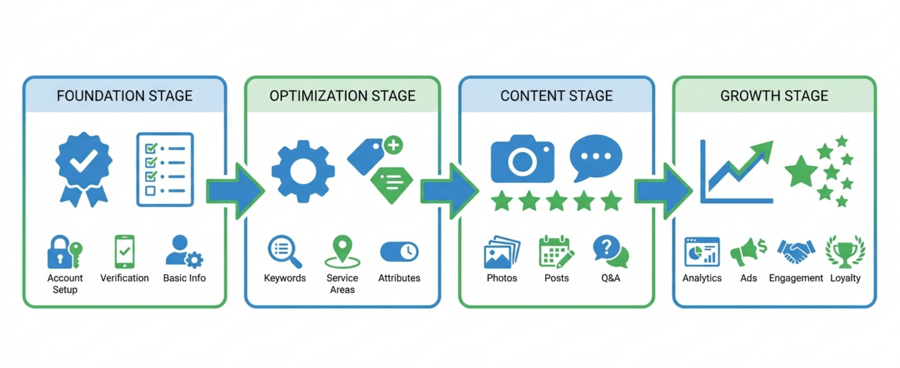
The Complete GBP Optimisation Framework
Start with competitor analysis
Before you touch your own profile, audit the top three competitors in the 3-pack you’re targeting:
- What primary and secondary categories are they using?
- How many reviews do they have, and how fast are they gaining them?
- What attributes are they highlighting?
- How often do they post?
- What photos are they uploading?
Find the gaps. If most competitors ignore an attribute or a service that’s genuinely relevant to your customers, that’s an opening. Our competitor GBP audit guide walks through this step by step.
Step 1: Set up and verify your profile
Your profile is the foundation of your Maps listing, which makes verification the first and most important step. It can be a genuine challenge, but it’s worth getting right.
| Method | Timeframe | Best for |
|---|---|---|
| Video | 24 to 48 hours | Google’s currently preferred method |
| Postcard | 1 to 2 weeks | Storefronts with a stable mailing address |
| Phone | Minutes to hours | Businesses with a verified phone line |
| 1 to 3 days | Select eligible businesses |
Once you receive the code (or confirmation the listing is live), enter it in your dashboard within the time limit. A fully completed profile includes:
- Business name, address, phone number
- Operating hours
- Website link
- Business description
- Services and products
- Attributes (accessibility, payment options, and so on)
Before you edit anything on an established profile: Google has tightened its algorithm to clean up Maps. Editing any of these five core elements is a common suspension trigger, business name, address (or storefront/SAB type), categories, URL, phone number. If your listing does get suspended, our Google Business Profile reinstatement service recovers profiles with a 98% success rate (295 of 300 Australian reinstatements since early 2025), reinstated or refunded.
| Field | Risk | Notes |
|---|---|---|
| Business name | High | Any change can instantly flag the profile |
| Address | High | Especially storefront ⇄ service-area switches |
| Categories | High | Changing primary, or adding unrelated secondaries |
| URL | Medium | Redirected or mismatched URLs raise spam signals |
| Phone number | Medium to high | New or unverified numbers can trigger re-verification |
Step 2: Get the business name right
Your name must match your real-world trading name and signage exactly. Google’s guidelines are strict and violations result in suspensions.
- Use your registered trading name (you don’t need “PTY LTD”, the brand name is fine).
- Don’t keyword-stuff (“Mario’s Pizza”, not “Best Pizza Perth”).
- Include a location only if it’s genuinely part of your registered name.
- Keep it identical across every platform.
If your target keyword naturally sits in your registered business name, that helps, but the answer is never to fake it. Google cross-checks against your registration documents.
Step 3: Choose categories precisely
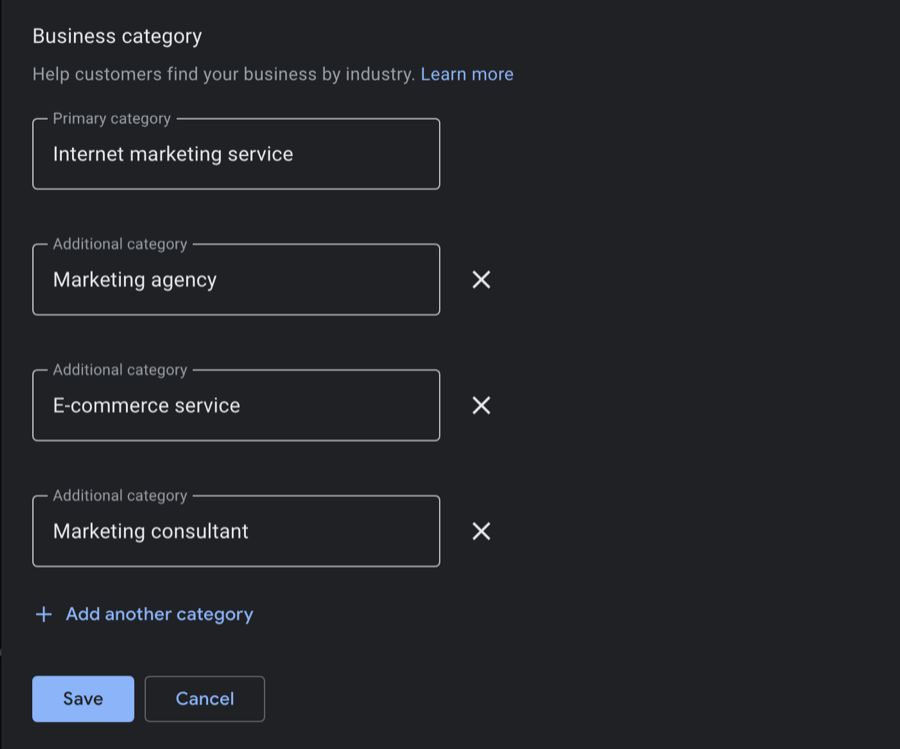
Your primary category is the cornerstone of your visibility, make it as specific as the options allow. “Italian Restaurant” beats “Restaurant”. This precision is what gets you in front of the right searches.
You can add secondary categories, but stick to a small number that genuinely relate to your primary. A medical clinic might add “Pediatrics” or “Internal Medicine”. Don’t pad the list, irrelevant secondaries dilute relevance and can confuse the algorithm.
- Choose the most specific category that describes your core business.
- Research competitor categories with a tool like GMB Everywhere.
- Avoid broad categories that just increase competition.
- Monitor Google’s category updates and adjust carefully.
Warning: Changing categories can trigger suspension. If your primary is genuinely wrong, fix it, but do it deliberately, not experimentally.
Step 4: Attributes
Attributes are the checkbox descriptors of your business, “Wheelchair accessible”, “Wi-Fi”, “Outdoor seating”. They appear as local justifications in results and help you match niche queries like “pet-friendly cafés with outdoor seating”, and they decide whether you surface when a customer taps a filter on Maps mobile (around 84% of Maps mobile searches show a filter bar) or when an AI assistant summarises local options from your structured data. Edit profile → “More” → “Attributes”, select everything that genuinely applies, and save. Available attributes depend on your primary category, and changes take 24 to 48 hours to appear.
There are three kinds. Factual attributes are objective and you set them (wheelchair access, contactless payment, free Wi-Fi); these fill the Maps filters. Subjective “from the business” attributes are self-declared descriptors, and in Australia the identity set is where the differentiation lives: Indigenous-owned (available in AU since 2022, list it if you are certified through Supply Nation or verifiably Indigenous-led), women-owned, LGBTQ+ owned or friendly, family-led, small business. Customer-reported highlights (“cosy atmosphere”, “good for groups”) are pulled from review content and you cannot edit them directly; you influence them by delivering the experience customers then describe.
One firm rule: only tick what is true. Over-claiming an attribute (wheelchair access you do not have, Indigenous ownership without basis) is a quality violation that can trigger a manual action if a customer reports it. The upside is that attributes are not one of the five core fields (name, address, phone, URL, categories), so editing them on a verified profile does not carry the suspension risk a category change does. They are the safest high-value surface to fix on an established profile.
Step 5: Optimise the business description
Your 750-character description is conversion real estate, not a keyword dump.
- Lead with your value proposition.
- Work primary keywords in naturally within the first ~100 characters, don’t over-optimise.
- Mention your location and two or three key service areas (not twenty).
- End with a clear call to action.
- Refresh it seasonally; updates signal an active profile.
A workable frame: “[Business] provides [service] for [area]. With [X] years’ experience we specialise in [specific expertise]. [Differentiator] helps [customer] achieve [outcome]. Contact us for [offer].”
Step 6: Phone number
Add your main business number. For multiple locations, use a distinct, location-relevant number per profile. Avoid swapping in unverified VOIP numbers on an established profile, it’s a re-verification trigger.
Step 7: Website URL
This field sends qualified traffic from your profile to your site.
- Link to the most relevant landing page, not always the homepage.
- Use the final destination URL, no redirect loops.
- Add UTM parameters so you can see GBP traffic in Analytics.
- Make sure the page is fast on mobile and matches the GBP’s services.
You don’t strictly need a website to have a profile, but treat the two as one ecosystem, a profile backed by an SEO-optimised site that mirrors your services and locations performs far better.
Step 8: Location and service areas
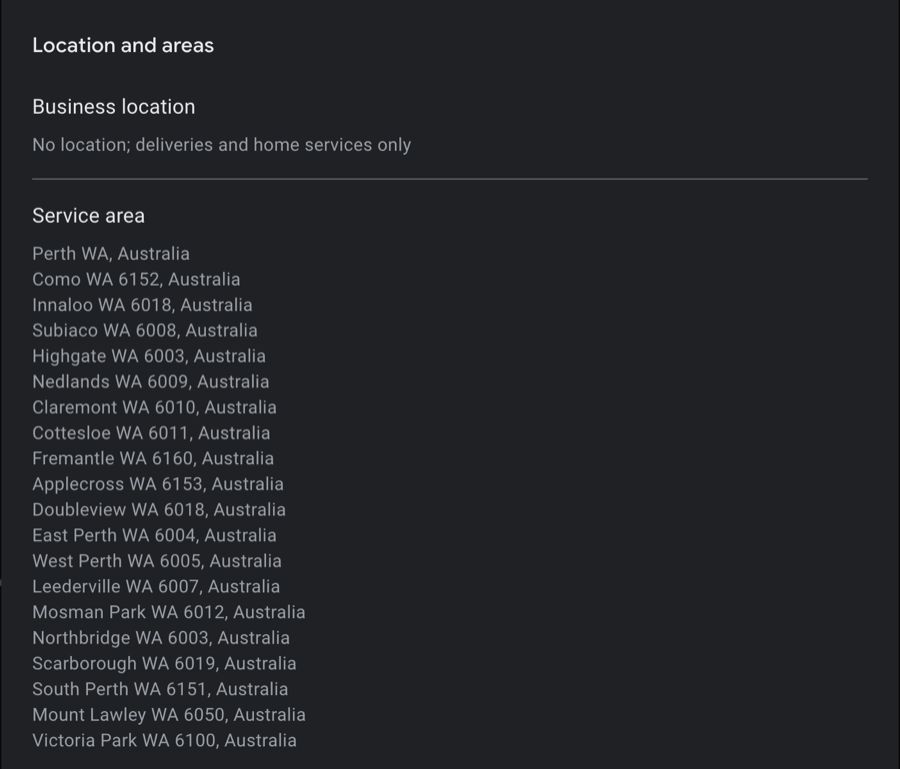
You’re one of three types:
- Storefront: customers visit you. Needs signage and documentation (lease/ownership, insurance). Storefronts usually perform best in Maps because of the proximity factor, which weights results toward wherever the searcher happens to be standing.
- Service-area business (SAB): you travel to customers. Hide the physical address and define your service areas. Tradies, mobile services, cleaners.
- Hybrid: both. Often the strongest setup, because you benefit from proximity and expanded service-area visibility.
| Type | Address visible | Visits clients | Welcomes clients |
|---|---|---|---|
| Storefront | Yes | No | Yes |
| Service area | No | Yes | No |
| Hybrid | Yes | Yes | Yes |
Critical SAB rules: Service areas must be within roughly a two-hour drive of your verified address. Adding entire states or broad regions triggers automatic suspension. Use specific city or town names (Google no longer accepts radius settings), and add them gradually rather than all at once, a sudden 20-area expansion looks like spam.
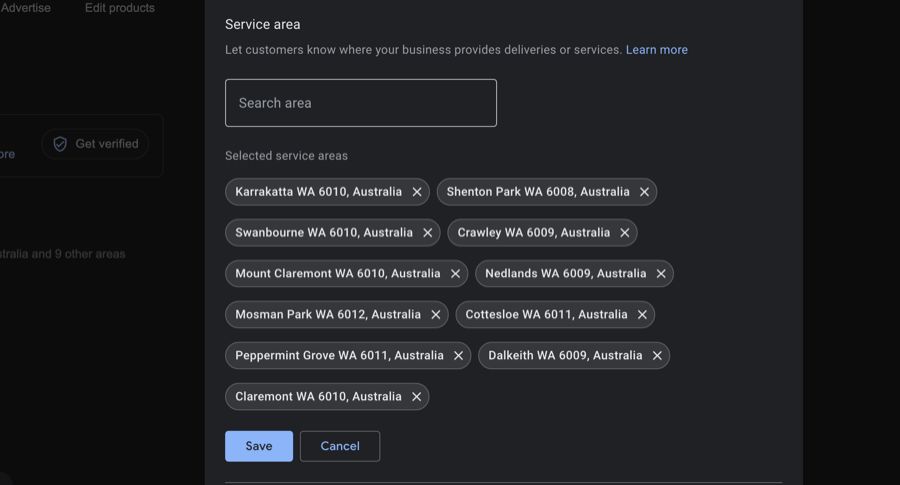
Pick areas where you genuinely have demand and can deliver consistently. Use your customer database to prioritise by frequency of service calls, competition, travel efficiency, and growth potential. Review your areas every 3 to 6 months against your Insights, and keep this information consistent across every platform.
Warning: Editing location settings is one of the most common suspension triggers. On an established, performing profile, consider getting a professional to make the change.
On the website side, our location pages guide covers how to build and structure a page for each location you serve.
Step 9: Opening hours
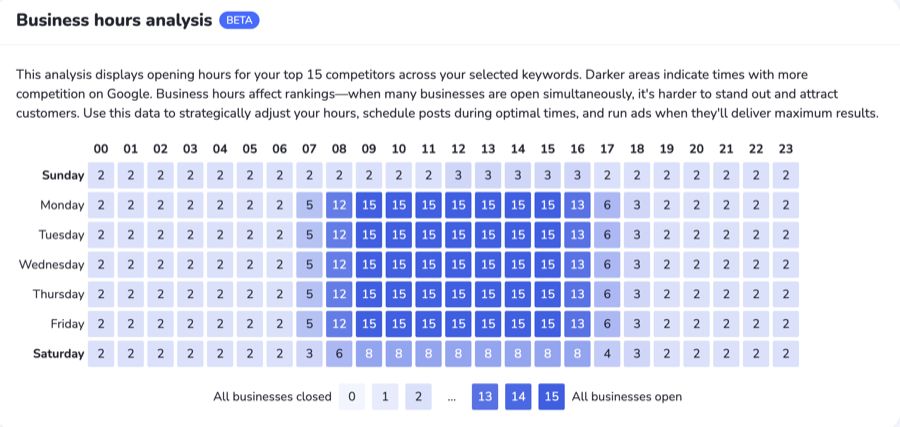
Hours must reflect reality. Don’t fake 24/7 unless you genuinely offer an emergency service, it reads as spammy. It can pay to open 30 minutes earlier and close 30 minutes later than competitors; the more hours you’re genuinely open, the more often Google can surface you.
Step 10: Don’t skip the secondary fields
Opening date, social profiles, special hours, and the questions in the “More” section all help Google understand the business. Don’t leave them blank.
Step 11: Messaging (retired, and what to do instead)
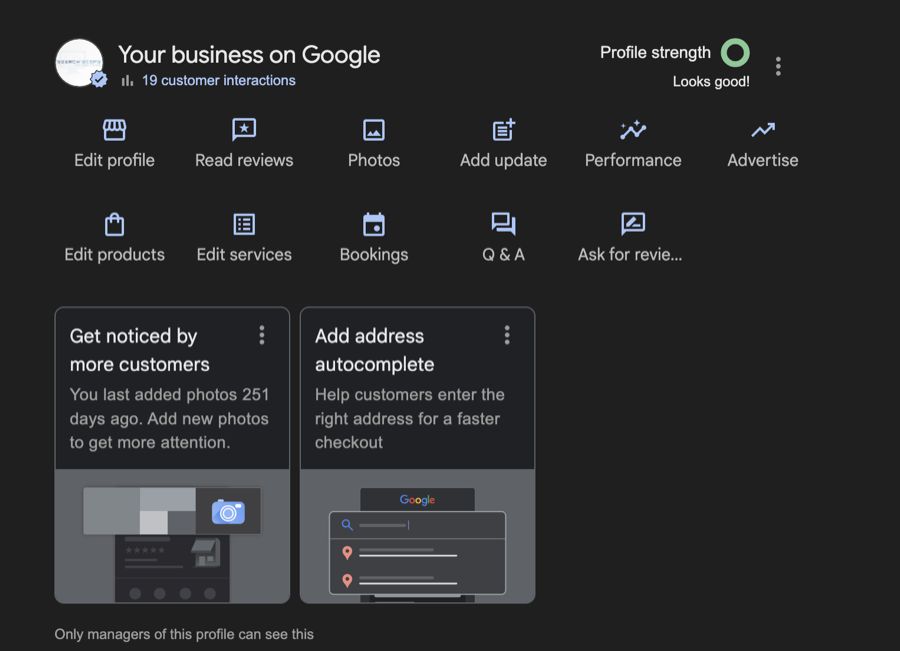
Skip this one. Google shut down Business Profile chat globally on 31 July 2024, along with call history, so there is no messaging feature left to enable and no message-to-conversion rate to track. Older guides still list it.
What matters now is that every other contact route works, because messaging is not there to catch the overflow:
- Make sure the phone number is correct and the call button works on mobile.
- Add a booking link if your category supports one.
- Point the website link at a page with a visible, tappable contact option above the fold.
Step 12: Photos
Active profiles with fresh, real photos consistently out-perform stale ones. Cover the range:
| Photo type | Purpose |
|---|---|
| Exterior | Builds trust, helps recognition |
| Interior | Gives a feel for the space |
| Products/services | Shows the offer visually |
| Team | Adds authenticity |
| Behind the scenes | Builds connection |
Use JPG or PNG, 10 KB to 5 MB, ideally around 1332 × 750 px for cover images. Refresh the gallery regularly, seasonal updates and new offerings signal an active business. Our photo optimisation guide covers the rules in detail.
Step 13: Reviews
Reviews are a top-three ranking factor and a major trust signal. In BrightLocal’s Local Consumer Review Survey 2026, an owner response is one of the things that makes a review more persuasive to the next customer (37% count it among the factors that matter), and 74% of consumers only trust reviews written in the last three months. Review responses and a steady, recent flow aren’t optional PR; they’re a ranking and conversion lever.
Get more reviews:
- Create your direct review link (dashboard → “Get more reviews”).
- Shorten it (Bitly/TinyURL).
- Put it everywhere: email signatures, receipts, invoices, business cards, QR codes on counters and service vehicles.
Ask after a completed project (service businesses), within 24 to 48 hours of purchase (retail), or right after positive feedback. Tools like Podium, Birdeye, or NiceJob can automate requests over email or SMS.
Respond to every review within a day or two. Thank positive reviewers by name and reference specifics; for negative ones, acknowledge, stay calm, and take it offline. Our guide to earning more Google reviews and 15 response templates cover the playbook.
Step 14: Posts and updates
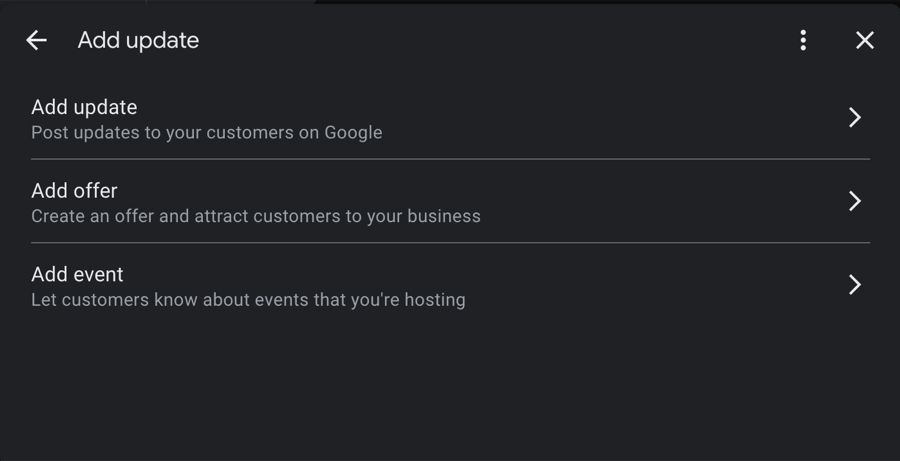
Posting communicates promotions and updates to customers and, from an SEO angle, teaches Google what your services, offers, and service areas are about. Our GBP posts guide covers the format choices and whether posts actually move rankings.
Plan posts around the Australian calendar, not the US one: Boxing Day, EOFY (30 June), Australia Day and Melbourne Cup pull more local intent than Black Friday for most AU businesses. Anzac Day is a remembrance day, acknowledge it respectfully or stay quiet, never run a sale post. A good post has one clear message, a real photo (not stock), a headline under 60 characters, and a single action button; skip the hashtags. Cadence matters more than volume: one post a week as a baseline, lifting to two or three in the seven to ten days before a big seasonal event. Past that, more posts actually depress engagement.
Since late 2025 you can schedule posts and set repeating evergreen offers natively in the dashboard, so queue the next four weeks in one monthly sitting rather than paying for a third-party tool. One honest caveat: a controlled nine-week Sterling Sky study found Google Posts have zero direct Local Pack ranking impact. They work indirectly, by driving the clicks, calls and direction requests that are themselves a growing ranking input, and by feeding the freshest “what is this business doing now” data into AI Overviews and Maps summaries. Post to keep the engagement surface alive, not to chase a ranking bonus that does not exist.
Step 15: Products and services
Mirror the services and products listed on your website, they’re one ecosystem.
Services: list everything you actually provide, use specific service names, add detailed descriptions with local keywords, include pricing where it’s competitive, and lead with the benefit, not just the feature. Few businesses do: in our Perth Google Business Profile study, only 7% of the 3,555 service entries we read had a description.
Products: upload quality images, write genuine descriptions, include pricing, use relevant categories, and keep stock status current.
Don’t list products in the services section or vice versa.
Step 16: Bookings
Add a booking link, your website contact form or a scheduling tool, so a ready customer can act without leaving the listing.
Step 17: Q&A (retired as a deliverable)
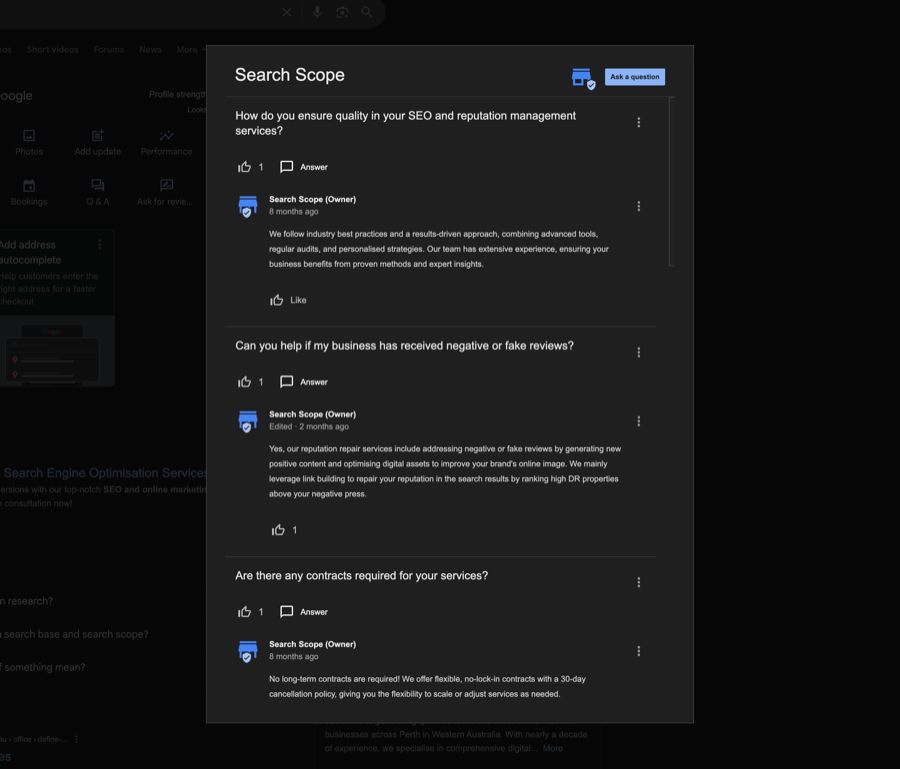
Do not spend time seeding questions. Q&A has been wound down and we no longer treat it as a deliverable on any profile we manage. The objections it used to handle still need answering, they just belong somewhere you control.
- Put the answers in your services descriptions, your business description and your website’s FAQ content, where you control the wording.
- Cover the same ground customers actually ask about: pricing and payment, availability and booking, location and access, hours and contact, qualifications and experience.
- Answer them again in your review replies, which are the most-read text on most profiles.
Heads-up: Google has been winding down the customer Q&A feature on Business Profiles, with its AI increasingly answering profile questions automatically by pulling from your listing, reviews, site, and other public data. The takeaway isn’t “ignore questions”, it’s that you no longer fully control the answer. The only reliable way to shape what Google’s AI says about you is a strong, consistent digital footprint: accurate profile data, complete services, current reviews, and matching information across the web. The fundamentals in this guide are what feed that answer.
If Google nudges you toward a paid Workspace account to “complete” your profile, you don’t need it. A profile can dominate without showing 100% completion.
Field and strategy summary
| Field | Key move |
|---|---|
| Business name | Match registration; no keyword stuffing |
| Categories | Specific primary, few relevant secondaries |
| Description | Value-led, location-aware, clear CTA |
| Website URL | Relevant landing page + UTM tracking |
| Phone | Unique number per location |
| Business type | Storefront, SAB, or hybrid, set correctly |
| Hours | Real hours; open slightly earlier/later than rivals |
| Photos | Regular, real, varied |
| Reviews | Ask consistently, reply to every one |
| Messaging | Enable, auto-respond, manage |
| Products/services | Mirror the site, price where competitive |
| Posts | Promotions, updates, location content |
| Q&A | Seed and answer professionally |
Score Your Own Profile
Tick everything your profile genuinely has in place right now. The tool will give you a completeness score and the highest-impact things to fix next.
Scoring under 80%? That gap is visibility you are handing to competitors. We do this build-out and the weekly maintenance for clients as a done-for-you Google Maps SEO engagement, or for a straight read on your profile.
How Google Ranks Profiles
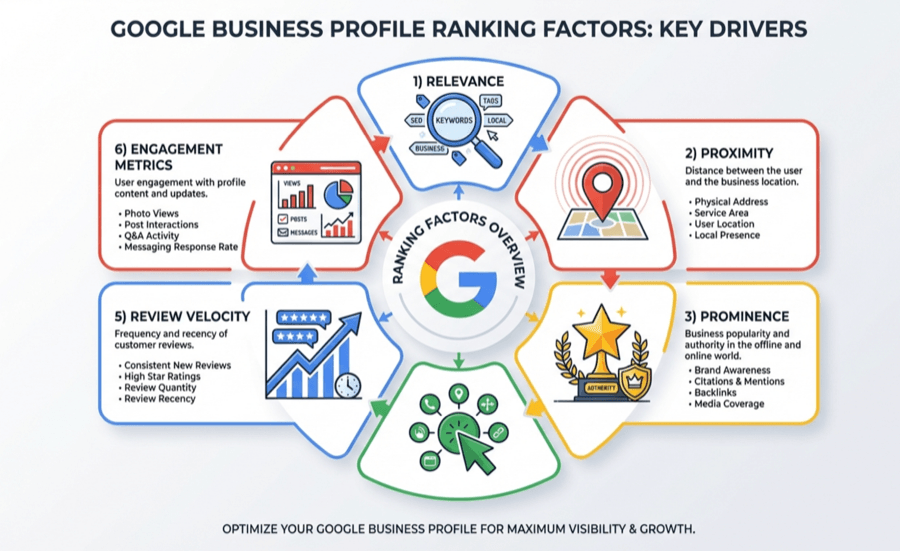
Relevance, proximity, and prominence are the headline factors, but in practice Google also weighs the signals underneath them:
- Review velocity: how fast you’re gaining new reviews. A business with 50 reviews and 10 in the last month can out-rank one with 200 reviews and none in six months.
- Behavioural signals: clicks to website, direction requests, calls, message interactions, booking clicks. Low engagement drags rankings down; high engagement compounds them.
- Engagement micro-signals: photo views, post impressions, Q&A activity. These tell Google the profile is genuinely useful.
Our guide to the Google Maps ranking factors sets out the priority order for what actually moves the local pack.
Advanced Tactics
Local link reinforcement. Backlinks from local sites boost prominence. Optimise for local relevance over raw domain strength: local news, community sponsorships, chambers of commerce, industry associations, event partnerships. These carry trust and pass location signals, and our Australian link building guide works through the local link sources worth pursuing and how to approach them.
Local authority stacking. Build topical clusters: GBP posts → blog posts → suburb pages → service pages, internally linked. Suburb-specific content (“plumbing services Fremantle”) reinforces the areas you want to rank in.
Suggested-edit protection. Anyone can suggest edits to your profile, competitors, spammers, confused customers, changing your phone number, hours, URL, or categories. Enable notifications (Settings → Notifications), check daily, and reject bad edits immediately. A complete, active profile gets fewer accepted spam edits. Our guide on why monitoring suggested edits is critical covers how to catch a bad change and get it reversed.
Handling negative and fake reviews. Respond to negatives professionally and resolve offline, never argue publicly. If a review genuinely breaches Google’s policies, report it, but expect a low removal rate; the durable fix is generating enough genuine reviews to keep one outlier in proportion. Our guide to combating fake reviews covers the reporting route when a review breaches policy, and handling negative reviews works through the response itself.
Fighting fake competitors and map spam. This is the one most optimisation guides skip, and it is a genuine problem in competitive Perth categories: a keyword-stuffed name (“Best Emergency Plumber Perth”), a fake or virtual address, a duplicate listing, or a lead-generation profile that reuses one phone number across dozens of fake businesses can sit above a fully optimised legitimate listing. You don’t have to just accept it. There are two reporting paths, and they are not equal:
- Suggest an edit (on the listing in Maps) is largely machine-reviewed, has a low success rate, but is worth doing first as a record.
- The Business Redressal Complaint Form is the one that matters: as BrightLocal documents, submissions here are reviewed by a human spam team at Google. Use it for fraudulent names, addresses, phone numbers, or URLs.
To give a report the best chance: build an evidence file first (the listing’s Maps URL, screenshots of the offending field, Street View showing no real premises), and in the explanation box argue the real-world harm to consumers and other businesses, not “they’re outranking me” (that framing gets ignored). You can report up to 10 listings at once, or attach a spreadsheet for more. Google won’t update you on the outcome, so check back in two to three weeks and resubmit with stronger evidence if nothing changed. This is exactly the kind of compliant, evidence-led cleanup we handle for clients as part of a Google Maps SEO engagement.
Tracking Performance That Matters
A profile is only optimised if it’s producing calls, directions, and leads, not “impressions”.
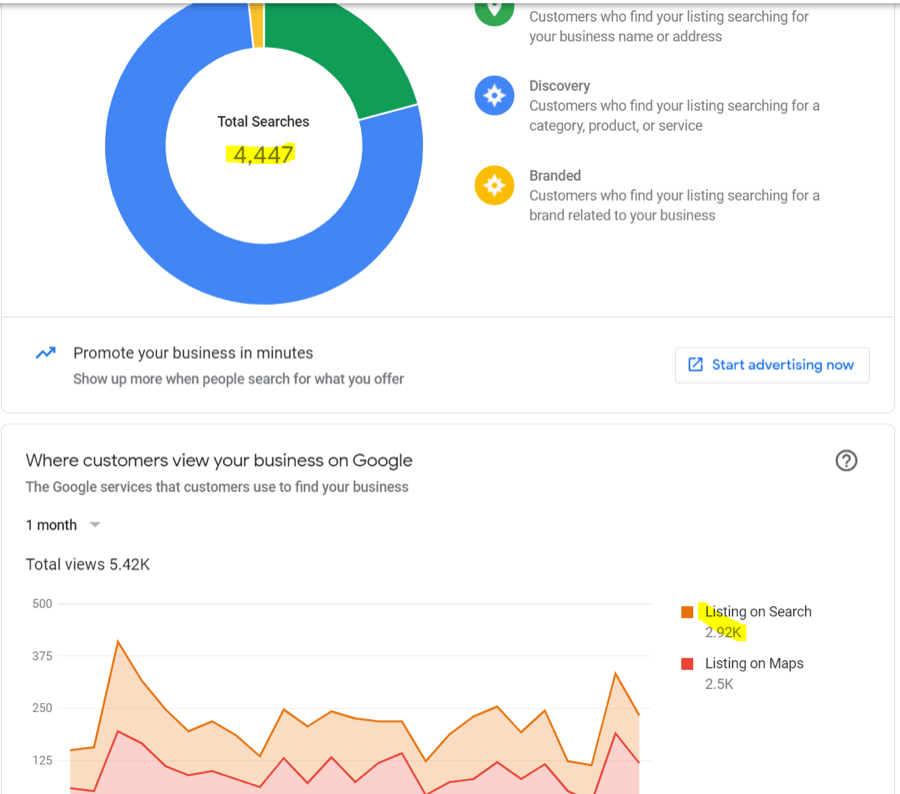
Insights to watch monthly: search views (Search vs Maps), direction requests, website visits, phone calls, booking clicks, and photo views. Track the direction of travel: up is good, flat or down means investigate. Our guides on using Insights and interpreting metrics go deeper.
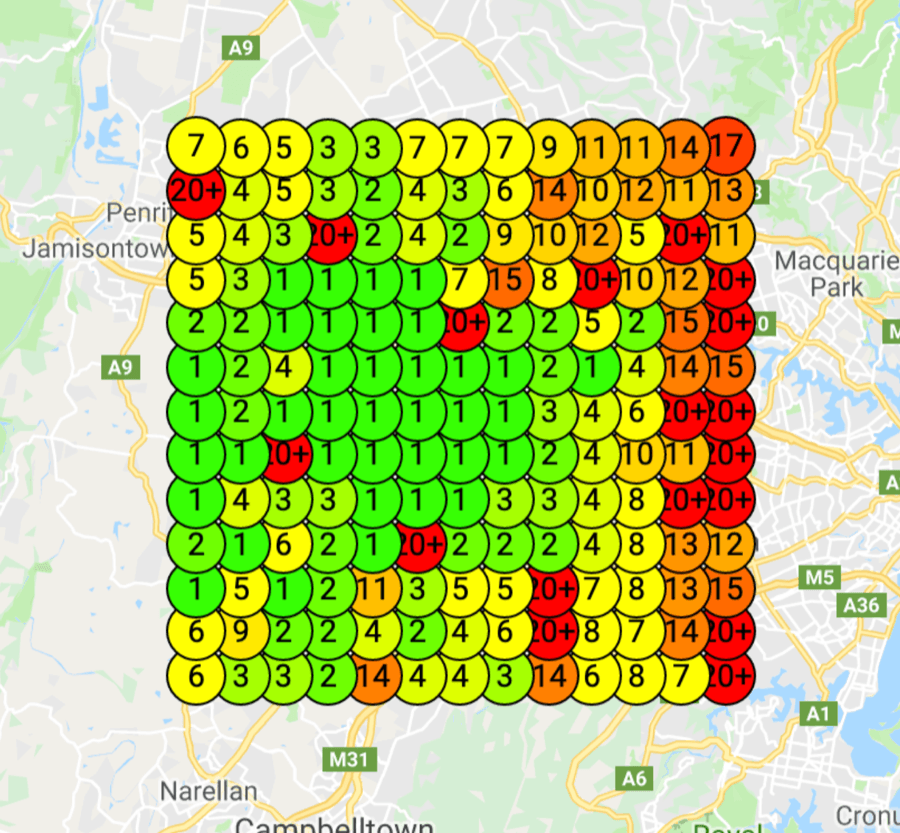
Geo-grid tracking. Your rank isn’t one number, you might sit at #1 in Subiaco and #12 in Fremantle for the same search. Geo-grid tools measure rankings from a grid of points across your service area so you can see and fix the weak spots. Set a grid (tighter intervals in dense areas, wider in the suburbs), track each node, then attack the low-ranking zones with local links, suburb content, and posts. Local Falcon and BrightLocal both offer this, and our geo-grid tools guide compares the tools we have tested ourselves on Australian grids.
Edits That Trigger Suspensions
Some “innocent” edits get profiles suspended overnight. The high-risk fields:
Business name
Any change signals possible spam. Only change it to match official registration.
Address
Switching storefront ⇄ SAB usually triggers a review. Expect a verification request even when the change is legitimate.
Primary category
Changing it can tank rankings and trigger suspension. Only if the current one is genuinely wrong.
Website URL
Redirected, mismatched, or suspicious URLs get flagged. Stay on one consistent domain.
Phone number
New or unverifiable numbers (especially VOIP) can trigger suspension.
Other triggers: keyword-stuffed names, fake or virtual addresses (Google cross-references Street View), duplicate profiles for the same business, and policy violations (restricted goods, PO Box addresses, misleading info).
If you get suspended: read the notice, identify the actual violation, fix it honestly (don’t lie in an appeal, Google knows), then submit a reinstatement request with evidence: registration documents, lease, utility bills, signage photos. First appeals are often denied; a persistent second appeal with additional evidence usually does the work. For the full process see our GBP suspension guide, how to avoid suspension, the step-by-step appeal guide, and when to hire a professional.
Keep Local SEO Consistent
Your profile is the foundation, not the whole strategy. Two things compound it:
- NAP consistency: your name, address, phone, URL, hours, and category should match across Google, Bing Places, industry directories, and social profiles. Inconsistency erodes trust signals, and our NAP consistency guide covers why local search treats a mismatched listing as a weaker one.
- Location-specific content: service pages and posts that reference real local areas, landmarks, and community involvement make you genuinely more relevant. Pair this with proper local keyword research, then work through how to rank for “near me” searches so the two line up.
FAQs
How long does GBP optimisation take? Basic setup: a few hours. Full optimisation (photos, posts, reviews flowing): 2 to 4 weeks. Ranking gains on competitive keywords: 3 to 6 months.
Do I need a website? No, but it amplifies results. A profile backed by an optimised website that mirrors your services and areas consistently out-performs one without.
How many reviews do I need to rank? There’s no magic number. Velocity beats total count, aim for a steady flow of genuine new reviews each month rather than a one-off batch.
Can I do this myself? Yes, but it’s ongoing work, weekly posts, review responses, photo updates, suggested-edit checks, geo-grid tracking. Most businesses hand it over once they see what consistent execution returns.
What’s the single biggest mistake? Ignoring reviews. Replying to every review is the fastest, cheapest way to lift both engagement and rankings.
What is the “7-11-4” rule people mention? It’s a marketing framework suggesting a buyer needs roughly 7 hours of interaction, across 11 touchpoints, in 4 separate locations, before they trust a business enough to act. It’s commonly attributed to Google and grew out of Google’s Zero Moment of Truth research, though Google has never officially published it as a “rule”, so treat it as a useful way to think rather than a precise law. The point that holds up: your profile, reviews, posts, photos, and website are several of those touchpoints, which is why a complete, consistent presence converts better than any single tactic.
How do I track performance properly? GBP Insights for native data, Google Analytics with UTM tags for GBP traffic, call tracking (e.g. CallRail) for phone leads, and a geo-grid tool for rankings by location.
A fake or spammy competitor is outranking me. What can I do? Report it, but report it well. “Suggest an edit” on the listing is machine-reviewed and rarely sticks, so use it only as a first record. The Business Redressal Complaint Form is reviewed by a human at Google and is the one that gets action on fake names, addresses, phone numbers, and lead-gen listings. Document the evidence (Maps URL, screenshots, Street View) and explain the harm to consumers, not the harm to your rankings. Expect two to three weeks and be prepared to resubmit with stronger proof.
Work With Search Scope
GBP optimisation is genuinely time-consuming, weekly posts, daily review responses, photo uploads, suggested-edit monitoring, geo-grid tracking. It’s a part-time job on top of running the actual business.
That’s what we do. Search Scope is a founder-led Perth agency built on Dorian’s SEO work since 2013, and we’ve generated $5M+ in tracked client revenue and 30,000+ qualified leads since 2021 by focusing on the things that move money, rankings, calls, leads, not vanity metrics.
What we handle:
Full GBP audit
Gaps, suspension risks, and the opportunities competitors are missing.
Setup and verification
The entire process, including re-verification after a move or change.
Ongoing optimisation
Posts, photos, review monitoring, Q&A, suggested-edit checks.
Review generation
Systems that bring in genuine reviews consistently.
Suspension recovery
A 98% reinstatement success rate (295 of 300 Australian reinstatements since early 2025), done-for-you, reinstated or refunded.
Performance tracking
Geo-grid rankings, call tracking, and ROI reporting, so you know exactly what the investment returns.
No lock-in contracts. We’ll also tell you honestly if SEO isn’t the right spend for your situation.
or get a free GBP audit and see your profile the way your competitors’ customers see it.
Related services: Google Maps SEO · GBP Reinstatement · Local SEO · Online Reputation Management