
How to Set Up Local Conversion Tracking
Learn how to set up local conversion tracking to link online actions to offline results, boosting ROI and improving marketing strategies.
Local conversion tracking helps you measure customer actions like phone calls, store visits, and form submissions specific to your business location. It’s essential for Australian businesses aiming to link online activity with offline results. Here’s a quick overview of what you’ll learn:
- Why it matters: Boost ROI by focusing on local leads, improve visibility in local search, and make better marketing decisions.
- What to track: Phone calls, direction requests, store visits, form submissions, and local bookings.
- How to set it up: Use tools like Google Ads, Google Business Profile, and Google Analytics 4 (GA4) to track and analyse local conversions.
- Key steps: Link your accounts, set up tracking codes, and assign conversion values for accurate ROI measurement.
This is the tactical setup guide. For the strategic view, what we report on monthly and how it ties back to revenue, read our companion piece on how we track the ROI of your SEO campaign.
The local conversion tracking stack
No single tool gives you the full picture; the value is in how they connect. The measurement stack we deploy from day one for every Search Scope client is the same one this guide walks through:
- Google Tag Manager, the instrumentation layer everything else depends on
- Google Analytics 4, the conversion and traffic layer
- Google Business Profile Performance, the local-intent layer
- Google Search Console, the keyword and organic visibility layer
- Microsoft Clarity, the behavioural diagnostic layer
- RingTonic with Twilio numbers, the call attribution and intelligence layer
- Geo-grid rank tracking, the geographic coverage layer (covered in our geo-grid rank tracking guide)
- seoutils.app LLM rank tracker, the AI citation visibility layer (covered in our AI search guide)
This is the stack we currently use, not the only one that works. There are plenty of strong alternatives at every layer: CallRail, WhatConverts or CallTrackingMetrics in place of RingTonic; Hotjar or FullStory instead of Clarity; Local Falcon or Whitespark’s grid tracker instead of seoutils.app; server-side GTM, Stape or Segment for a heavier instrumentation layer. The principles below apply regardless of which specific tool you pick at each step. Pick what fits your budget and the team that has to maintain it.
Google Tag Manager: the instrumentation layer
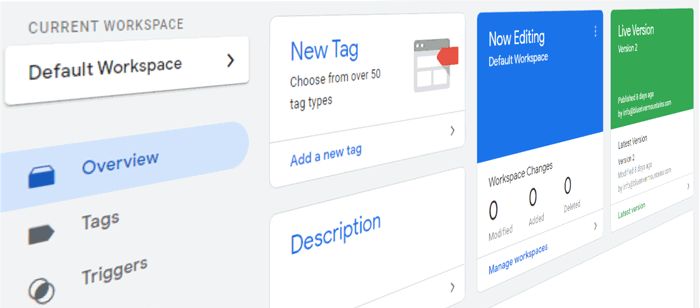
Before any of the downstream tools, Ads, GA4, Clarity, RingTonic, are useful, the tracking has to be set up correctly. Google Tag Manager is the system we use to deploy and manage all tracking without touching your website’s code every time something changes. It is the foundation the whole stack sits on, and the single biggest reason most local businesses end up with broken or partial conversion data is that they skipped it.
Why GTM matters more than you think
Three reasons we will not work without it:
- No code changes for every event. Once the GTM container snippet is on the site, every new tag (Ads conversion, GA4 event, Clarity, Facebook Pixel, anything) is added, edited and tested inside GTM without a developer touching the site. For a local business that does not have an in-house developer, this is the difference between “we will add that next sprint” and “it is live in five minutes”.
- Version control and preview mode. Every change is versioned and can be rolled back. Every change can be tested in GTM’s Preview mode before publishing, so you see exactly which tags fire on which page, with which values, before any real visitor triggers them.
- One dataLayer for every tool. Instead of duplicating tracking logic for GA4, Google Ads, Microsoft Ads, Clarity and Facebook (or paying a developer to do it), you push events to GTM’s dataLayer once and fan them out to every tool that needs them. This is how the conversion numbers stay reconciled across platforms instead of every tool reporting a slightly different number.
The events we configure for every local business
The contact actions that matter for a local business are not what GA4 tracks by default. These are the GTM-driven events we set up for almost every Search Scope client:
- Click-to-call. Fires when a mobile visitor taps a
tel:link on your site. This is the single most important event for trades and service businesses, and it is almost never tracked by default because GA4’s auto-tracking does not catch it reliably. Set it up via a GTM trigger on link clicks whereClick URL contains "tel:", then push aphone_call_clickevent to the dataLayer. - Form submissions on confirmed submit, not thank-you-page view. The lazy way to track form submissions is a tag that fires when the visitor lands on
/thank-you/. The problem is the visitor can press back and forward, refresh, or share that URL, and the event fires again every time. Use GTM’s Form Submission trigger, or a custom dataLayer push on the form’s success callback, so each lead is counted once. - Calendly or booking-platform confirmations. If you take strategy calls or quotes via Calendly, ServiceM8 or a similar tool, listen for the booking-confirmation message (Calendly posts a
messageevent you can capture in GTM) and push a key event. - Chat widget interactions. If you use Tawk, Intercom, or a chatbot, configure the widget’s “chat started” or “message sent” callback to push an event into the dataLayer.
- Outbound link clicks to your Google Business Profile. Useful for catching the cohort that opens your Maps listing from your site rather than calling directly from the page.
The five-minute setup
Create a free Google Tag Manager account at tagmanager.google.com, add the container snippet to your site (Astro, WordPress, Webflow and Shopify all have official integrations), and verify it is firing with the Google Tag Assistant Chrome extension. From there, build the click-to-call tag first; that one alone usually doubles the conversion count most local businesses see in GA4.
Google Ads Conversion Setup
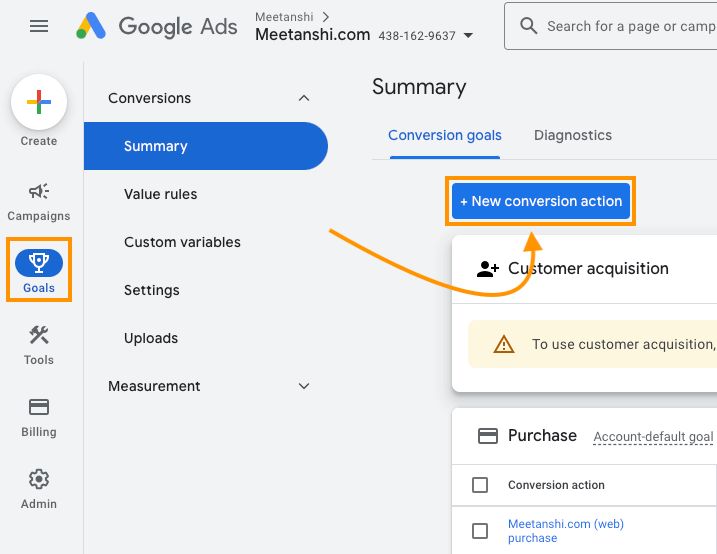
Tools and Access You’ll Need
To track local conversions in Google Ads, ensure you have the following:
- A Google Ads account with admin access
- A verified Google Business Profile
- Website admin access to add tracking codes
- (Optional) A Google Tag Manager account
Start by linking your Google Ads account to your verified Business Profile. This allows you to track local interactions effectively. Then, set up specific conversion actions tailored to your business needs.
How to Set Up Conversion Actions
Here’s how to configure conversion actions for your business:
- Phone Call Tracking
Go to ‘Tools & Settings’ > ‘Measurement’ > ‘Conversions’. Define a minimum call duration and assign a conversion value that aligns with your business goals. - Store Visit Tracking
Store visit tracking is available for eligible advertisers. Ensure your physical locations are connected to your verified Google Business Profile and meet Google’s eligibility requirements. - Local Form Submissions
Create a website conversion action to track local service inquiries. Give the action a clear name, assign a conversion value, and track unique form submissions.
Once these actions are set up, deploy them through your existing GTM container (see the GTM section above). The Google Ads conversion tag is just one more tag inside GTM, fired by the same phone_call_click, form_submit or booking_confirmed dataLayer events you already set up for GA4. One source of truth, one set of events, no duplicate tracking code in the site source.
Google Analytics 4 Conversion Setup
GA4 Setup and Code Installation
To set up Google Analytics 4 (GA4) for your website, follow these steps:
- Create Your GA4 Property
- Go to Admin > Create Property in your Google Analytics account.
- Choose “Web” as your platform.
- Enter your business details, including the appropriate Australian time zone.
- Install the Tracking Code
- Find your Measurement ID in the GA4 interface.
- Add the GA4 configuration tag to your website’s
<head>section. Use the following code snippet:
<!-- Google Analytics 4 tag --> <script async src="https://www.googletagmanager.com/gtag/js?id=G-XXXXXXXXXX"></script> <script> window.dataLayer = window.dataLayer || []; function gtag(){dataLayer.push(arguments);} gtag('js', new Date()); gtag('config', 'G-XXXXXXXXXX'); </script>Event Creation and Key Events
One naming change to know: in 2024 Google renamed GA4 “conversions” to “key events”. In Analytics you now mark an event as a key event; the word “conversion” now refers to a key event you import into Google Ads. Once your GA4 property is installed, set up events to track the actions that matter for your business. For local businesses, consider defining custom events for actions like:
- Phone calls: Use parameters such as
call_durationandcall_type(e.g., mobile or landline). - Store visits: Capture data like
location_id. - Direction requests: Track how often users request directions to your store.
- Click-to-message actions: Monitor interactions like SMS or chat requests.
- Local inventory checks: Record when users check product availability in-store.
You can also track local enquiries by setting parameters for:
- Service type
- Location preferences
- Preferred contact methods
Setting Conversion Values
Assigning values to your defined events helps measure return on investment (ROI). Use the table below for guidance:
| Event Type | Suggested Value Range (AUD) | Value Calculation Method |
|---|---|---|
| Phone Calls | $25 to $150 | Average transaction value × conversion rate |
| Store Visits | $50 to $200 | Historical in-store purchase average |
| Form Submissions | $15 to $100 | Lead-to-sale ratio × average sale value |
The dollar ranges above are illustrative only. Base your real values on your own historical data, seasonal trends, and averages specific to your services. Make sure to review and update them every quarter to keep your analysis accurate.
Local Action Tracking
Local Action Setup
Tracking customer interactions at your physical location starts with setting up location assets in Google Ads. This allows you to monitor key local actions that signal customer interest.
Here’s how to enable local action tracking:
-
Location assets
Link your Google Business Profile to Google Ads through location assets. This helps track actions that indicate purchase intent, like visits or direction requests. -
Call Tracking
Activate call assets to generate unique forwarding numbers for better call tracking. Configure these settings:Feature Recommended Setting Why It Matters Call Reporting Enabled Tracks call duration and timing Call Recording Optional Useful for quality checks and training Minimum Duration 30 seconds Filters out non-meaningful calls -
Direction Request Tracking
Use location assets to monitor how often customers request directions to your store.
These tools help bridge the gap between online engagement and offline actions, giving you a clearer picture of customer behaviour.
Store Visit Tracking
Store visit tracking helps measure how your online advertising drives foot traffic to your physical locations. To use this feature, your business must meet specific criteria:
| Requirement | Details |
|---|---|
| Multiple Locations | Operate more than one physical store |
| High Ad Click Volume | Handle thousands of ad clicks per month |
| Verified Google Business Profile Listing | Keep your Google Business Profile profile accurate |
| Location Reporting | Enable location reporting in Google Ads |
Be honest with yourself about this one: store visit tracking has never published an exact threshold, but agencies running AU campaigns consistently report needing tens of thousands of ad clicks per month plus multiple physical locations before the conversion appears at all (Search Engine Land’s 2024 update and consistent practitioner reports on r/PPC). For most single-location Australian SMBs, it is effectively unavailable. If that is you, do not chase it. Focus on the call, direction request and form conversions that you can actually measure, and use the GBP Performance report as your store-visit proxy.
For most local businesses, the Google Business Profile is one of the biggest sources of calls and direction requests, so it is worth tracking properly.
To get the most out of store visit tracking, ensure your business hours, address, and location details are always up-to-date. A well-maintained Google Business Profile also boosts tracking accuracy.
For businesses targeting local customers, pairing store visit tracking with other conversion metrics provides a clearer understanding of your marketing impact.
These are some of the steps we cover when setting up campaigns for our clients, as part of our Perth SEO services.
Track what your profile sends you (and tag it)
Here is the part most guides miss, and it matters more for a local business than any of the above. A huge share of your local conversions, the calls and direction requests, happen on Google’s own surfaces and never touch your website, so classic web analytics simply cannot see them. Two fixes close that gap.
First, read your Google Business Profile Performance report. It natively reports calls, direction requests, website clicks, messages and bookings straight from your listing. For a business that gets most of its leads from Maps, this is your most important conversion dashboard.
Second, tag the website link on your profile. By default, traffic from your Google Business Profile lands in GA4 as “organic” or “direct” because the referrer is stripped, so you cannot tell which website enquiries came from your listing. Fix it by adding UTM parameters to your profile’s website link (for example ?utm_source=gbp&utm_medium=organic) using Google’s Campaign URL Builder. Now those visits show up cleanly in GA4 and you can follow them through to a form submission.
For phone-heavy businesses, calls are the conversion that matters most, and they are the conversion that goes uncounted most often. The next section covers the call-tracking stack we use to close that gap.
Call tracking with RingTonic and Twilio numbers
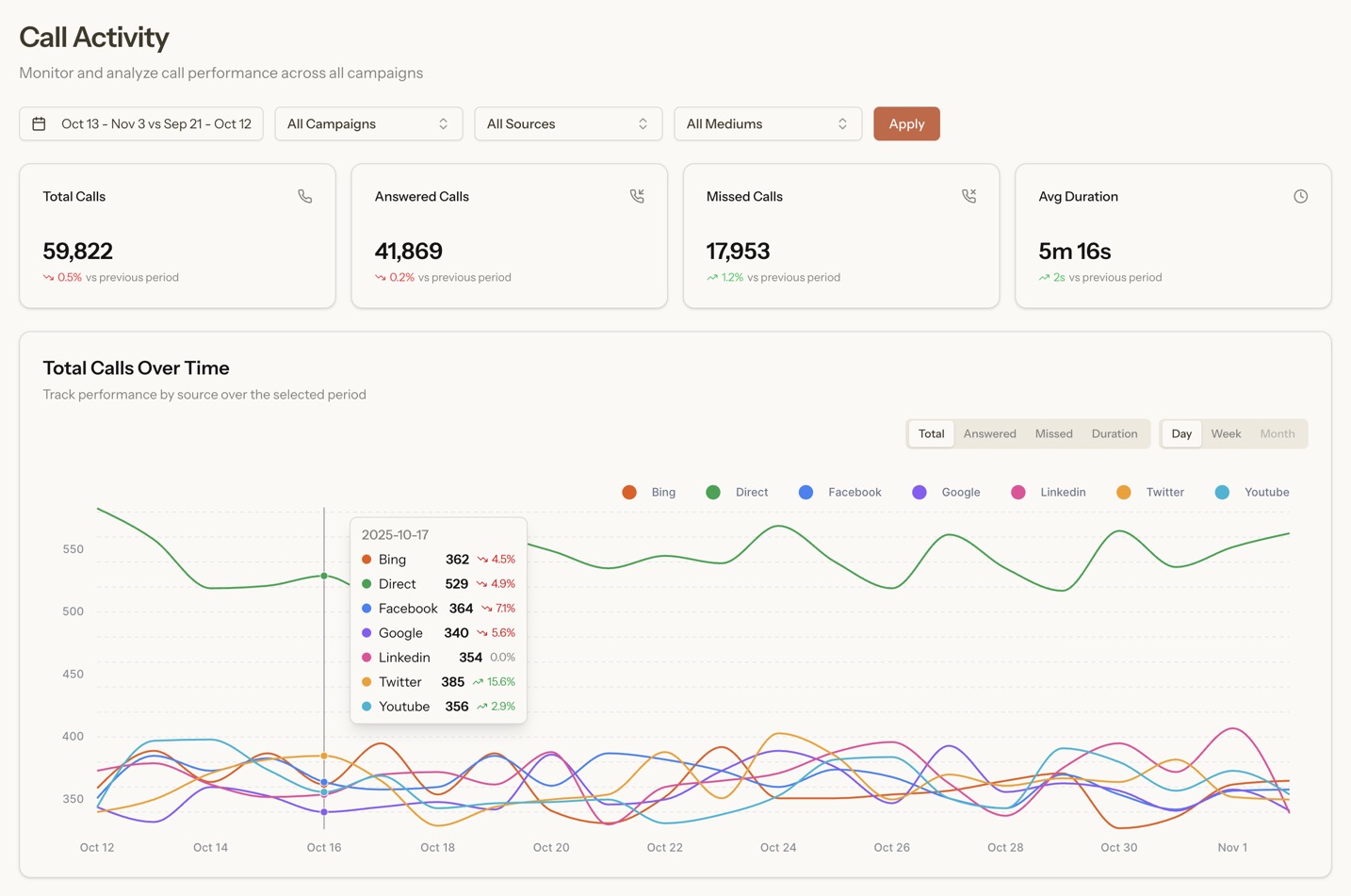
Without call tracking, you see the website visit but not the call that came two minutes later, and the SEO that drove the visit gets none of the credit. The Search Scope stack uses RingTonic for this, on top of Twilio phone numbers. There are other strong options (CallRail, WhatConverts, CallTrackingMetrics) that do similar jobs; this is the combination we have settled on.
How the stack works
Twilio is the underlying telecommunications infrastructure, the same provider major enterprises use, that provisions and routes the actual tracking phone numbers. You buy AU mobile or landline numbers through it (typically around $1.15 per number per month plus fractions of a cent per minute connected), and calls to those numbers ring through to whatever real phone line you nominate, with no caller-experience difference.
RingTonic sits on top of Twilio as the analytics and intelligence layer. It assigns tracking numbers to channels (organic search, Google Maps, paid ads, a specific landing page), records and transcribes calls, and pushes call data into GA4 and Google Ads as conversions so they show up alongside form submissions in your normal reporting.
What this actually gives you
- Channel attribution. Every call is tagged with the source that drove it, organic, Maps, paid, direct, so when you ask “how many calls did SEO bring this month” you get an actual answer instead of a guess.
- Dynamic Number Insertion (DNI), implemented safely. Your website swaps the displayed number after the page loads based on where the visitor came from. Googlebot still sees your real business number in the static HTML (preserving NAP consistency); human visitors see the tracking number that matches their channel. This is the website half of the Darren Shaw three-surface framework covered in the next subsection.
- Transcription and speaker diarisation. Every recorded call is transcribed automatically, with speaker labels (so you can read “agent vs caller” without listening to the recording). For a busy phone line, this turns hours of “did that call convert?” into a thirty-second scan.
- AI lead scoring. RingTonic classifies each call as a qualified lead or not, and estimates an indicative deal value based on what was discussed. This is what closes the gap between “we got more calls” and “we got more revenue”.
- Keyword spotting. Flag calls that mention specific services, competitor names, or budget signals so you can review the calls that matter without listening to everything.
The Money Map
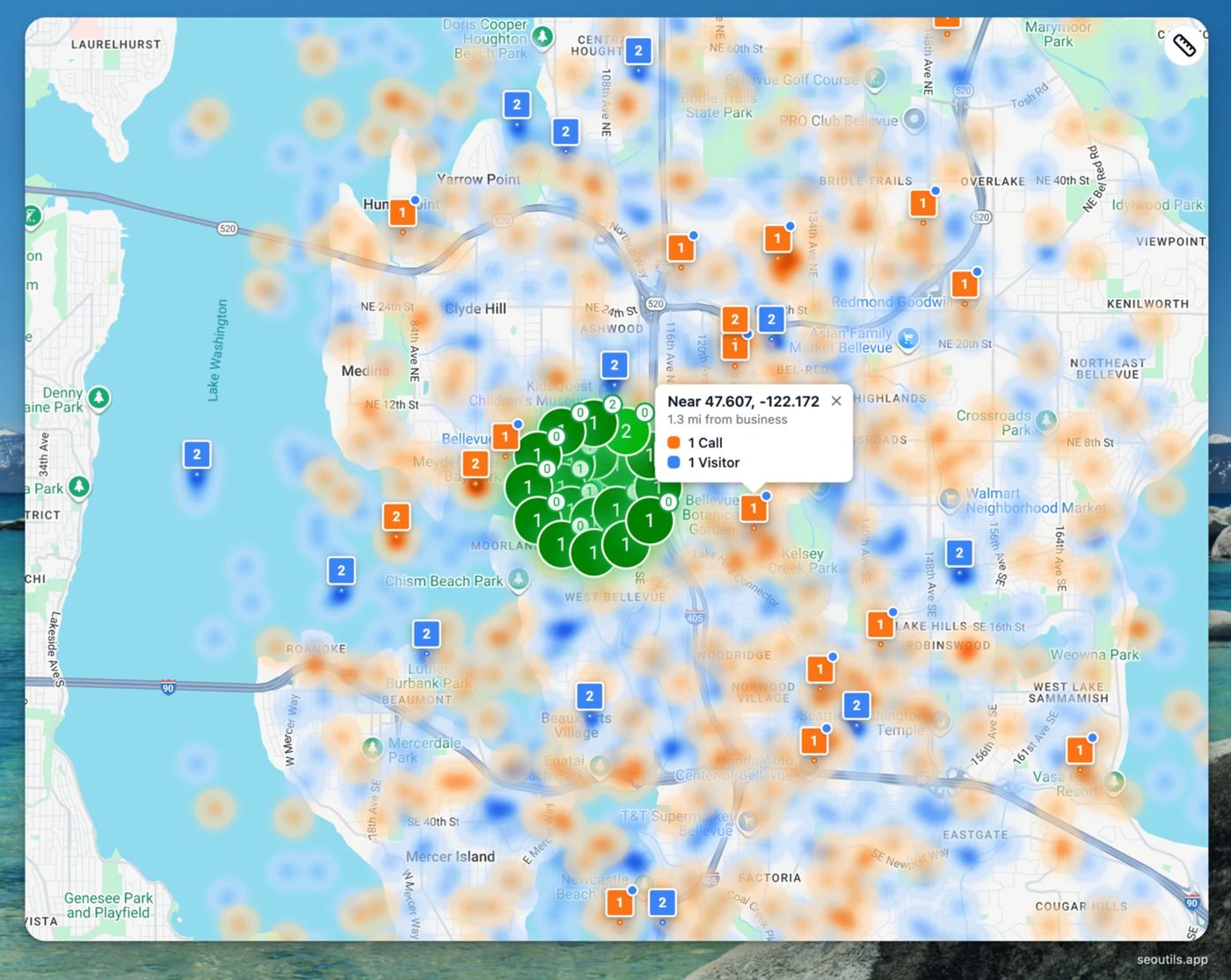
When RingTonic is connected to a geo-grid rank tracker, you get what we call the Money Map: an overlay where your ranking heatmap (where you appear on Google Maps across the suburbs in your service area) is layered with where your calls are actually coming from geographically. Two patterns to watch for:
- Suburbs where you rank well but no calls come in. The traffic is there, the conversion is not. Usually a landing-page problem or an attribution gap.
- Suburbs where calls come in but you do not rank strongly. Demand exists, you are underserving it. Usually the next content priority.
Our geo-grid rank tracking guide covers the grid side; the Money Map only appears when you combine it with call data.
Cost framing
Twilio phone-number cost is typically a few dollars per month per tracking number plus a small amount per minute connected. For a local business running two or three tracking numbers (organic, paid, and a default), the all-in monthly Twilio bill usually sits under $50 even with high call volume. RingTonic’s platform fee is bundled into most Search Scope plans; if you run it standalone, pricing depends on number of tracked numbers and minutes.
Set call tracking up correctly across GBP, your website and your citations
Most local businesses either avoid call tracking entirely because they are worried about NAP consistency, or set it up so aggressively that they hurt their rankings. Both are mistakes. The cleanest pattern, summarised by Darren Shaw of Whitespark, treats each surface differently:
- Google Business Profile: yes, use a tracking number, but as the primary phone, and put your real business number in the “additional phone numbers” field on the profile. Google only reports calls from mobile click-to-call taps, so without a tracking number you genuinely cannot see what GBP is driving. The real number in the additional field keeps Google’s consistency check happy.
- Website: use dynamic number insertion (DNR) that swaps the number after the page loads. Googlebot crawls the static HTML and sees the real business number; human visitors see the tracking number. Consistency is preserved because the crawler never sees the swap.
- Citations: keep the real business number on Yellow Pages, Localsearch, Apple Business Connect, Bing Places and the rest. One or two exceptions for paid listings are fine; running different tracking numbers across every citation is what genuinely confuses Google.
Sterling Sky’s writeup on call tracking and local SEO myths and CallRail’s advanced guide to DNI and NAP consistency reach the same conclusion from the other direction: DNI is safe when the canonical NAP stays consistent in the HTML, the schema, and across your citations. The Whitespark framework gives you the operational rules per surface.
Add Microsoft Clarity for the “why didn’t they convert” question
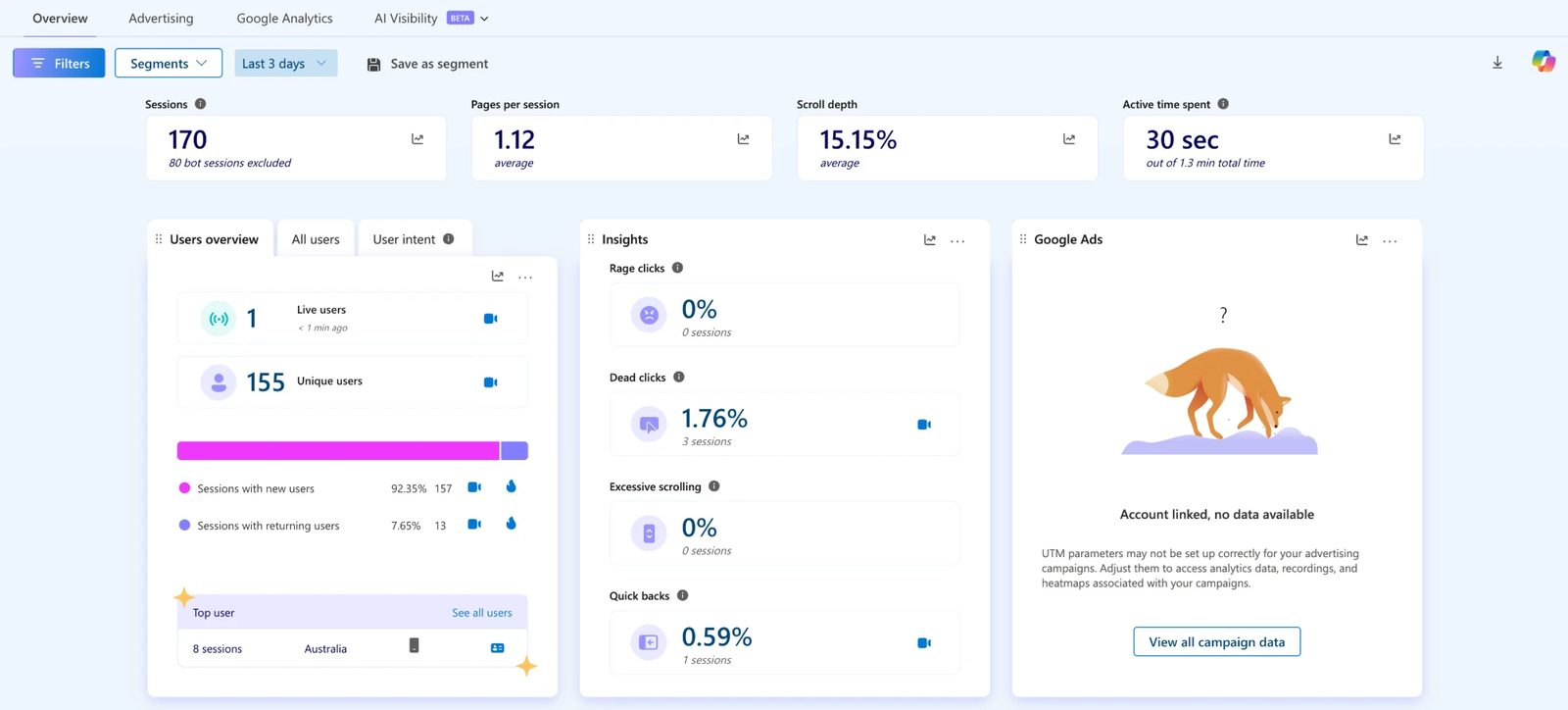
GA4 tells you what happened, not why. For a few minutes of setup, Microsoft Clarity gives you heatmaps and full session recordings on every page of your site, free, with no traffic cap.
AU practitioners now routinely run Clarity alongside GA4 on local-business sites: GA4 for the numbers, Clarity for the recordings of why someone left without booking. Watching three or four sessions of “people who clicked Get a Quote but did not submit” usually surfaces the actual blocker (a confusing form field, a layout shift on mobile, a hidden phone number) faster than any GA4 funnel report.
Install it with a single script tag, or via your existing Google Tag Manager container.
Data Analysis and Improvement
Reading Conversion Reports
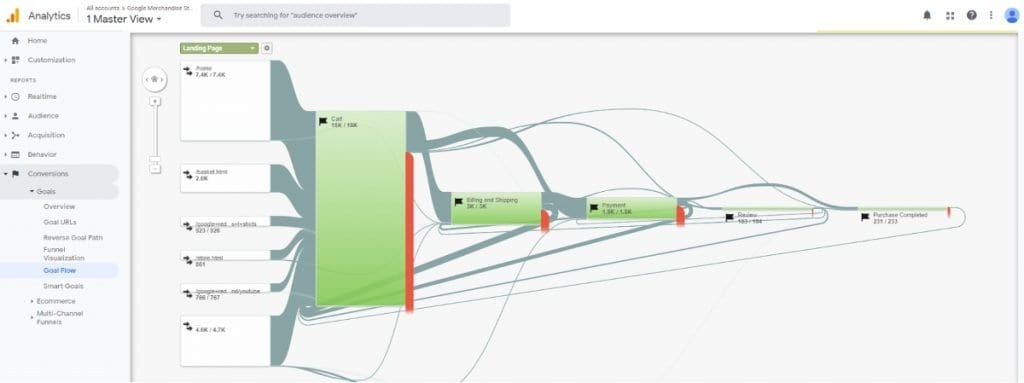
To optimise your campaigns, dive into conversion reports from Google Ads and GA4. Focus on these key metrics:
| Metric Type | What to Monitor | Why It Matters |
|---|---|---|
| Local Actions | Actions like direction requests, calls, and visits | Shows customer interest in your business |
| Conversion Value | Revenue per conversion, cost per lead | Helps calculate return on investment (ROI) |
| Time Analysis | Peak conversion hours, seasonal trends | Helps fine-tune ad scheduling |
| Geographic Data | Suburb performance, radius effectiveness | Improves targeting accuracy |
Pay attention to how online interactions lead to offline conversions. For example, do phone calls result in more valuable leads than form submissions? Identifying such patterns in customer behaviour can help you make better decisions.
Use these insights to fine-tune your campaigns for better performance.
Marketing Adjustments
Once you’ve analysed the data, tweak your marketing strategy accordingly:
-
Conversion Rate Optimisation
Make sure your Google Business Profile is fully updated and set up for conversion tracking. This ensures you’re capturing all relevant data. -
Budget and Geographic Optimisation
Action Implementation Expected Outcome Radius Adjustment Adjust targeting based on conversion density Better allocation of ad spend Suburb Targeting Focus on areas with strong performance Higher conversion rates Location Bid Adjustments Increase bids in profitable regions Improved ROI -
Campaign Optimisation
Use your conversion insights to refine campaigns. For example:- Align ad schedules with peak conversion times.
- Improve landing pages based on user behaviour.
- Adjust keyword targeting to capture more local searches.
- Strengthen your online reputation to build trust and encourage conversions.
Conclusion
Setting up local conversion tracking is essential for businesses looking to link online interactions with offline results. By doing so, you gain a clear view of how digital engagement translates into real-world actions.
Using the tracking methods discussed earlier, you can make smarter marketing decisions. For example, an optimised Google Business Profile can generate a large share of local leads. Tools like Google Analytics and Google Ads help you measure your efforts and see what’s working.
With conversion tracking in place, you can monitor key actions like store visits, phone calls, and direction requests. This data gives you the insights needed to fine-tune your campaigns and maximise your return on investment.
The key is in regularly reviewing the data. Analysing trends and customer behaviours allows you to adapt your strategy over time. This approach strengthens your local marketing efforts and ensures steady growth.
FAQs
How does local conversion tracking enhance my marketing strategy?
Local conversion tracking helps refine your marketing strategy by providing valuable insights into how potential customers interact with your business. By tracking specific actions, like calls, form submissions, or in-store visits, you can identify which campaigns are driving the most engagement and optimise your efforts accordingly.
This data empowers you to target the right audience, improve ROI, and focus on attracting high-quality leads. With a clearer understanding of your customers’ behaviour, you can make informed decisions to grow your business and better serve your local market.
What tools do I need to set up local conversion tracking for my business?
To effectively set up local conversion tracking, you’ll need Google Analytics and Google Ads. These tools work together to help you monitor and optimise how users interact with your business online and track key actions, such as calls, form submissions, or store visits.
Using these platforms, you can gain valuable insights into your audience, measure campaign performance, and refine your marketing strategies to drive better results.
How can I assign accurate conversion values to local actions to measure ROI effectively?
To assign accurate conversion values to local actions, start by identifying the specific actions that matter most to your business, such as phone calls, store visits, or form submissions. Assign a monetary value to each action based on its contribution to your revenue. For example, if a phone call typically leads to a $100 sale, you can assign that value to phone call conversions.
Use tools like Google Ads and Google Analytics to track these actions. In Google Ads, set up conversion tracking by selecting the action type, defining its value, and linking your Google Analytics account for more detailed insights. Regularly review and adjust these values to reflect changes in your business performance or customer behaviour, ensuring your ROI measurements remain accurate and actionable.
If you are spending on SEO or ads but cannot tell which calls and clicks turn into real jobs, that is exactly the gap we close for clients. Our SEO ROI tracking process walks through the full monthly reporting framework that sits on top of the stack above. Book a call and we will set up tracking that ties your local visibility to actual revenue.