Why Proximity Is the Real Power Behind Google Maps Rankings
Last Updated on 21 January 2026 by Dorian Menard
Essential takeaway: Proximity is the non-negotiable anchor of Google Maps rankings, especially since the Vicinity Update tightened local visibility. Because faking a location leads to suspension, businesses outside the immediate zone must overcompensate with superior prominence. You cannot hack physical distance, so you must dominate with reviews and legitimate local authority.
You might dominate the local pack right outside your front door, but watching that visibility vanish just a few blocks away is a frustrating reality for most business owners.
The Google Maps proximity ranking factor is often the silent killer of local SEO campaigns, rigidly filtering results based on physical distance rather than your actual service quality or reputation.
Instead of fighting a losing battle against fixed GPS coordinates, I will show you the specific mechanics behind this algorithm and the legitimate strategies you need to force Google to rank you further afield using prominence and relevance.
- What Proximity in Google Maps Actually Is (and What It Isn’t)
- Why a Physical Storefront Almost Always Wins on Proximity
- The “Proximity Curve”: How Your Visibility Decays With Distance
- Legitimate Strategies to Manage the Proximity Factor
- Proximity vs. Relevance vs. Prominence: A Decision Framework for Action
- The Non-Negotiable Storefront Setup Checklist for Google’s Compliance
- Navigating the Tricky Edge Cases: SABs, Co-Working, and Multi-Location Brands
What Proximity in Google Maps Actually Is (and What It Isn’t)
The Hard Truth About Distance
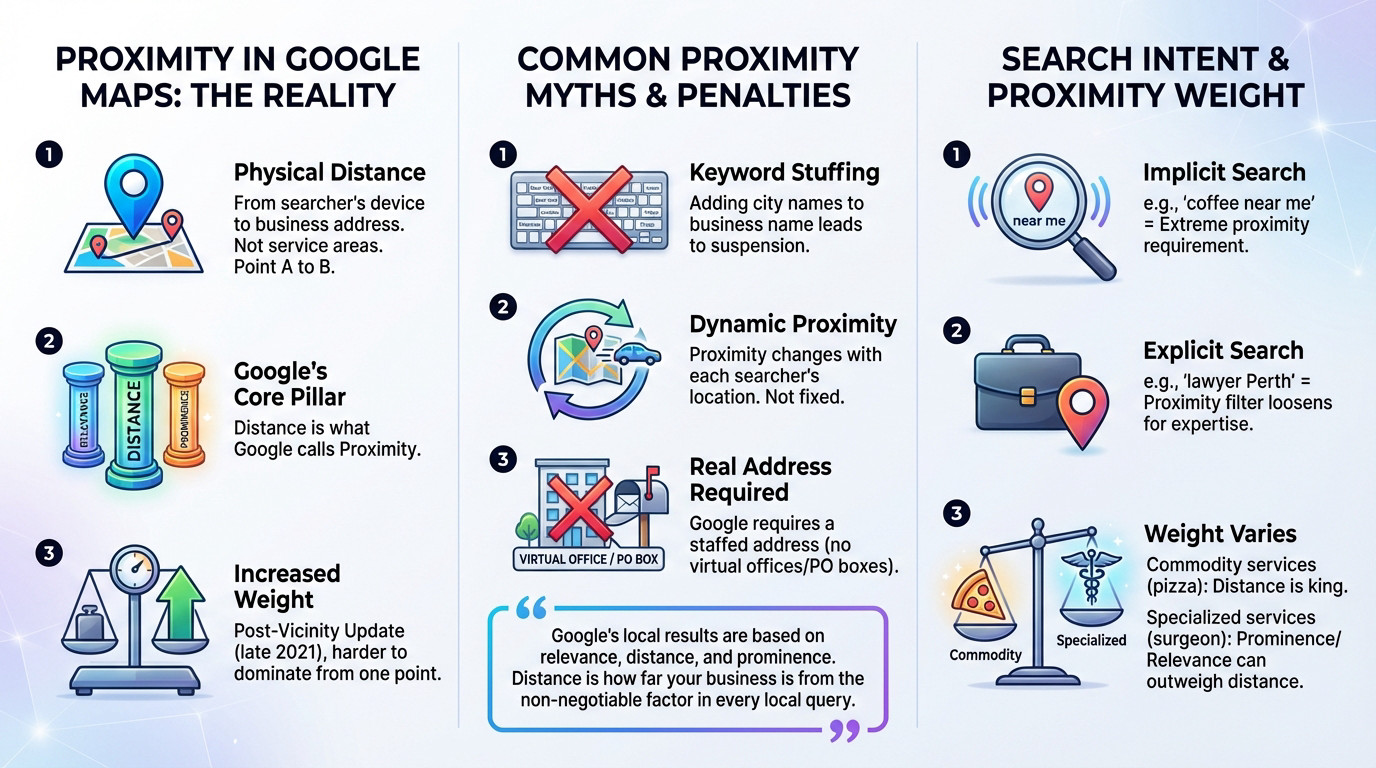
Let’s be clear. Proximity is the raw physical distance between the searcher’s device—or their inferred location—and your business’s actual brick-and-mortar address. It is a cold, hard Point A to Point B calculation, not the “service area” radius you drew in your settings.
Google explicitly confirms that local results hang on three specific pillars: Relevance, Distance, and Prominence. That “Distance” element is exactly what we mean by proximity. It is a foundational signal that dictates visibility.
Since the “Vicinity” update in late 2021, Google has aggressively dialed up the weight of this factor. Being the most famous shop in town is no longer enough to dominate an entire city from a single map pin.
Common Myths That Get Businesses Suspended
You cannot hack the Google Maps proximity ranking factor by stuffing city names into your business title. Adding “London” to your name doesn’t move your GPS coordinates. It just flags your profile for a swift, painful suspension.
Understand this: proximity is fluid. It shifts with every single search based on where the user stands. Your “ranking” is never absolute; it is entirely relative to the searcher’s pocket.
Stop using virtual offices. Google demands a tangible location where you are staffed and ready to receive customers during stated hours. Using a P.O. Box or an empty co-working shell is a direct violation of their strictest guidelines.
Google’s local results are based on relevance, distance, and prominence. Distance is how far your business is from the searcher, a non-negotiable factor in every local query.
How Search Intent Changes the Proximity Game
We must distinguish between implicit and explicit needs. A query like “coffee shop near me” triggers an extreme proximity filter. Google assumes you want caffeine right now, not a twenty-minute drive across town.
Conversely, searching for “real estate lawyer in Perth” relaxes that tight grip. Google understands the user is willing to travel further for specific, high-stakes expertise.
Here is the nuance: Google adjusts the proximity weight based on the entity type. For commodity services like gas or pizza, distance reigns supreme. However, for specialized services like surgeons, prominence and relevance can override distance.
Why a Physical Storefront Almost Always Wins on Proximity
Now that we’ve stripped back the layers of what the Google Maps proximity ranking factor actually means, let’s look at why having a visible, brick-and-mortar address gives you a competitive edge that is nearly impossible to beat.
The Clear Advantage of a Physical Address
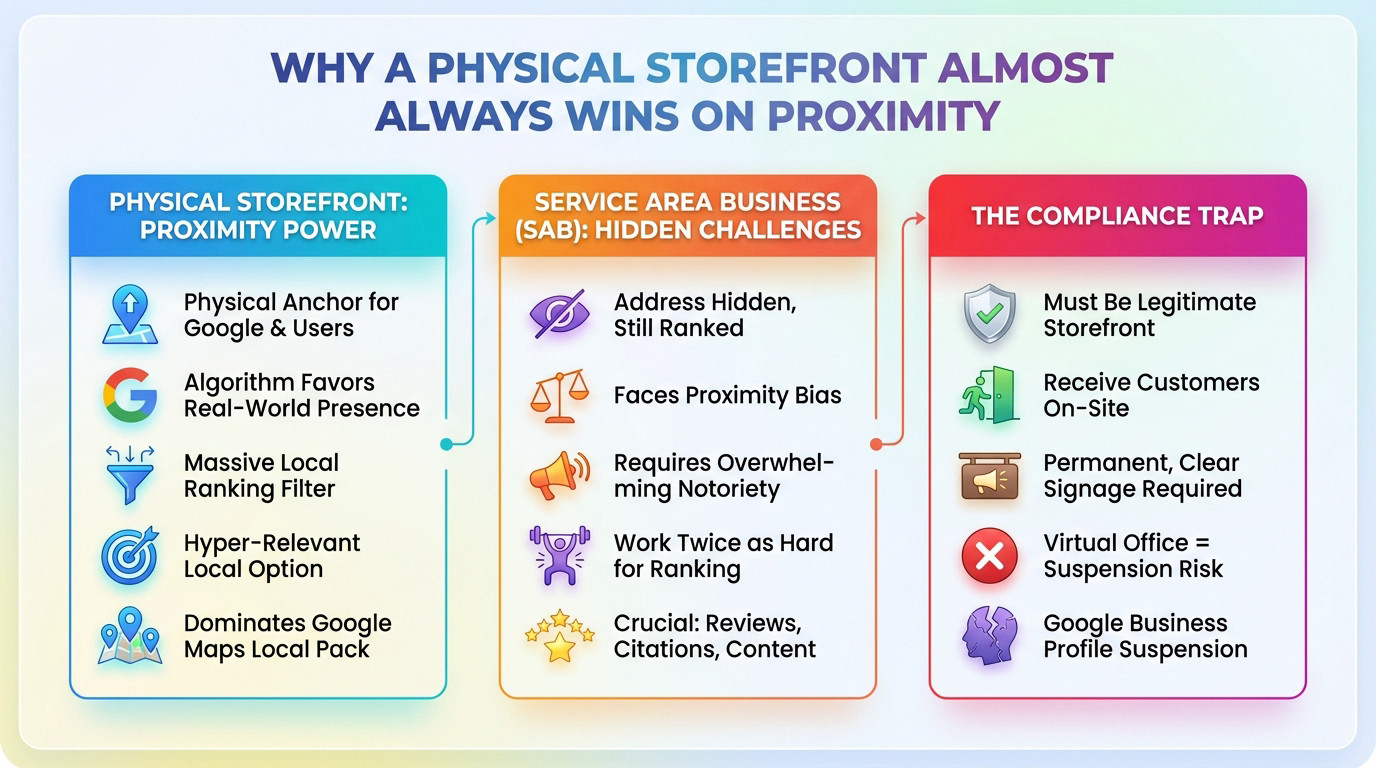
A storefront address hands Google and users a physical reference point and unambiguous location. It serves as a concrete anchor in the real world that the algorithm absolutely loves to verify. There is simply zero guesswork involved regarding your actual spot on the map.
When the searcher is nearby, this verified address acts as a massive ranking filter against competitors. You instantly become a hyper-relevant option for that specific query.
That is exactly why businesses with a storefront, like cafes or retail shops in Perth, consistently dominate the Google Maps local pack for those high-intent, immediate searches nearby.
The Hidden Handicap of Service Area Businesses (SABs)
Service businesses (SABs), such as plumbers or electricians who mask their address, still possess a ranking anchor point. Google simply utilizes the address you provided during verification, even if that specific location remains hidden from the public eye.
The trouble is, you are fighting against businesses with visible pins. This “proximity bias” means you must overcompensate with overwhelming prominence and relevance to win visibility.
You have to work twice as hard on reviews, local citations, and site content to stand a chance when competing as a service-area business far from your hidden base.
The Compliance Trap: When a Storefront Is a Liability
The angle is simple: “If you can legitimately be a storefront, do it.” But the keyword here is legitimately.
Google is crystal clear: you can only display an address if you receive customers there, during stated hours, with permanent and clear signage. Failing to respect this explicit rule is playing with fire.
Trying to cheat the system with a virtual office or a co-working space where nobody is present is the fastest route to a suspension for violating Google’s eligibility expectations.
The “Proximity Curve”: How Your Visibility Decays With Distance
Understanding the power of a physical address is one thing; visualizing how your influence bleeds out the further you get from it is what separates the amateurs from the pros.
Visualizing Your Ranking Radius With Geo-Grid Tracking
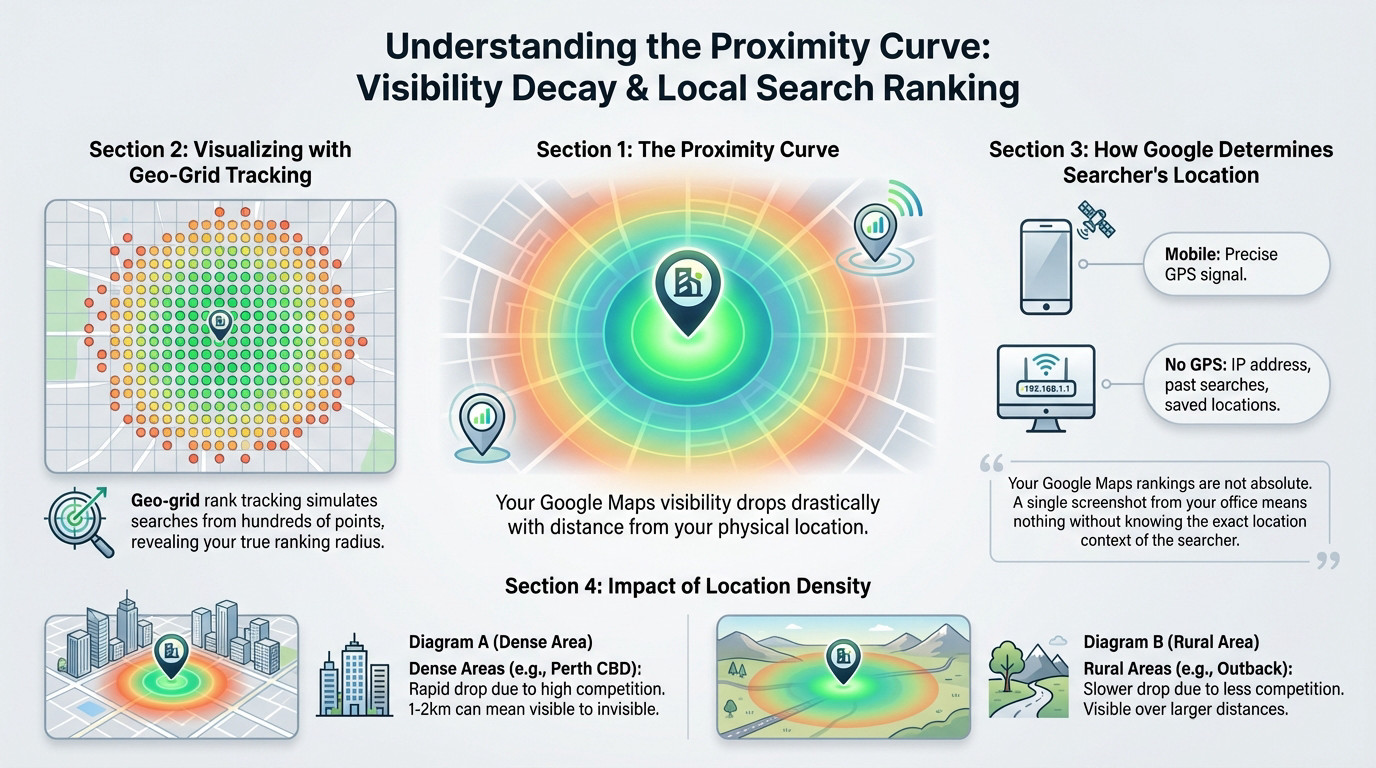
The concept of the Google Maps proximity ranking factor is simple: your visibility on the map drops drastically the moment a searcher steps away from your physical location.
To see this in action, we use geo-grid rank tracking tools. They simulate searches from hundreds of coordinate points on a map, showing you exactly where you dominate and where you become invisible.
It is the antidote to the illusion of a single ranking screenshot taken from your own front desk. See this in action.
How Google Determines the Searcher’s Location
The searcher’s location is half the proximity equation. On mobile, it is primarily the device GPS signal—the famous “blue dot.” It is the most precise data Google can possibly get.
But what if the user doesn’t share their location? Google then uses “what it knows about them.” This might include IP addresses, previous search history, or locations saved as “Home” and “Work.”
Your Google Maps rankings are not absolute. A single screenshot from your office means nothing without knowing the exact location context of the searcher.
Why the Drop-Off Is Different in Perth vs. the Outback
The effect of this proximity curve is not uniform. In dense metro zones like the Perth CBD, the visibility drop is extremely rapid. One or two kilometers often makes the difference between ranking #1 and being invisible.
The reason is simple: the density of competition. There is always another option just around the corner.
In rural or less dense areas, that curve is softer. You can stay visible over a much larger distance simply because there are fewer competitors to replace you.
Legitimate Strategies to Manage the Proximity Factor
Accepting the reality of proximity doesn’t mean being powerless. Here is what you can actually do to work with this factor, not against it.
Choose the Correct Business Model in Your Profile
The first step is radical honesty in your Google Business Profile. You must select the right model: Storefront, Hybrid, or Service-Area Business (SAB). This decision is the absolute bedrock of your entire location strategy.
Google’s rule is non-negotiable: if you don’t serve customers at your address, you must hide it. For hybrid businesses—like a restaurant that also delivers—you need to define both your physical address and your specific service area boundaries to stay compliant.
If you operate from home, it might be worth converting a room into your office and purchasing branding material and signage to be eligible for a storefront listing!
Strategic Expansion: The Only Real Way to “Move” Closer
You cannot move the searcher, and you should never fake locations. The only genuine strategy to “improve” proximity in a new zone is to actually plant yourself there.
This means opening a legitimate new location, complete with actual staff and permanent signage, closer to the demand you are targeting. This is a heavy operational decision, not a quick SEO hack or a digital trick.
If the unit economics work, this remains the single most powerful strategy for extended local dominance.
I’m regularly brought in to audit the local search performance of businesses across major Australian capital cities. In most cases, my recommendation is the same: expand your legitimate footprint by securing additional locations and increasing your presence on the map to outmanoeuvre competitors.
This is never about creating fake Google Business Profiles. It’s about understanding Google’s guidelines and using compliant, legitimate methods to establish new locations and listings when the opportunity exists.
We offer consulting sessions for lead generation businesses and brands with a national or multi-location presence. These sessions cover how to legally secure and scale additional locations, set up and structure Google Business Profile accounts correctly, manage them long term, and apply strict hygiene and compliance best practices to avoid suspensions. This is advanced GBP risk, compliance, and account architecture consulting built for businesses that need to scale safely
When You Can’t Move: Amplify Prominence and Relevance
What if a new branch isn’t an option? You fight on the two other fronts: relevance and prominence.
Google explicitly states that a business farther away can outrank a closer one if it’s deemed a better match for the user. That is your window of opportunity to beat the Google Maps proximity ranking factor.
This means getting high-quality reviews, building solid local citations, securing relevant local links, and ensuring your profile is perfectly optimised. You win by amplifying prominence until the distance factor matters less.
Proximity vs. Relevance vs. Prominence: A Decision Framework for Action
Diagnosing Your Local Ranking Problem
Stop guessing. Your ranking patterns tell you exactly what is wrong. It is a simple decision tree.
Scenario 1: You lose to competitors even when the search happens right outside your door. That is not a proximity issue. That is a relevance or category problem.
Scenario 2: You rank #1 within 500m but vanish at 2km. That is the Google Maps proximity ranking factor cutting you off. You need a location strategy or massive prominence.
Scenario 3: You appear on the map, but well below weaker competitors. That is a clear prominence deficit.
A Practical Framework for Local SEO Priorities
To clarify the right actions, here is a simple framework based on that diagnosis.
| Symptom | Likely Cause | Primary Action |
|---|---|---|
| You lose rankings even when the searcher is physically close. | Relevance Problem: Incorrect GBP categories, poor on-page signals, content mismatch. | Fix your Google Business Profile categories and on-page service content. Ensure you match the query. |
| You rank #1 nearby but disappear quickly with distance. | Proximity Problem: Your physical location is too far from the searcher’s area. Classic proximity bias. | Build massive prominence to compete at a distance, or consider a strategic physical expansion. |
| You appear in a wide area but always below weaker competitors. | Prominence Problem: Lack of reviews, weak backlink profile, low citation volume and consistency. | Execute a review generation campaign and build local citations and links. |
This table should be your starting point for any local campaign. It turns “it’s not working” into “here is what to fix,” based on the three pillars of local search.
The Non-Negotiable Storefront Setup Checklist for Google’s Compliance
If you commit to a storefront strategy, compliance is not optional. Here is the direct checklist to keep you on Google’s safe side.
Your Physical Location and Address Integrity
Everything hinges on your address data. It must be precise and match your actual, physical real-world location perfectly.
Don’t settle for “close enough” on the map. The pin must drop exactly on your front door. Never add keywords or city names into your address lines. That is spam and you will get penalized.
Google uses this specific data point to calculate distance. Any inaccuracy hurts your ability to rank for the closest searches. The Google Maps proximity ranking factor relies on this precision.
The Brutally Practical Compliance Checklist
To avoid a nightmare scenario, follow this list exactly. These are the hard rules of the game.
- Real-world location: Your address must be an actual, verifiable physical location.
- No virtual offices (unless staffed): If it’s a Regus or co-working space, your own team must be present during business hours.
- Permanent, fixed signage: Your business name must be clearly and permanently visible at the location. A piece of paper taped to the door doesn’t count.
- One profile per real location: Do not create multiple profiles for one business address.
- Hide your address if you’re a SAB: If you operate from home and don’t serve customers there, your address must be hidden from the public profile.
Missing even one of these points invites a suspension. This is not a gray area for debate.
Navigating the Tricky Edge Cases: SABs, Co-Working, and Multi-Location Brands
The basic rules are clear, but business is often messier, especially when you consider how the Google Maps proximity ranking factor actually treats non-standard locations. Let’s tackle the specific scenarios that cause the most headaches.
Home-Based and Hybrid Business Rules
If you operate out of your home, the rule is stark: unless you actually welcome customers into your living room—and most don’t—you must operate as a Service Area Business (SAB) and hide your address. This prevents suspensions. It keeps you compliant.
For hybrid businesses, like a pizza shop that also delivers, the setup is different. You must display your storefront address AND define your specific service areas. This captures both markets.
Google warns against stretching these service zones beyond a 2-hour driving time from your base. Don’t ignore this limit.
The Truth About Co-Working and Virtual Offices
This is the biggest area for confusion and sudden suspensions. A virtual office or generic co-working membership is not eligible for a storefront by default. Google hates these fake locations.
The only exception is if you rent a permanent, dedicated office. Your own staff—not the building’s receptionist—must be there during stated hours to serve clients. You need proof of occupancy. It can’t just be a floating desk.
You must also possess your own permanent signage. Using the address merely as a mailbox is a direct violation of terms.
Managing Multiple Locations and Practitioners Correctly
Multi-site brands can and should have a profile for every legitimate physical location. The key is that they must all be real places and fully staffed. No ghost kitchens allowed.
For practitioners like doctors, lawyers, or real estate agents working in a firm, separate rules apply. The main practice gets a profile. Additionally, every public-facing practitioner can have their own individual profile. This maximizes your visibility on the map.
- Multi-Location Brands: Create one GBP for each distinct, staffed storefront.
- Practitioners: The main practice gets a profile. Each public-facing professional can also have their own individual profile.
- Solo Practitioners in a shared space: If you are your own brand at a shared address (e.g., a therapist in a wellness center), you can have your own profile.
Understanding these distinctions is vital because user interactions with map listings vary significantly depending on whether the entity is a brand or an individual.
Proximity is the single ranking factor you cannot fake. Stop fighting the map with spam tactics that only risk suspension. If you want to dominate beyond your immediate neighborhood, you have two legitimate choices: build massive brand prominence or physically expand your footprint. The algorithm rewards reality, not tricks.
FAQ
Is proximity the single most important factor for Google Maps rankings?
It depends entirely on the search intent. Google balances three pillars: Relevance, Prominence, and Distance (proximity). For “convenience” searches like “petrol station” or “coffee near me,” proximity is the absolute kingmaker—you simply won’t rank if you aren’t close. However, for specialised searches like “medical malpractice lawyer,” Google often prioritises Prominence (reviews and authority) over sheer distance, meaning a highly-rated firm can outrank a closer, less established competitor.
Can I rank in a specific suburb if my business address isn’t physically located there?
It is difficult, but possible with enough authority. This is the “proximity bias” in action. If you are a Service Area Business (SAB), Google still calculates your rankings based on your verified base of operations, even if that address is hidden. To rank in a suburb 10 kilometres away, your Prominence signals (reviews, backlinks, citations) must be strong enough to override the fact that competitors are physically closer to the searcher.
Will opening a virtual office help me expand my proximity reach?
I strongly advise against this. Using a virtual office or an unstaffed co-working space to “hack” a new location is a direct violation of Google’s guidelines. Unless you have your own staff present to receive customers during stated hours, you are risking an immediate suspension of your Business Profile. Expansion requires legitimate physical footprints, not just a rented mailbox.
Why do my rankings drop off so sharply just a few kilometres away?
We call this the “proximity curve.” In dense areas like a city centre, there is an abundance of competition. Google doesn’t need to look 5km away when there are twenty relevant businesses within 500 metres of the searcher. The higher the density of competitors, the faster your visibility decays as you move away from your office. In rural areas with less competition, that curve is much flatter, allowing you to rank across a wider radius.
Does adding city names to my business description help with proximity?
No. Proximity is a calculation based on your verified GPS coordinates and the user’s location, not the text in your bio. You cannot “optimise” your physical location with keywords. Furthermore, stuffing city names into your business name (e.g., “Plumber London”) violates Google’s naming policy and is a common trigger for profile suspension. Stick to your legal business name and focus on building genuine local authority.

Dorian Menard
https://searchscope.com.auI’m Dorian, founder of Search Scope and an SEO obsessed with ROI and lead generation. After a decade in the trenches, I’ve built and ranked digital assets for businesses across the world. I cut through the noise with data, automation, and strategies that actually convert. When I’m not scaling rankings, you’ll find me on a motorbike or setting chess traps — always planning three moves ahead.