Ecommerce Internal Linking: How to Push Authority to Category Pages and Scale Rankings
Last Updated on 28 January 2026 by Dorian Menard
The bottom line: Authority is earned externally but often wasted internally. Instead of obsessing over backlinks, successful e-commerce SEO focuses on channeling existing power to stable category pages rather than fleeting products. This architectural shift maximizes crawl efficiency and turns overlooked link equity into a direct lever for higher rankings and revenue.
Your category pages are likely struggling to rank because your current structure wastes authority on low-value URLs instead of funneling it to your money pages. Implementing a strategic ecommerce internal linking framework solves this by directing link equity straight to the collections that drive revenue.
We will cover the specific architecture adjustments required to stop the leak and force Google to prioritize your most profitable assets.
- Why Internal Linking Is the Real Growth Lever for Ecommerce
- Building a Site Architecture That Channels Authority
- Your Internal Linking Toolkit: Navigation, Contextual, and Breadcrumbs
- Advanced Plays and Common Blunders to Avoid
- Auditing Your Links and Measuring What Matters
Why Internal Linking Is the Real Growth Lever for Ecommerce
Your Link Building Is Fine, Your Authority Distribution Is Broken
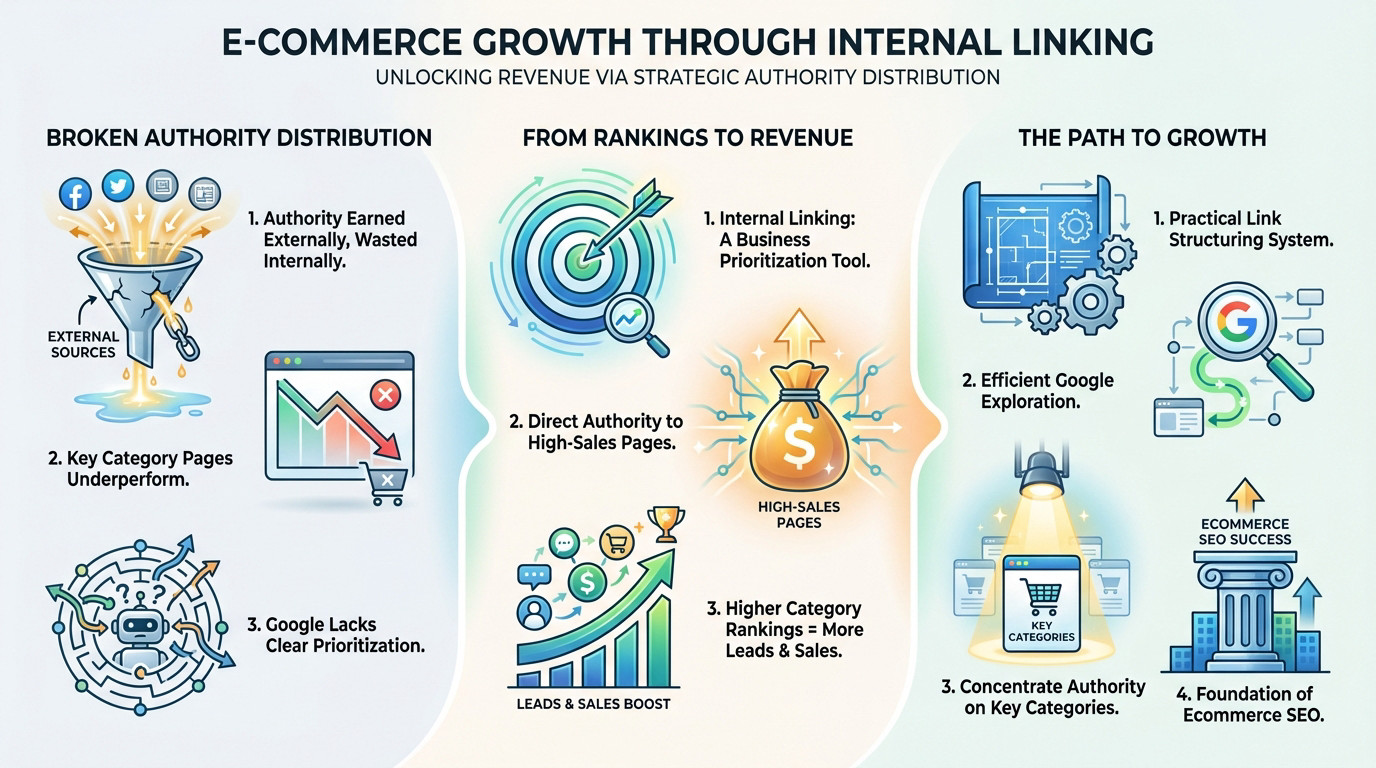
Stop obsessing over backlinks. The problem with most online stores isn’t a lack of external signals, but the mismanagement of internal authority. You earn credibility from the outside, yet you squander it on the inside by trapping equity in the wrong places.
The symptom is obvious. Your high-margin category pages remain invisible in search results, starving for weight, while useless product variants or old blog posts hoard all the power. Without a clear map, Google has no idea which pages actually matter.
Fixing this architecture costs zero media budget. It simply redirects existing power to drive revenue and visibility immediately.
From Rankings to Revenue: The Business Case
Internal linking is not just a technical SEO task. It is a ruthless business prioritization exercise. You must funnel traffic and authority specifically toward the pages that generate the most sales.
Most ecommerce sites don’t have a link building problem. They have an internal linking problem. Authority is earned externally but wasted internally.
When category pages climb the rankings, you don’t just get traffic. You get more qualified leads and conversions, which remain the only metrics that pay the bills.
What This Guide Will Deliver
We are building a practical system to structure links so Google crawls efficiently and pushes maximum authority to the categories that count. No fluff, just concrete actions.
Ecommerce internal linking is the backbone of a solid ecommerce SEO strategy. We will stop the bleed of authority and turn your site structure into a revenue engine.
Building a Site Architecture That Channels Authority
The Hierarchy of Power: Categories First
You must establish a strict flow of authority for ecommerce internal linking. It starts at the homepage, moves to main category pages, flows into subcategories, and trickles down to products.
Why prioritize categories? Unlike products that go out of stock, categories are stable assets that target high-volume keywords. They act as permanent hubs for grouping inventory. This stability makes them the perfect vessel for holding and compounding authority.
Linking aggressively to individual products is a rookie mistake that burns equity. It dilutes power and creates messy maintenance nightmares when items eventually expire. Focus on your product categories first!
Designing a Clean and Flat Structure
We need to talk about click depth. Your most valuable category pages should never sit more than two or three clicks away from the homepage. If users dig, you lose.
A clear category tree combined with logical URL structures—like /category/subcategory/product—is non-negotiable. This setup helps search bots understand your hierarchy instantly. It drastically reduces crawl friction across the site.
- It drives better distribution of PageRank across the board.
- It triggers faster indexation for your priority pages.
- It delivers a vastly improved user experience.

Your Internal Linking Toolkit: Navigation, Contextual, and Breadcrumbs
A solid architecture is the blueprint. Now, let’s look at the tools to build the roads.
Structural Links vs. Contextual Links
Structural links live in your headers, footers, and sidebars. Their job is strictly defining the global architecture of your site so crawlers understand the skeleton without getting lost in the noise.
Contextual links sit inside body copy—like blog posts or category descriptions. They carry a different weight: transmitting thematic relevance to show Google exactly how topics connect semantically and logically.
Relying solely on navigation is a rookie mistake that costs you rankings. Contextual links, paired with descriptive anchor text, provide the strongest semantic signal to Google about what a page actually represents.

The Power of Contextual Links from Content
Take your high-authority assets—blogs with backlinks or buying guides—and use them to push “juice” straight to category pages. This is where external authority gets redistributed internally to drive revenue where it counts.
For instance, a comprehensive “How to choose a coffee machine” guide must link directly to the “/coffee-machines/” category using exact phrasing.
Even individual items play a role here. By optimising your product pages with smart links, you guarantee the entire ecosystem participates in the global strategy rather than just sitting in isolation.
Breadcrumbs: The Unsung Heroes of Hierarchy
Breadcrumbs define the hierarchy for Google while letting users climb back up category levels instantly. More importantly, they inject relevant internal links onto every page, reinforcing the parent-child relationship automatically.
Consistency across the entire site is non-negotiable. Use BreadcrumbList structured data to highlight this path in SERPs, giving search engines a clear map of your structure.
Advanced Plays and Common Blunders to Avoid
The basics are covered. Now let’s look at the mistakes that cost money and the strategies that actually make a difference.
Taming Faceted Navigation and Filters
Faceted navigation (filters) often creates thousands of low-value URLs that dilute authority and waste your crawl budget. You are effectively asking Google to crawl junk. This hurts your site’s overall performance.
The solution is simple. Use the meta robots="noindex, follow" tag on most filter URLs to stop indexation while allowing authority to flow. This is exactly what technical SEO experts recommend. It keeps the index clean.
Only filter combinations with significant search volume should be allowed for indexation. You should create static landing pages for these specific opportunities.
Anchor Text Strategy: Descriptive Not Desperate
You should use descriptive anchor text that varies naturally. Instead of a generic “click here,” use terms like “espresso coffee machines” or “our best-selling sneakers.” This provides context.
Be careful not to over-optimize. Using the exact same anchor text everywhere looks like spam to Google, even for internal links. Variety is the key to safety.
Common Mistakes That Kill Your Rankings
Here is a list of the most frequent errors that sabotage your internal linking efforts. These mistakes silently kill your rankings and waste your budget.
- Orphan category pages (without any internal links pointing to them).
- Link spam in the footer (ineffective and risky).
- Links to 301 redirects or 404 pages.
- Infinite pagination loops that trap crawlers.
Internal linking is about focus, not volume. Linking everything to everything else is a recipe for chaos and signals to Google that nothing is important.
Auditing Your Links and Measuring What Matters
Strategy without measurement is guessing. Here is how to verify your ecommerce internal linking efforts are actually driving ROI.
How to Conduct a Quick Internal Link Audit
You can’t fix what you can’t see. Start by crawling your site structure to map the real hierarchy. This technical snapshot is the foundation of any serious audit.
Use a tool like Screaming Frog to visualize the architecture. It strips away design to show exactly how authority flows—or doesn’t—through your pages.
Target the obvious leaks first. Identify orphan pages, spot redirect chains wasting crawl budget, and check the click depth of your high-revenue categories.
Key Metrics to Track for Success
Stop obsessing over vanity metrics. Rankings are a byproduct, not the full story. Real success indicators connect directly to crawl efficiency and revenue.
- Ranking improvement for targeted category pages.
- Reduction in “discovered – currently not indexed” errors.
- Increase in organic traffic and conversions.
- Decrease in average click depth for priority URLs.
| Metric | What it Means | Why it Matters |
|---|---|---|
| Crawl Depth Reduction | Fewer clicks from the homepage to key pages | Faster authority flow and better indexation. |
| Ranking Lift for Categories | Your money pages are gaining visibility | Direct impact on traffic and revenue. |
| Lower “Discovered – not indexed” | Google can find and process your pages efficiently | Less wasted crawl budget, more of your site is visible. |
From Audit to Action
An audit is just a diagnosis. You must move to execution immediately: fix broken paths, inject contextual links, and tighten the hierarchy.
This isn’t a “set and forget” task. It requires ongoing attention, much like a comprehensive SEO audit ensures long-term health.
Internal linking is not just a technical box to check; it is a direct line to higher revenue. Stop letting your authority die on low-value pages. Channel that power to the categories that actually convert. The strategy is clear, and the payoff is measurable—now go build the pathways.
FAQ
Why should I prioritise linking to category pages over product pages?
Think of your category pages as the permanent real estate on your site, while products are often temporary tenants. Products go out of stock, get discontinued, or change seasonally, which turns links pointing to them into dead ends or wasted equity. Categories, however, are stable hubs that target broad, high-volume keywords.
By channelling authority to your categories, you build long-term ranking power that lifts every product sitting underneath them. It’s about investing in the assets that will actually drive traffic year after year.
What is the ideal click depth for an ecommerce site structure?
You should aim for a “flat” architecture where your most important pages are no more than three clicks away from the homepage. If Google’s crawlers have to dig through five or six layers of navigation to find a sub-category, they are likely to deem it unimportant or miss it entirely.
Keeping key pages within a 3-click radius ensures that authority flows efficiently from your homepage down to your money pages, reducing crawl friction and speeding up indexation.
How do I handle faceted navigation without hurting my SEO?
Faceted navigation (filters for size, colour, price) is great for users but can generate thousands of near-identical URLs that dilute your site’s authority and waste crawl budget. If Google indexes every combination of filters, you end up with a massive “thin content” problem.
The solution is to use `meta robots=”noindex, follow”` tags on these filtered results. This tells Google to crawl the links to find your products but keeps the low-value filter pages out of the search index, preserving your authority for the main categories.
Does internal anchor text actually matter for rankings?
Absolutely. Internal anchor text provides the context Google needs to understand what the target page is about. Using generic text like “click here” or “view more” tells search engines nothing. Instead, use descriptive, natural language like “waterproof hiking boots” or “espresso machines”.
However, don’t force it. Avoid spamming the exact same keyword repeatedly. The goal is to be helpful and descriptive, creating a natural variety that signals relevance without looking like you are trying to game the system.
What is the difference between structural and contextual links?
Structural links are the hard-wired pathways of your site, found in your main navigation menu, footer, and breadcrumbs. They define the overall hierarchy and parent-child relationships of your store. They are the skeleton of your architecture.
Contextual links are the ones you place manually within the body content, such as in a blog post or a category description. These are powerful because they are surrounded by relevant text, allowing you to direct authority strategically from high-traffic informational content to your transactional category pages.

Dorian Menard
https://searchscope.com.auI’m Dorian, founder of Search Scope and an SEO obsessed with ROI and lead generation. After a decade in the trenches, I’ve built and ranked digital assets for businesses across the world. I cut through the noise with data, automation, and strategies that actually convert. When I’m not scaling rankings, you’ll find me on a motorbike or setting chess traps — always planning three moves ahead.