
How a Business Name Change Can Get Your Google Profile Suspended (and How to Do It Safely)
Renaming a business is one of the fastest ways to lose the profile. What Google flags, the safe sequence to follow, and what to do if it is already suspended.

Yes, changing your business name on Google Business Profile can trigger a suspension or force you to re-verify. The name is one of the most abused fields on a listing, which is exactly why Google scrutinises it so hard. A name edit counts as a significant change, and significant changes often push the profile straight into an automated review the moment you hit save.
That does not mean you can never rebrand. It means a genuine name change and a keyword grab look completely different to Google, and that difference decides whether your profile survives the edit. Here is why it happens, the real ranking tension behind it, how to change the name safely, and what to do if you are already caught up in a Google Business Profile suspension.
- A name change is a significant edit Google reviews automatically, and it can force re-verification.
- Legitimate rebrands are allowed, as long as the new name is real and consistent everywhere.
- Keywords in the name do lift local rankings, but only if the name is genuinely registered and used; otherwise it is a common suspension trigger.
- Change the name on its own, with documentation ready, never alongside other edits.
- If you are suspended, do not create a new profile. Fix the trigger and submit one strong appeal with evidence.
Why a name change triggers a suspension
When you edit the business name, you are changing a core identity field. Google flags name, address and phone changes as significant edits, and those edits commonly route the profile through an automated review before the change goes live. Sometimes that passes quietly. Sometimes it suspends the profile or forces re-verification.
Google’s own guidance is blunt about this. Its Business Profile Help documentation states that if you change your business name after verification, you may need to verify the business again. That is not a glitch. It is Google rechecking that the business is still legitimate after a fundamental change.
The scrutiny exists for a reason. The name field has years of abuse behind it: owners stuffing it with services, suburbs and superlatives, and fake listings built entirely on keyword-rich names. Google now treats every name edit as guilty until proven legitimate.
Google’s rule on business names, in plain English
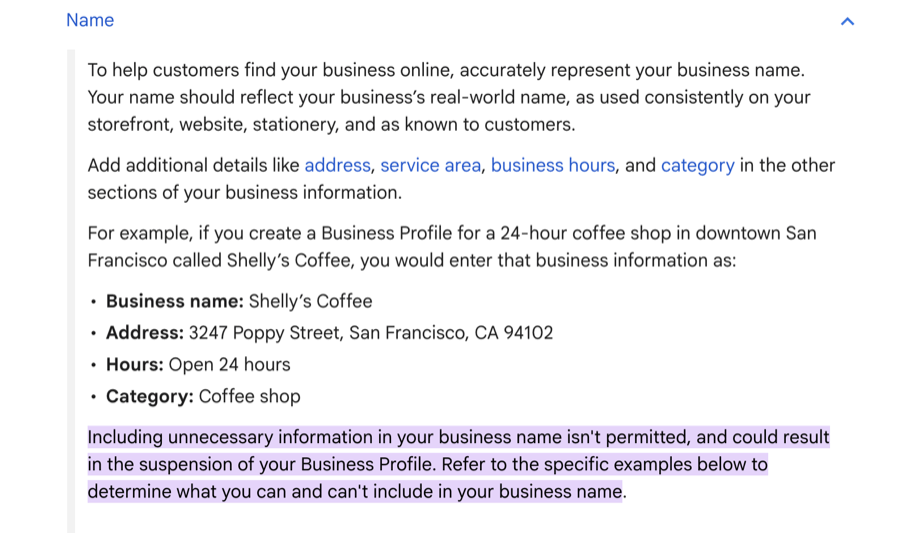
The rule itself is simple. Your Google Business Profile name must be your real-world business name, the one on your signage, stationery and branding, and nothing more.
No added keywords. No service descriptions. No suburb or city bolted on, no taglines like “24/7” or “Best”, no symbols or emojis. “Johnson’s Plumbing” is fine. “Johnson’s Plumbing Emergency Plumber Perth 24/7” is a suspension waiting to happen.
There is one real exception. If you have a registered trading name, a DBA, that genuinely includes descriptive or location words, and you actually operate under it, that registered name is acceptable. The test is whether customers and your legal documents know you by that name, not whether the words happen to help you rank.
The uncomfortable truth: keywords in the name do help rankings
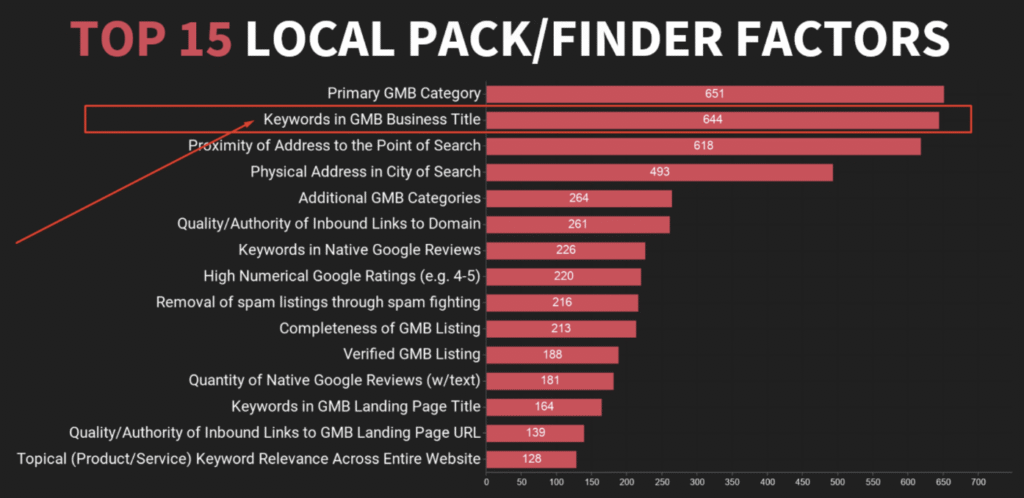
Here is the part most agencies will not say out loud. Keywords in the business name do improve local rankings, and it is well documented.
Joy Hawkins ran a controlled test that added “Salad Bar” to a restaurant’s profile name. The listing started ranking for “salad bar” searches it had never appeared for. Remove the words, the ranking vanished. Add them back, it returned. Darren Shaw of Whitespark ran a similar experiment, appending a keyword and city to a listing name, and saw a sharp jump. None of this is folklore. Keyword-in-business-title consistently sits near the top of Whitespark’s local search ranking factors data.
So the temptation is real. The way to act on it safely is to make the keyword-rich name your actual name. That means:
- Change your trading name.
- Register it with ASIC on the Business Names Register.
- Use it consistently on signage, website, invoices and everywhere else.
Done in that order, a name like “Rapid Hot Water Plumbing” is compliant, and the ranking benefit is legitimate and durable.
The version that gets punished is the shortcut: a business registered as something else that just types keywords into the Google name field. That can get the profile suspended and pulled from Search and Maps. You can lose the ability to respond to reviews or update details. Repeat offences attract harsher treatment.
Google’s detection has also matured, so even the shortcut tends to get reverted and the ranking stripped anyway. Earn the name, register it, then use it. That is the whole distinction.
A legitimate rebrand versus keyword stuffing
A real name change is a business event, not a Google edit. The business has actually rebranded. The new name is on the signage, the legal registration, the website, the invoices, the social profiles, and in how staff answer the phone. “Smith and Sons Plumbing” becoming “Smith and Sons Plumbing and Gas” because the services genuinely expanded is legitimate, even though it adds a keyword, because the change is real everywhere, not just on Google.
Before you touch the profile, get the evidence together:
- Updated business registration.
- Photos of new signage.
- Refreshed stationery or vehicle wraps.
- The updated website.
- Any public rebrand announcement.
That same documentation is what carries an appeal if the profile gets reviewed.
Selling, buying or rebranding the whole business: the identity-change trap
There is an important line between renaming a business and replacing it. A genuine rebrand is the same business under a new name: same owner, same operation, customers and suppliers carry over. Google treats that as an edit. But if the business has been sold, or the change is large enough that it is effectively a different business, that is no longer a name edit at all.
Google’s own guidance says that if the nature of the business changes substantially, it should be treated as a new business: you close or mark the old profile and create a fresh one, rather than editing the name on the existing listing. Operators who try to rename through a sale have started running into a hard rejection that flags the change as a business-identity issue, even when the address, phone and website all stay the same, and Google then asks for documents like a licence or a photo of the premises before it will proceed.
So before you rename, be honest about which situation you are in:
- Same business, new name (a true rebrand): edit the name on the existing profile, following the safe sequence below, and keep your reviews and history.
- New owner or genuinely a new business: expect Google to want it handled as a new entity. Have the ownership and registration paperwork ready, and accept that forcing a rename on the old listing can trigger a rejection or suspension rather than a clean edit.
If you are mid-acquisition and the reviews on the existing profile are valuable, get advice before you touch the name field. This is one of the easiest ways to lose a listing’s history by accident.
How to change your business name safely
Treat this as a sequence, not a single click.
- Change the real world first. Update signage, the website, social profiles and major directories so the new name is consistent before Google sees it.
- Gather your documentation. Registration, signage photos and the website should all show the new name.
- Change only the name. Leave the address, phone, categories and everything else alone in that session. Several edits at once looks suspicious and raises the chance of a review. In particular, never change the name and the address (or phone) in the same edit. Stacking two significant changes at once is one of the most reliable ways to trigger a suspension, and we have seen relocations-plus-renames end in a denied appeal. If you are also moving, change the name, let it fully settle and re-verify if asked, then change the address as a separate step weeks later.
- Let it settle. Wait for the name change to confirm before making any other profile updates.
- Expect possible re-verification, and know what it involves. It may come by postcard, phone or video. Video is now the common one: Google asks for an unedited clip, recorded live on your phone through the Business Profile app, showing your premises and signage, and the business name on that permanent signage must match the new name on the profile (Google). Review can take up to five business days, during which the profile may be offline, so film it promptly. In Australia, line your paperwork up first: update your ASIC business name registration before you record, so the name on your documents, signage and profile all agree.
- Then update the remaining directories so everything matches.
- Do not flip-flop. Repeated name edits are a strong red flag. Pick the correct name and leave it.
Patience here is a lot cheaper than a suspension.
What happens to your reviews, your old listing and embedded maps
A legitimate name change keeps your reviews and rating, because those are tied to the profile, not the name. But three things do change, and they catch people out.
Watch for an accidental duplicate. Renaming, especially on a service-area business, sometimes prompts Google to spawn a second listing for the “old” business, occasionally exposing an address you had hidden. If a duplicate appears, do not claim or build it. Report it through Google Maps using “Suggest an edit” and flag it as a duplicate, so reviews and authority stay consolidated on your real profile.
Your place ID can change. Google’s own documentation states that a place’s ID may change when it moves or is updated, and the old ID can return a “not found” response (Google). That matters if you have a Google Map embedded on your website by place ID, a “leave us a review” link, or any integration or schema that hard-codes it. After a significant change, check that your embedded map and review link still resolve, and refresh the ID if they do not.
Old-name mentions look stale. Reviews written before the change will still mention the old name in their text. That is normal and harmless, but it is worth a short pinned post or an updated business description explaining the rebrand so customers are not confused.
If Google keeps changing your name back
A frustrating one: you set the correct new name, and within hours or days Google quietly reverts it. This is almost never random. Two usual causes:
- Inconsistent signals across the web. If your old name still appears in your website header, logo, footer, title tags, schema, or on high-authority listings like your socials and major directories, Google’s systems may “correct” the profile back to what they still see everywhere else. Fix the name at the source, especially your own website and LocalBusiness schema, then change the profile.
- Public suggested edits. Anyone, including a competitor or an enthusiastic Local Guide, can suggest an edit to your name, and trusted suggestions can go live automatically. Keep an eye on the profile after a change and reject any suggested edit that pushes it back.
The durable fix is consistency: make the new name unambiguous everywhere you control first, add or update LocalBusiness schema as a high-confidence source, and the change is far more likely to stick. Rebuilding a consistent local SEO footprint across your site, schema and directories is what makes the new name the version Google trusts.
What to do if your profile is already suspended
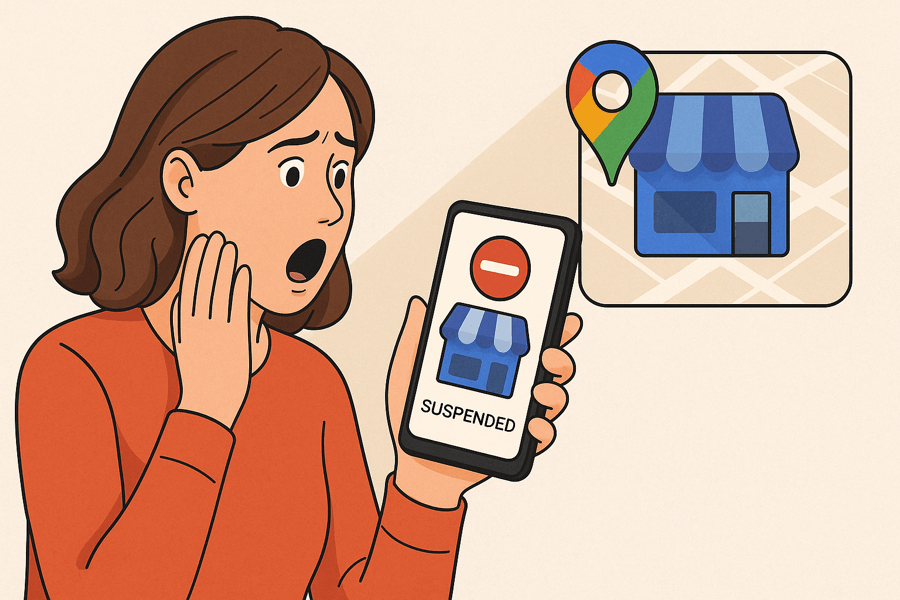
If the profile is already down, slow down. Panic edits make it worse.
First, confirm it is actually suspended inside the Business Profile dashboard, rather than just not showing for one search. Then hold off on two things:
- Do not create a new profile. A duplicate rarely ranks and usually complicates the appeal.
- Do not keep editing the listing while it is under review.
Then fix what triggered it. After a name change, that is almost always the name, so set it back to your true, real-world business name. Pull together the documentation that proves that name is genuine.
Submit one strong appeal through Google’s official Business Profile appeals tool, with clear evidence, and then wait. Responses can take anywhere from a few days to several weeks. Firing off repeated weak appeals tends to slow things down, not speed them up.
If the business is losing enquiries while the profile is offline, getting it right the first time matters most. This is exactly the situation our GBP reinstatement service is built for.
When to get help
Handle it yourself if the cause is obvious, the fix is simple, and the business is not bleeding leads. Get help when the profile is offline and costing you real enquiries, when the first appeal has already failed, or when you genuinely cannot tell what triggered it.
A failed appeal makes the next one harder, because a weak or contradictory second submission can entrench the suspension. If you are not certain how to put a clean case together, our guide on how to file a Google Business Profile appeal walks through it step by step. The work our reinstatement service does day to day is the same in principle: find the real trigger, correct it, and submit one clean, evidence-backed appeal instead of a string of hopeful ones.
Getting visibility back is also the foundation of any serious local search work. You cannot run Google Maps SEO on a profile that is suspended, so reinstatement always comes first.
I have been in SEO since 2013, and the pattern with name-change suspensions barely moves. The businesses that recover quickly are the ones that stopped editing, fixed the trigger, and appealed once, properly.
FAQ
Can I change my Google Business Profile name without getting suspended?
Yes, if it is a genuine rebrand and you do it carefully. Use your real new name, make it consistent everywhere first, change only the name field, and keep documentation ready in case Google asks you to re-verify.
Will I lose my reviews if I change the name?
No. Reviews and ratings are tied to the Business Profile, not the name, so a legitimate name change keeps them. The risk is suspension from a policy breach, not review loss.
What happens if my profile is suspended?
It is removed from Google Search and Maps, and you generally lose the ability to manage it, including replying to reviews, until it is reinstated. The fix is to correct what triggered it and appeal.
How long does reinstatement take?
It varies. Some appeals resolve in a few days, others take several weeks, depending on the case and how strong your evidence is. Nobody can guarantee reinstatement or a fixed timeframe, and anyone who does is not being straight with you.
Can I change the name after an appeal?
Wait until the profile is fully reinstated and stable, then make only a legitimate, real-world-accurate change if you still need to. Editing the name again too soon, or repeatedly, risks another review.
I bought the business. Can I just rename the existing Google profile?
Be careful. If it is genuinely the same business under new ownership, a clean rename can work. But if Google treats it as a different business, renaming the old listing can be rejected as an identity change and may need to be set up as a new profile instead. When the existing reviews are valuable, get advice before editing the name, so you do not lose the listing’s history by accident.
The bottom line
A name change is not a small edit to Google. It is a trust check on one of the most gamed fields on the platform. Keep the name real, register it if you want the keyword benefit, change it cleanly, keep your evidence ready, and a rebrand is manageable. Try to slip keywords in without the registration behind them and you are gambling the whole profile for a ranking Google will eventually strip anyway.
If your profile is already suspended after a name change, or you want a rebrand handled without losing visibility, or start the onboarding form. Calm, methodical, one proper appeal, no guesswork.